Run LFM3-1.7B Locally in Ollama (1 GB Model)
LFM3-1.7B (Liquid AI, Oct 2026) runs in Ollama as lfm3:1.7b, a 1.7 GB download. Setup, honest benchmarks vs Qwen3.5 and Gemma 4, and the $10M licence cap.
LFM3-1.7B, released by Liquid AI on October 27, 2026, is a 1.73B-parameter text model that Ollama ships as lfm3:1.7b: a 1.7 GB Q4_K_M download that the model card says runs in about 1 GB of memory at 4-bit. Run it with ollama run lfm3:1.7b on almost any laptop, no GPU required. It is built for local agents, tool calling and structured output, and it is honestly not a replacement for a 14B+ model when you need deep reasoning or polished long-form prose.
Here is what the LFM3 family is, how to run it, what the published benchmarks actually say, and where it fits next to Typilot's Polish and Notes commands.
What LFM3 is
Liquid AI describes LFM3 as a family of six open-weight models of roughly 2B parameters each, all built on one shared backbone, covering text, vision, audio and an "omni" model plus two small decision models. The one most people will pull into Ollama is the text model.
| Model | Parameters | Context | Modality |
|---|---|---|---|
| LFM3-1.7B | 1.73B | 256K tokens | Text |
| LFM3-VL-2B | 1.92B | 128K tokens | Text + vision |
| LFM3-Omni-2B | 2.2B | not listed here | Text, vision, audio |
The text model's card lists 24 layers (13 gated short convolutions, 5 sliding-window attention, 6 global attention), a 128,000-token vocabulary, and 16 supported languages: English, Arabic, Chinese, French, German, Italian, Japanese, Korean, Portuguese, Spanish, Vietnamese, Thai, Indonesian, Hindi, Russian and Polish. Weights ship as GGUF (llama.cpp, Ollama, LM Studio), MLX 4-bit for Apple Silicon, ONNX, and server formats.
Run it in Ollama
ollama run lfm3:1.7b
The Ollama library page lists the tag at 1.7 GB, quantised Q4_K_M, with a 256K-token context window ("input + output"). Per Liquid AI's model card, the recommended generation settings for general chat, tool use and agents are temperature 0.1, top_k 50 and repetition penalty 1.1. For math and STEM it suggests temperature 1.0, top_p 0.95 and top_k 20.
To bake the general settings into a reusable local model, create a Modelfile:
FROM lfm3:1.7b
PARAMETER temperature 0.1
PARAMETER top_k 50
PARAMETER repeat_penalty 1.1
ollama create lfm3-writing -f Modelfile
ollama run lfm3-writing
The Ollama page lists a 1.1 GB weights blob, so memory is rarely the limit. If you are sizing other models, see how much RAM to run a local LLM and running a local LLM without a GPU.
What the benchmarks say (and do not say)
Liquid AI's model card compares LFM3-1.7B against five other small models across 29 benchmarks. These are vendor-reported numbers, run in BF16 at full context, so treat them as indicative rather than independent.
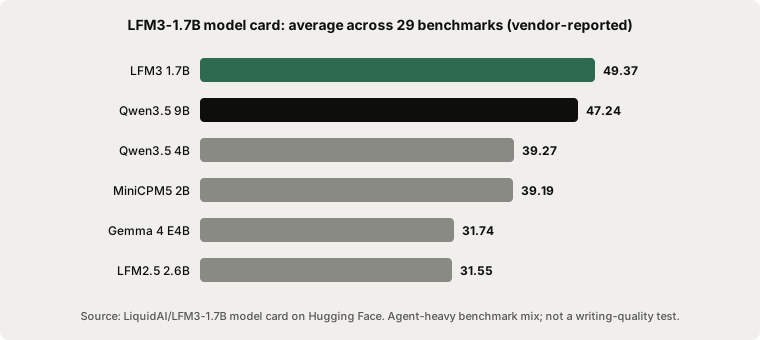
The average favours LFM3 because the suite is agent-heavy. Pick a few individual rows and the picture is more honest:
| Benchmark | LFM3 1.7B | Qwen3.5 9B | Gemma 4 E4B |
|---|---|---|---|
| BFCL V4 (tool calling) | 71.39 | 62.83 | 48.25 |
| IFEval (instruction following) | 96.66 | 92.08 | 90.02 |
| LiveCodeBench v6 | 73.46 | 69.86 | 71.00 |
| GPQA Diamond (hard science QA) | 63.37 | 80.40 | 57.88 |
| SWE-bench Verified (OpenCode) | 43.40 | 51.20 | 0.50 |
| RULER 128K (long context) | 65.56 | 87.11 | 18.82 |
| Humanity's Last Exam (no tools) | 7.17 | 16.41 | 4.77 |
A 1.7B model beating a 9B model on tool calling and instruction following does not make it the smarter model. Qwen3.5 9B still wins on hard science questions, long-context retrieval and software-engineering tasks. Liquid AI itself advises against using LFM3-1.7B for agentic coding or complex multi-step reasoning, and recommends retrieval or search for knowledge-heavy tasks.
LFM3 versus the cloud models
Frontier cloud models such as Claude Opus, Sonnet and Fable are far more capable at reasoning, long documents and nuanced writing. A 1.7B model will not match them, and it should not be pitched as if it could. What it offers instead:
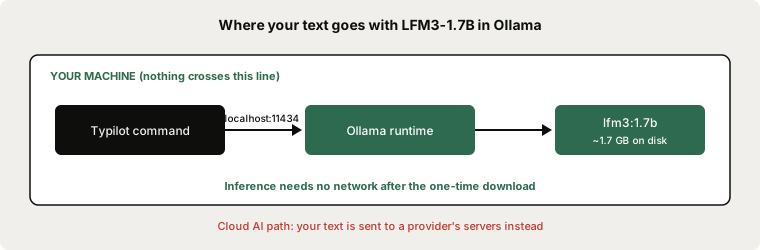
- Privacy. Prompts go to
localhostand stay there. - Offline use. After the one-time download, no connection is needed.
- Zero per-token cost and no rate limits.
- Tiny footprint. About 1 GB in memory leaves room for Typilot's dictation model to run alongside it.
If you want more writing quality on the same machine, step up to a larger model; see best local LLMs for writing and local LLM vs Claude Opus and Sonnet.
Where it fits with Typilot
Typilot's Polish, Rewrite, Summarise and Generate commands run on a local model through Ollama, which Typilot reaches on localhost:11434 by default. Because LFM3-1.7B is small and strong at following instructions, it is a reasonable choice for short, structured jobs: tightening a sentence, reformatting notes into bullets, or producing a fixed output format. For long rewrites where tone and flow matter, a larger model is the better pick. Setup steps are in the Ollama setup guide, and see also model management.
Licence: read this before commercial use
LFM3 ships under the LFM Open License v1.0, which is not Apache 2.0. Coverage of the launch consistently reports that free commercial use stops at $10 million in annual revenue, after which you need a separate agreement with Liquid AI, and some analyses note that the threshold may be counted across affiliated companies. Research, education and personal use are not restricted by that cap. If you plan to deploy it inside a company, read the licence file in the model repository and get legal review first.
The short version
LFM3-1.7B (Liquid AI, October 27, 2026) is a 1.73B text model with a 256K context window that runs in Ollama as lfm3:1.7b, a 1.7 GB download needing roughly 1 GB of memory at 4-bit. It leads its small-model peer group on tool calling and instruction following, but trails Qwen3.5 9B on hard reasoning, long-context retrieval and coding, and no local model of this size rivals Claude Opus, Sonnet or Fable. Use it for fast, private, structured text jobs; step up in size for serious writing. Download Typilot for a 3-day free trial: dictation, Polish and Notes all run on your hardware. See the security page for the full data-flow architecture, and the Ollama setup guide to connect your model.
Common questions.
How do I run LFM3-1.7B locally with Ollama?+
Install Ollama and run `ollama run lfm3:1.7b`. The Ollama library lists the tag at 1.7 GB, quantised Q4_K_M, with a 256K-token context window. Liquid AI recommends temperature 0.1, top_k 50 and repetition penalty 1.1 for general chat and tool use.
How much memory does LFM3-1.7B need?+
Liquid AI says the 1.73B-parameter model runs in about 1 GB of memory at 4-bit precision. The Ollama download is 1.7 GB on disk, with a 1.1 GB weights blob, so it fits on most modern laptops without a dedicated GPU.
Is LFM3-1.7B better than Qwen3.5 9B or Claude?+
Not overall. On its model card LFM3-1.7B beats Qwen3.5 9B on tool calling (BFCL V4 71.39 vs 62.83) and instruction following, but Qwen3.5 9B wins on GPQA Diamond (80.40 vs 63.37), RULER 128K and SWE-bench Verified. Liquid AI advises against using it for agentic coding or complex multi-step reasoning. Frontier cloud models such as Claude Opus are far more capable; local wins on privacy, offline use and cost.
Is LFM3 free for commercial use?+
LFM3 uses the LFM Open License v1.0, not Apache 2.0. Launch coverage reports that free commercial use ends at $10 million in annual revenue, with a separate agreement needed above that, and the threshold may be counted across affiliated companies. Read the licence file in the model repository and get legal review before deploying it commercially.