Best Local LLM for Writing in 2026
Best local LLMs for writing in 2026 ranked by RAM and prose quality. Qwen3 8B, Phi-4 14B, Gemma 4 26B, and Mistral Small 3.2 - run privately via Ollama.
The best local LLM for writing in 2026 depends on your machine. On a 16 GB laptop - Mac or PC - Qwen3 8B and Phi-4 14B fit comfortably and handle prose polish, rewrites, and note cleanup well. Step up to 24-32 GB of unified memory or VRAM and Qwen3 32B or Gemma 4 26B unlock noticeably sharper output. All of them run entirely on your device via Ollama at localhost:11434 - no prompt ever leaves your machine.
Here is how each model performs on writing tasks, what hardware it needs, and how to wire one up as a system-wide writing assistant.
What this covers
This post is about AI-assisted writing while you type: prose polish, rewrites, shorten, extend, meeting note cleanup, and dictation transcript formatting. That is the sweet spot for local models - short-to-medium tasks with clear instructions. Long-form generation from scratch (a 10,000-word draft without human editing) is where local models still trail cloud frontier models most noticeably.
The model shortlist
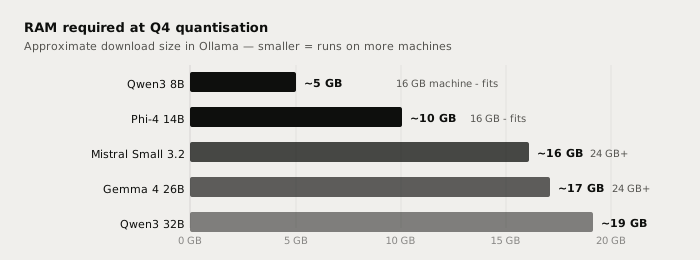
| Model | Ollama tag | RAM at Q4 | Fits 16 GB | Best writing use |
|---|---|---|---|---|
| Qwen3 8B | qwen3:8b | ~5 GB | Yes | Daily rewrites, autocomplete |
| Phi-4 14B | phi4:14b | ~10 GB | Yes | Technical and analytical prose |
| Mistral Small 3.2 | mistral-small3.2 | ~16 GB VRAM | With 24 GB GPU | Multilingual, instruction-heavy |
| Gemma 4 26B | gemma4:26b | ~17 GB | With 24 GB RAM | Apple Silicon Mac, balanced quality |
| Qwen3 32B | qwen3:32b | ~19 GB | No - needs 24 GB+ | Best all-round local writing quality |
All five are open-weight with permissive licences (Apache 2.0 or MIT) and are available in the Ollama library. Pull any of them with one command:
ollama pull qwen3:8b
Qwen3 8B - the 16 GB pick
Qwen3 8B (Alibaba, released April 2025, Apache 2.0) is the standout choice for machines with 16 GB of RAM or unified memory. It fits in roughly 5 GB at Q4 quantisation - leaving headroom for the OS and other applications. The 128K token context window means a long email thread or a full meeting transcript fits in a single pass.
For writing, Qwen3 8B punches above its size class: Alibaba's benchmarks show it matching Qwen 2.5 14B on many tasks despite needing half the RAM. Rewrites, shortenings, and structured summaries come back clean. Where it falls short of larger models is voice consistency on long drafts and subtle stylistic adjustments that require holding more context at once.
ollama pull qwen3:8b
ollama run qwen3:8b
Phi-4 14B - technical and analytical prose
Microsoft's Phi-4 14B (December 2024, MIT) needs roughly 10 GB at Q4 - still inside a 16 GB machine. It was trained on heavily curated synthetic and academic data: formal structure, step-by-step reasoning, and analytical writing land notably well. For code comments, structured reports, and technical emails it edges out Qwen3 8B. For casual prose and creative work it is more conservative.
Phi-4 14B is also available as a reasoning-tuned variant (phi4-reasoning:14b) that generates extended chain-of-thought before answering - useful for complex document analysis but overkill for routine polish.
ollama pull phi4:14b
Gemma 4 26B - the Apple Silicon pick
Google's Gemma 4 26B (April 2, 2026, Apache 2.0) is a mixture-of-experts model: despite 26B total parameters, only roughly 4B are active per token, so compute load is lower than the parameter count suggests. It needs approximately 17 GB, which fits comfortably in a Mac with 24 GB of unified memory.
The key point for Mac users: Ollama v0.31.1 (released June 30, 2026) added multi-token prediction for Gemma 4, cutting average token generation time by up to 90% on Apple Silicon. The speedup is on by default and requires no configuration. On an M3 Pro or M4 Max, Gemma 4 26B runs at a pace that feels interactive.
ollama pull gemma4:26b
Mistral Small 3.2 - multilingual writing
Mistral Small 3.2 (Mistral AI, June 2025, Apache 2.0, 24B parameters) needs roughly 16 GB of VRAM - it fits on an RTX 4090 or inside a Mac with 32 GB of unified memory. On CPU-only it runs but slowly.
Its standout capability is multilingual instruction following: English, French, German, Spanish, Italian, Japanese, Korean, and more are all first-class, with consistent quality across languages. For teams writing in multiple languages, or for users whose daily writing mixes languages, Mistral Small 3.2 is the right pick.
ollama pull mistral-small3.2
Qwen3 32B - the upgrade path
If you have 24 GB or more of unified memory (M3 Max, M4 Max, or a 24 GB GPU such as an RTX 4090), Qwen3 32B at roughly 19 GB is the best all-round local writing model available. It matches Qwen 2.5 72B on benchmarks at roughly half the parameter count, and independent writing benchmarks score it around 82/100, where cloud frontier models score 90+. The gap is real but workable for iterative writing with human editing.
ollama pull qwen3:32b
Models to skip for prose writing
Llama 4 Scout (Meta, April 2026): 109B total parameters, needs roughly 55 GB at Q4. Its 10 million-token context window is genuinely impressive, but the hardware cost is disproportionate for short-to-medium writing tasks.
DeepSeek R1 full model: 671B parameters, server-class hardware only. The distilled 8B variant (deepseek-r1:8b) fits on 16 GB but is a reasoning model - it generates extended chain-of-thought before each reply, adding latency you do not want for a quick rewrite.
Honest comparison: local vs cloud
A 7-14B model in Ollama handles most everyday writing tasks at zero cost per request. The gap with cloud models is real and shows on long creative drafts, subtle style matching, and complex reasoning. Local wins on privacy, offline use, and no rate limits; cloud wins on raw output quality.
| Task | Qwen3 32B local | Claude Sonnet / Fable cloud |
|---|---|---|
| Prose polish and rewrite | Very good | Excellent |
| Email drafting | Excellent | Excellent |
| Meeting note cleanup | Very good | Excellent |
| Long-form draft (5,000+ words) | Good - coherence can drift | Excellent |
| Subtle style matching | Good | Excellent |
| Per-request cost | $0 | Pay-per-token |
| Works offline | Yes | No |
| Audio and text stay on device | Yes | No |
The honest frame: a 32B local model delivers roughly 85-90% of what a cloud frontier model delivers on the writing tasks most people do every day. The remaining gap is most visible on long creative drafts and tasks requiring broad world knowledge. For private, offline, high-volume writing work - internal documents, client notes, draft emails - local is a practical and cost-effective answer.
Connecting a local model to Typilot
Typilot connects to Ollama automatically at http://localhost:11434. Once Ollama is running and a model is pulled, open Typilot and select the model in Settings > General. No API key or URL configuration is needed unless Ollama is on a different machine.
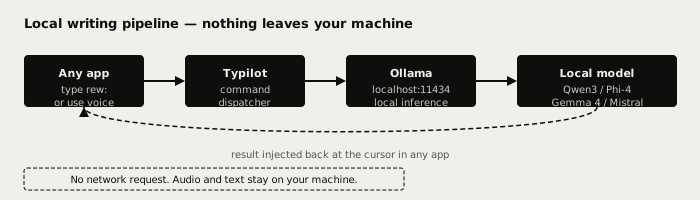
With a model connected, Typilot's writing commands work in any text field across any application:
rew: this paragraph      → rewrite at the cursor
fix: this sentence       → fix grammar and phrasing
sho: this section        → shorten without losing meaning
imp: this draft          → improve structure and tone
sum: these notes         → summarise a transcript or paste
In Settings > Autocomplete, you can assign a different model to the autocomplete layer - useful for keeping a fast 8B model for instant ghost-text while routing heavier rewrite commands through a 32B model. The full setup walkthrough is in the Ollama setup docs. See how to run a local AI assistant with Ollama for the initial install steps.
The short version
For 16 GB machines, start with Qwen3 8B (ollama pull qwen3:8b, ~5 GB at Q4). For 24 GB Apple Silicon, Gemma 4 26B is the fastest option thanks to Ollama v0.31 multi-token prediction. For 24 GB+ with a discrete GPU, Qwen3 32B gives the best all-round prose quality. All of them run entirely on your device - no prompt sent anywhere, no per-token cost, works offline. Typilot connects to any Ollama model on first launch (3-day free trial) and puts rewrite, polish, and 27 other writing commands on a hotkey in every app. The security page shows exactly what touches your machine and what never does.
Common questions.
What is the best local LLM for writing on a 16 GB laptop?+
Qwen3 8B is the best option for a 16 GB machine: it fits in roughly 5 GB at Q4 quantisation, runs via Ollama with one command (ollama pull qwen3:8b), and handles prose polish, rewrites, and summaries well. Phi-4 14B is a stronger choice for technical or analytical writing and needs around 10 GB at Q4.
Can I run a local LLM for writing without a GPU?+
Yes. Models run on CPU via Ollama, though generation is slower - typically 1-5 tokens per second on a modern CPU versus 20-60 tok/s with a GPU or Apple Silicon. On Apple Silicon, unified memory serves as GPU memory, so an M2 or M3 Mac with 16-24 GB handles Qwen3 8B or Phi-4 14B at comfortable speeds with no discrete GPU required.
How does a local LLM compare to Claude or GPT for writing?+
A 7-14B local model handles most everyday writing tasks - rewrites, polish, summaries, and email drafting - at a quality level that is workable for iterative workflows with human editing. On complex creative drafts, subtle style matching, and tasks needing broad world knowledge, frontier cloud models (Claude Sonnet, Fable) still lead. Local wins on privacy (nothing sent to any server), offline use, and zero per-request cost.
Which local LLM is fastest for writing on Mac?+
Gemma 4 26B is the fastest large-model option on Apple Silicon. Ollama v0.31.1 (June 2026) added multi-token prediction for Gemma 4 that speeds up token generation by up to 90% on M-series chips, on by default. For the fastest absolute response time on any Mac, Qwen3 8B at roughly 5 GB generates tokens quickest and runs well on any Mac with 16 GB or more of unified memory.