Local AI Typing Assistant: What to Choose
A local AI typing assistant keeps your voice and text on-device. Compare voice dictation, inline autocomplete, and local chat tools - with honest hardware requirements for 2026.
A local AI typing assistant is software that uses a machine-learning model running on your own hardware to help you write faster - by transcribing your voice, completing your sentences, or rephrasing selected text. Nothing is sent to a cloud server during inference. The term covers three architecturally different tool categories, and picking the right one depends on whether your bottleneck is speaking faster than you type, reducing keystrokes, or getting AI rewrites without sharing drafts with a vendor.
Here is how the categories differ, what specific tools sit in each, and what hardware you need.
Three categories, not one product type
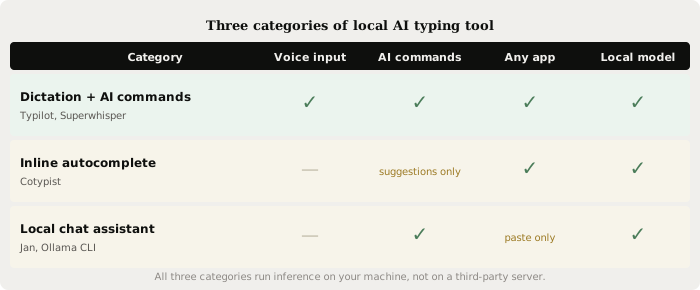
Dictation + AI commands
These tools listen for a hotkey, record your voice, transcribe it using a local speech-to-text model (usually Whisper or Parakeet), and type the result into whatever app is active. Higher-end tools in this category also pass the transcription through a local language model for polish, rewriting, or instruction-following before inserting the result. Typilot does this: holding the activation key records audio, Whisper transcribes it on-device, and if you have Ollama running, the text passes through a local model at localhost:11434 before landing where your cursor sits. The pipeline runs entirely on your machine.
Rivals in this space include Superwhisper (Mac, Windows, iOS, $8.49/mo or $249 lifetime), Handy (free, open source, Mac/Windows/Linux), and OpenWhispr (free tier, Mac/Windows/Linux, $8/mo Lazy Edition). Most use Whisper for transcription; some add Parakeet for faster English-only results. See how Whisper and Parakeet compare on accuracy and speed for the tradeoffs between the two engines.
Inline autocomplete
Cotypist is the clearest example of this category: it watches what you type in Mail, Slack, Notes, or any other Mac app, and offers completions via a local LLM when you pause. Pressing Tab accepts the suggestion; the model updates its prediction as you keep typing. The tool functions more like GitHub Copilot for prose than like a dictation app. It does not process voice.
Cotypist runs on Apple Silicon only (macOS 14+), requires 16 GB of unified memory for comfortable use, and costs nothing for 100 accepted completions per day. Plus ($6/mo) removes the cap; Pro ($9/mo) adds the full model catalog and per-app instructions. Because inference is local, none of your drafts reach a cloud server.
This category is narrower than dictation: it helps you finish sentences you have already started, but it does not replace the keyboard and it does not run AI rewrites on demand.
Local chat assistants
Tools like Jan, Open Interpreter, and the Ollama CLI give you a chat window backed by a locally running model. You type a prompt, the model responds, and you copy the output where you need it. These are general-purpose rather than typing-specific: there is no global hotkey, no in-app injection, and no voice layer. They are useful for drafting long passages you then paste, or for running complex AI tasks outside your writing flow.
The quality ceiling here is whatever model you pull into Ollama or Jan. A 14B model at Q4 on a 16 GB Mac gives you writing assistance that handles most prose tasks, though it falls short of cloud frontier models (Claude Opus, GPT-4.1) on complex reasoning and creative nuance. See local LLMs vs Claude and ChatGPT for an honest comparison of where the gap shows.
How local stacks up against cloud
| Dictation + AI (local) | Cloud dictation assistant | |
|---|---|---|
| Audio sent to servers | No | Yes |
| Works offline | Yes | No |
| Per-token cost | None | Billed by usage |
| Rate limits | None | Varies |
| Raw AI quality | Good (7-14B range) | Frontier (Claude, GPT-4.1) |
| Setup time | 10-20 minutes | Near-instant |
The quickest check: if your assistant stops working when you disconnect Wi-Fi, it is a cloud tool regardless of the marketing. A genuinely local tool keeps transcribing and processing with no network connection after the initial model download.
The on-device pipeline
When dictation and AI commands both run locally, the full pipeline looks like this:
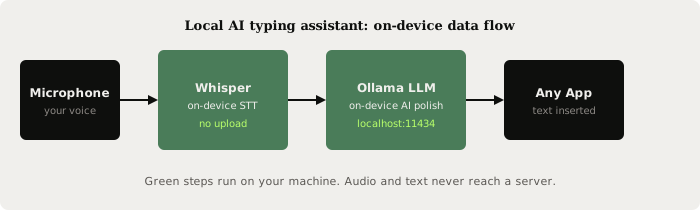
Your microphone input goes to a local Whisper instance (or Parakeet for English-only speed), which transcribes it to text. If you have an AI-command mode enabled, that text is sent to an Ollama model at localhost:11434 for a polish pass. The final text is typed into the active application - all on your device, with no external call at any stage. For the step-by-step Ollama setup, see run a local AI assistant with Ollama.
Hardware requirements by category
The dictation half of a local AI typing assistant is lightweight. Whisper tiny (75 MB) runs on any modern CPU at 2-3x real-time; Whisper large-v3-turbo (~1.6 GB) still runs on CPU and handles most accents well. Voice-only tools like Handy work comfortably on machines that cannot run a local LLM at all.
The AI-command half needs more:
| Use case | RAM needed | Example config |
|---|---|---|
| Dictation only (no AI) | 4 GB available | Any Mac or Windows laptop |
| Dictation + 7-8B AI | 16 GB unified memory | M1 MacBook Air or RTX 3060 12 GB |
| Dictation + 14B AI | 16 GB unified memory | Any Apple Silicon Mac (M2/M3/M4) |
| Dictation + 32B AI | 24 GB unified memory | M2 Pro or M3 Max, or RTX 3090 |
Ollama v0.32.0 (released July 13, 2026) adds an interactive agent mode and broader model support, and confirms flash attention for older NVIDIA GPUs (compute capability 6.x), which narrows the speed gap on GTX 10xx and RTX 20xx cards compared to the default path.
Inline autocomplete tools (Cotypist) have their own requirements: Apple Silicon only, macOS 14+, and 16 GB recommended. Their local LLM is typically smaller and optimised specifically for short-form completion rather than long rewrites.
Which category fits your workflow
If your primary problem is typing speed - you think faster than you type, or repetitive strain has made extended keyboard use painful - the dictation category solves it directly. A 7-8B model on a 16 GB machine handles the AI-command layer for most writing tasks, and you can run dictation-only mode without Ollama at all while you decide whether to add the AI layer.
If your primary problem is word choice and completion while you are already at the keyboard, inline autocomplete (Cotypist) is the natural fit. It does not require microphone permissions and does not interrupt your typing flow.
If you need complex rewrites, long-form drafts, or structured tasks - summaries, bullet lists, email replies from notes - a local chat tool paired with your editor may be more practical. The chat interface is more flexible than a keyboard shortcut for tasks that need several rounds of back-and-forth with the model.
For privacy-sensitive work, all three categories keep your text on-device. The meaningful distinction is between cloud tools (Wispr Flow, Grammarly Go) that route your audio or text through vendor servers, and local tools that do not. See Typilot vs Wispr Flow for a direct breakdown of that tradeoff.
The short version
A local AI typing assistant keeps your voice and text on-device by running Whisper for speech recognition and Ollama for AI commands at localhost. The three main categories - dictation with AI commands, inline autocomplete, and local chat - are not interchangeable: pick by whether your bottleneck is typing speed (dictation), word choice (autocomplete), or complex rewrites (chat). A 16 GB machine handles the dictation and 7-14B AI layer with no cloud component.
Try Typilot with a 3-day free trial, read the privacy and security architecture, or follow the Ollama setup guide to add the local AI command layer to your workflow.
Common questions.
What is a local AI typing assistant?+
A local AI typing assistant uses machine-learning models that run on your own machine to help you write faster - by transcribing voice to text, completing sentences, or rephrasing selected text. Nothing is sent to a cloud server during inference. The three main categories are voice dictation apps (using Whisper or Parakeet), inline autocomplete tools (predicting your next words), and command-based AI tools that rewrite text via a locally running language model like Ollama.
How is a local AI typing assistant different from cloud tools like Wispr Flow or Grammarly?+
Cloud tools route your audio or text through vendor servers for processing, which means your drafts, voice recordings, and prompts are sent outside your device. A local AI typing assistant runs the full pipeline on your own hardware: speech recognition at the OS level and AI inference at localhost:11434. The trade-off is that local models in the 7-14B parameter range are weaker than frontier cloud models on complex tasks, while winning on privacy, offline use, and zero per-token cost.
Does a local AI typing assistant work in every app?+
Voice dictation and AI-command tools in this category (Typilot, Superwhisper, Handy) work in any app that accepts keyboard input - editors, terminals, browsers, and chat apps - because they inject text via the OS accessibility or input layer rather than a plugin. Inline autocomplete tools like Cotypist also work across apps on Mac. Local chat tools (Jan, Ollama CLI) require you to copy and paste output, so they do not integrate directly into your typing flow.
What hardware do I need to run a local AI typing assistant?+
For voice dictation without AI commands, any modern machine with 4 GB of available RAM handles Whisper tiny to large. For dictation plus an AI-command layer, 16 GB of unified memory (any Apple Silicon Mac) or 12-16 GB of VRAM covers 7-14B models at Q4 quantisation via Ollama - enough for everyday prose, email, and meeting notes. A 32B model for stronger rewrites needs 24 GB of unified memory or a 24 GB GPU such as an RTX 3090 or M2 Pro.