Are Chinese AI Models Safe to Run Locally
Chinese AI cloud APIs store data in the PRC under the National Intelligence Law. Running MIT-licensed DeepSeek R1 or Apache 2.0 Qwen3 weights via Ollama sends nothing to any vendor.
Running Chinese AI model weights locally via Ollama is private: your prompts execute on your own CPU or GPU and nothing is sent to any vendor server. The safety concern about Chinese AI applies to cloud APIs and chat products that store your data in the People's Republic of China under the terms of China's National Intelligence Law. When you pull MIT-licensed DeepSeek R1 distills or Apache 2.0-licensed Qwen3 weights to your machine and run them through Ollama, that law has no reach over your laptop.
Here is what the law actually covers, which model families run on consumer hardware, and what you honestly trade away by running local instead of cloud.
Two products with the same name
Most "are Chinese AI models safe" questions conflate two architecturally distinct things.
Cloud APIs and chat products (chat.deepseek.com, the Qwen API, and similar hosted services) collect your prompts, responses, device data, and account information on servers in the PRC. China's 2017 National Intelligence Law requires Chinese companies to cooperate with intelligence agencies on request - companies legally cannot refuse. This is the concern that led Italy to ban DeepSeek's cloud app within 72 hours of its launch, prompted investigations in 13 European jurisdictions, and caused multiple government agencies to prohibit it on managed devices.
Open weights are a different product. DeepSeek R1 distills and Qwen3 are also published as downloadable model files under MIT and Apache 2.0 licences - the same release model Meta uses for Llama and Google uses for Gemma. Weight files contain no telemetry, no network code, and no data collection. Once downloaded, they run entirely on your hardware. Disconnect your internet after the download and the model keeps working. That is the structural proof.
The confusion is understandable: the same name appears in both contexts and in the same news cycle. The distinction is architectural.
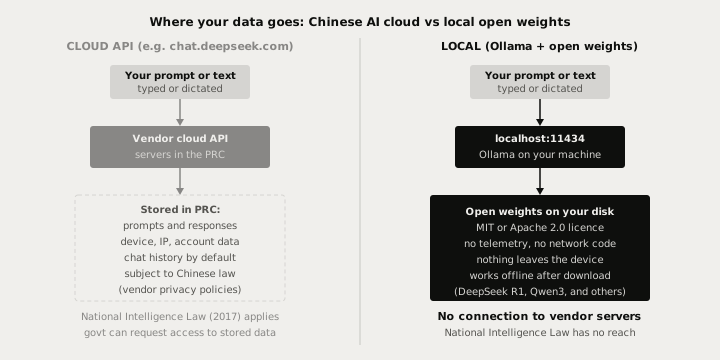
What the National Intelligence Law actually covers
China's National Intelligence Law (Article 7, 2017) obligates "any organisation or citizen" to assist national intelligence work when required. In practice, this applies to Chinese companies and their services - they must cooperate and cannot legally refuse when compelled to hand over data they hold.
The key limit: the law applies to organisations and the data they hold, not to open-source weights you download and run yourself. DeepSeek's obligation under that law is to assist with data stored on its infrastructure - not data that never reached it. An open-weight model running at localhost:11434 has no data to hand over because your prompts never left your machine.
MIT and Apache 2.0 licences both grant you permission to run the software for any purpose, offline, with no phone-home requirements. There is no licence clause requiring network access or data sharing. The weight files are inert numerical parameters until your hardware executes them.
A Booz Allen Hamilton report published in June 2026 found that Qwen3-Coder produced more vulnerable code when prompted under a government-agency persona via the cloud API (a "sleeper agent" alignment concern). That finding is about the cloud model responding to certain prompts - it does not apply to running the same model locally, and it is worth knowing as a separate concern from data privacy.
Which Chinese models actually run on consumer hardware
The models that make headlines - DeepSeek V4 Pro (requires 48-80 GB VRAM), GLM-5.2 (753 billion parameters total), Kimi K2.7, MiniMax M3 - are server or frontier class. They do not run on a MacBook or a single consumer GPU.
The consumer-runnable models are the smaller distills and open-weight families:
| Model | Licence | RAM at Q4 | Minimum hardware |
|---|---|---|---|
| deepseek-r1:7b | MIT | 5 GB | 8 GB GPU / 16 GB Mac |
| deepseek-r1:14b | MIT | 9 GB | 12 GB GPU / 16 GB Mac |
| deepseek-r1:32b | MIT | 20 GB | RTX 3090 or M2 Max (24 GB) |
| qwen3:8b | Apache 2.0 | 5 GB | 8 GB GPU / 16 GB Mac |
| qwen3:14b | Apache 2.0 | 9 GB | 12 GB GPU / 16 GB Mac |
| qwen3:32b | Apache 2.0 | 19 GB | 24 GB GPU |
The 14B distills (both families, around 9 GB at Q4) are the recommended starting point for most machines. They fit on any Apple Silicon Mac with 16 GB of unified memory and any GPU with 12-16 GB of VRAM, and the reasoning quality is noticeably stronger than the 7-8B options on structured writing tasks.
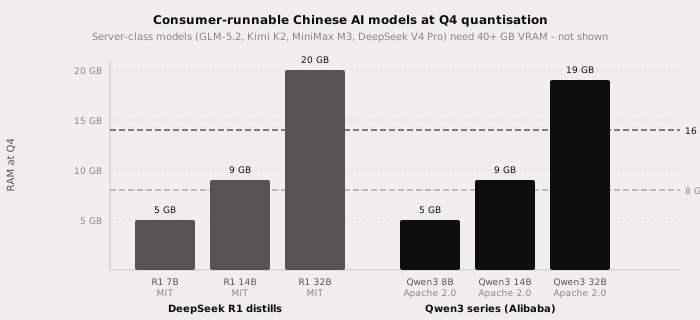
For a full comparison of these families on writing and coding tasks, see best Chinese open-source LLMs to run locally.
One configuration risk
Running Ollama with default settings is private. The single exception is OLLAMA_HOST.
Ollama listens on 127.0.0.1 by default - only your own machine can reach the API. If you set OLLAMA_HOST=0.0.0.0 (to share the endpoint with another device on your network), the API becomes accessible from your local network, and from the open internet if your machine is directly routable.
Researchers identified roughly 7,000 publicly exposed Ollama instances in early 2025 running Chinese and other open-weight models. The risk was the misconfigured server, not the model origin.
# safe default - only your machine reaches the API
# no OLLAMA_HOST setting needed

# risky on shared or open networks - do not do this unless you know what you are doing
# OLLAMA_HOST=0.0.0.0 ollama serve
Leave OLLAMA_HOST unset and the model runs privately regardless of which weights you use. To reach Ollama from a second device on your home network, use an SSH tunnel rather than binding to 0.0.0.0.
The privacy concern about Chinese AI applies to cloud APIs that store your data in the PRC. Running MIT-licensed DeepSeek R1 or Apache 2.0-licensed Qwen3 via Ollama sends nothing to any vendor server after the initial download. Leave OLLAMA_HOST unset and the API stays local-only.
The honest quality trade-off
A 7-14B model running on a consumer laptop is not as capable as Claude Opus, Sonnet, or Fable on complex multi-step reasoning. That gap is real and you should not expect parity. Local wins on privacy (nothing leaves the device), offline use, zero per-token cost, and no rate limits. Cloud wins on raw reasoning quality and context breadth.
For everyday writing tasks - rewriting a paragraph, drafting a reply, summarising meeting notes - a Qwen3 8B or DeepSeek R1 14B performs at roughly 75-85% of a frontier cloud model. The quality gap matters for complex planning and deep reasoning; it matters much less for polish, summarisation, and first-draft generation, which is where most people spend most of their writing time.
For a head-to-head quality comparison see local LLM vs Claude Opus and Sonnet.
Using Chinese open weights with Typilot
Typilot connects to any running Ollama model automatically at http://localhost:11434. Once you have Ollama serving qwen3:14b or deepseek-r1:14b, open Typilot and select the model under Settings > General. No API key or URL configuration is needed.
The privacy story is consistent from end to end: Typilot transcribes your voice with on-device Whisper, passes the text to the local Ollama model, and nothing - audio, transcript, or prompt - reaches any external server. The security page shows the complete data flow.
See the Ollama setup guide for initial configuration and run a local AI assistant with Ollama if Ollama is not yet installed.
The short version
Chinese AI cloud APIs and chat products store your data in the PRC under China's National Intelligence Law - the privacy concern there is well-documented and real. The MIT-licensed DeepSeek R1 distills and Apache 2.0-licensed Qwen3 weights are a different product: once downloaded and running in Ollama at localhost:11434, inference stays entirely on your machine. The law has no reach over files on your laptop. Consumer-runnable sizes start at roughly 5 GB (7-8B at Q4); the 14B distills (~9 GB) give meaningfully stronger reasoning for everyday writing tasks. Leave OLLAMA_HOST at its default and the API stays local-only. Typilot integrates with any Ollama model and puts 27 AI commands on a hotkey across every app on your machine - 3-day free trial, no cloud transcription, nothing leaves the device. The security page shows the complete on-device data flow.
Common questions.
Are Chinese AI models safe to use?+
It depends on whether you use the cloud API or the open weights. Chinese AI cloud products (chat.deepseek.com, Qwen API) store your prompts and data on servers in the PRC, subject to China's National Intelligence Law, which requires companies to cooperate with intelligence agencies. The open-weight models - MIT-licensed DeepSeek R1 distills and Apache 2.0-licensed Qwen3 - are downloadable files with no telemetry or network code. Running them via Ollama means inference stays entirely on your machine.
Does running DeepSeek or Qwen locally via Ollama send data to China?+
No. When you run DeepSeek R1 distills or Qwen3 via Ollama, the model weights execute on your own CPU or GPU at localhost:11434. Nothing is sent to any vendor server - Chinese or otherwise - after the initial model download. Disconnect your internet after downloading and the model keeps working. The National Intelligence Law applies to Chinese companies and data they hold, not to files running on your laptop.
What is the National Intelligence Law and does it apply to local weights?+
China's National Intelligence Law (Article 7, 2017) requires Chinese companies to cooperate with intelligence agencies on request. It applies to organisations and the data they hold on their servers. It does not apply to open-source weight files you have downloaded and run locally - DeepSeek has no obligation over data that never reached its infrastructure. MIT and Apache 2.0 licences impose no network-access or data-sharing requirements on the user.
Which Chinese AI models can I run locally on a consumer machine?+
The consumer-runnable options are the DeepSeek R1 distills (7B at 5 GB, 14B at 9 GB, 32B at 20 GB, all MIT-licensed) and the Qwen3 series from Alibaba (8B at 5 GB, 14B at 9 GB, 32B at 19 GB, Apache 2.0). The headline models - DeepSeek V4 Pro, GLM-5.2, Kimi K2.7, MiniMax M3 - require 40-320 GB of VRAM and do not run on consumer hardware. A 16 GB Mac or a 12 GB GPU covers the 14B size in both families.