Local LLM vs Claude: The Honest Trade-off
Local LLM vs Claude or ChatGPT: honest quality gap, privacy wins, offline use, and the routing strategy that gets the best of both.
A 7-14B local model running in Ollama handles roughly 80-90% of everyday writing tasks at quality levels that are competitive with cloud frontier models on short-to-medium work - email drafts, prose polish, meeting note cleanup, and summaries. The gap with Claude Sonnet or Fable is real and becomes visible on long creative drafts, complex multi-step reasoning, and tasks that need broad current world knowledge. On those, cloud still leads. Local wins on the dimensions cloud cannot match: your text and audio never leave the device, the tool works offline, every request costs nothing, and there are no rate limits.
Here is where the gap actually sits, which tasks belong on each side, and the models that close the distance most.
Where cloud frontier models still lead
Long creative drafts. A 7-14B model can polish and rewrite at near-cloud quality, but generating a coherent 3,000-word piece from a short brief is different. Local models at this size lose voice consistency and structural coherence as the output grows. A 32B model (Qwen3 32B, ~19 GB at Q4) closes much of the gap - independent writing benchmarks score it around 82/100 compared to 90+ for cloud frontier models - but the gap is still there on long-form work.
Complex multi-step reasoning. Tasks that require holding multiple constraints across many steps - a long analysis, a structured argument from varied sources, a document review with cross-references - run better on frontier cloud models. The reasoning architecture in Claude Sonnet and Fable class models gives them an edge that quantisation and model size alone cannot overcome at consumer hardware levels.
Broad world knowledge. Cloud models have a more recent training cutoff and broader coverage. For research-heavy writing that requires accurate citations to current events, local models without internet access can drift or hallucinate on niche topics.
Speed for large outputs. Cloud infrastructure delivers 60-80 tokens per second on large output tasks. A local 7B model on CPU generates 10-25 tok/s; an RTX 4090 reaches 130-160 tok/s at model sizes up to about 14B. For quick rewrites the difference is invisible, but for a 2,000-word draft the latency gap is real.
Where local wins: the four advantages cloud cannot offer
Privacy by architecture, not by policy. When you use a cloud model, your prompt travels to a vendor server on every request. No privacy policy changes that transfer. When Typilot routes a command to Ollama at localhost:11434, the text never touches a network socket. Verify it: turn off your internet connection and the tool keeps working.
Offline use. Air-gapped networks, corporate environments with restricted outbound internet, airplane mode, clinics, and legal offices with IT restrictions are all viable once the model is downloaded. Cloud tools fail at any of these.
Zero per-request cost. A Claude Pro subscription runs around $20/month. A ChatGPT Plus subscription is similar. A local model on Ollama costs nothing per request after the initial hardware and model download. If you run 500 rewrites a day, the economics flip fast.
No rate limits. Cloud services throttle heavy usage at every tier. A local model has no rate limit - you can run batch rewrites on 1,000 documents without a queue or a warning.
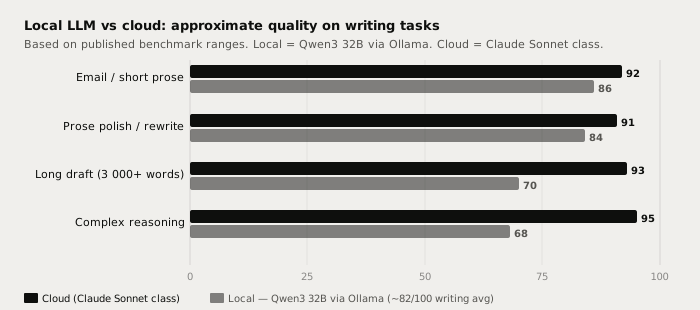
Head-to-head on writing tasks
| Task | Qwen3 32B local | Claude Sonnet / Fable |
|---|---|---|
| Email drafting | Very good | Excellent |
| Prose polish and rewrite | Very good | Excellent |
| Meeting note cleanup | Very good | Excellent |
| Short summaries | Very good | Excellent |
| Long creative draft (3 000+ words) | Good - coherence can drift | Excellent |
| Complex multi-step reasoning | Good | Excellent |
| Per-request cost | $0 | Pay-per-token |
| Works offline | Yes | No |
| Audio and text on device | Yes | No |
| Rate limits | None | Varies by tier |
The pattern holds across tasks: local at 32B delivers roughly 85-90% of cloud frontier quality on the work most people do most of the day. The remaining gap is most visible on long creative generation and complex analysis. For private, offline, high-volume writing - the majority of a typical day's output - local is a practical and cost-effective answer.
Which local models come closest to Claude
Not all local models close the gap equally. The ones worth running via Ollama for writing:
Qwen3 8B (Alibaba, April 2025, Apache 2.0, ~5 GB at Q4) is the 16 GB machine pick. Pull it with ollama pull qwen3:8b. It handles rewrites, email drafting, and short summaries well. The gap with cloud shows on anything requiring more than about 1,000 tokens of output.
Phi-4 14B (Microsoft, December 2024, MIT, ~10 GB at Q4) runs on the same 16 GB machine and is better suited to structured, analytical, and technical prose. Reports and formal documents benefit from its curated training data.
Qwen3 32B (Alibaba, Apache 2.0, ~19 GB at Q4) needs 24 GB or more of RAM or unified memory. It is the closest local model to a cloud frontier model on prose writing - rated around 82/100 on independent writing benchmarks where cloud frontier models score 90+. The gap is real but workable for iterative writing with human editing.
Gemma 4 26B (Google, April 2026, Apache 2.0, ~17 GB) is the fastest option on Apple Silicon. Ollama v0.31.2 (July 8, 2026) includes the multi-token prediction optimisation that cuts average generation time by up to 90% on M-series chips. On an M3 Pro or M4 it runs at a pace that feels interactive.
ollama pull qwen3:8b         # 16 GB machine
ollama pull phi4:14b         # technical prose on 16 GB
ollama pull qwen3:32b        # best local writing quality, needs 24 GB+
ollama pull gemma4:26b       # fastest on Apple Silicon, needs 24 GB
A local 7-14B model is not as capable as Claude Sonnet or Fable on complex reasoning and long creative work - that gap is real and should be stated plainly. Local wins on privacy, offline use, zero cost per request, and no rate limits. Concede the quality ceiling; then decide whether it matters for the task at hand.
A routing strategy that works
The winning approach treats local and cloud as complementary rather than competing.
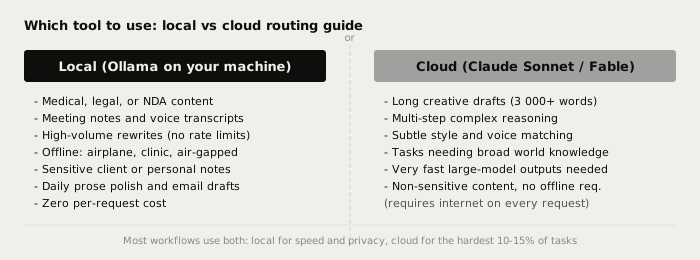
Route to local first for:
- Any content that is sensitive, NDA-protected, medical, or under legal hold
- Meeting transcripts, voice-captured notes, client discussions
- High-volume batch tasks (rewrites, summaries, draft polishing)
- All work done offline or on restricted networks
- Everyday short-output tasks where the quality ceiling does not matter
Route to cloud when:
- The output is long-form creative work (3,000+ words with strong coherence requirements)
- The task needs complex multi-step reasoning across many constraints
- You need real-time awareness of recent events the local model's training does not cover
- Subtle style-matching to a specific voice matters more than cost or privacy
Most developers and writers who test this end up with roughly an 80-20 split: local for four out of five tasks, cloud for the hardest fifth. See best local LLMs for writing in 2026 for model setup steps and the autocomplete configuration that keeps a fast 8B model on inline suggestions while a 32B model handles the heavier rewrite commands.
Connecting local models to Typilot
Typilot connects to any Ollama model automatically at http://localhost:11434. Once Ollama is running and a model is pulled, open Typilot, go to Settings > General, and select the model. No API key or URL change is needed unless Ollama is on a different machine.
With a model connected, commands work in any text field across any application - the text never leaves your device at any point in the pipeline:
rew: this paragraph          → rewrite at the cursor
fix: this sentence           → fix grammar and phrasing
imp: this draft              → improve structure and tone
sum: these meeting notes     → summarise a transcript
gen: draft a reply to        → generate from a short prompt
The Ollama setup docs cover the full initial configuration. The run a local AI assistant guide is the recommended starting point if you have not installed Ollama yet. For the full list of 27 commands see /docs/commands.
The short version
A 14-32B local model via Ollama handles 80-90% of everyday writing at near-cloud quality, for zero cost per request and with no data leaving your device. The gap shows on long creative drafts, complex reasoning, and very fast large outputs - those tasks are the right cases for cloud frontier models like Claude Sonnet or Fable. For private, offline, and high-volume writing work, local is the practical default. Typilot connects to any Ollama model on first launch and puts rewrite, polish, and 27 other commands on a hotkey in every app on your machine (3-day free trial). The security page shows exactly what touches your hardware and what never does.
Common questions.
Is a local LLM as good as Claude for everyday writing?+
On short-to-medium writing tasks - email drafts, prose polish, meeting note cleanup, and summaries - a 32B local model via Ollama delivers roughly 85-90% of what Claude Sonnet produces. Independent writing benchmarks score Qwen3 32B around 82/100 where cloud frontier models score 90+. The gap widens on long creative drafts (3,000+ words) and complex multi-step reasoning, where cloud still leads clearly.
Why use a local LLM instead of Claude or ChatGPT?+
Four reasons cloud cannot match: (1) Privacy - your text never leaves your device at any point in the pipeline; (2) Offline - works in airplane mode, air-gapped networks, clinics, and any environment without internet; (3) Zero per-request cost - no $20/month subscription, unlimited requests; (4) No rate limits - run batch rewrites on thousands of documents without throttling.
How much RAM do I need to run a local LLM that comes close to Claude?+
The closest consumer-hardware option to Claude quality on writing is Qwen3 32B, which needs roughly 19 GB at Q4 quantisation - so 24 GB of RAM or unified memory (Mac) or GPU VRAM. For a 16 GB machine, Qwen3 8B (~5 GB) and Phi-4 14B (~10 GB) both run well and handle everyday writing tasks. Smaller models have a wider quality gap on long-form and complex tasks.
Can I use both a local model and Claude together?+
Yes, and that is the recommended approach. Route privacy-sensitive, offline, or high-volume tasks to a local model via Ollama - those represent the majority of daily writing work. Reserve cloud frontier models for the hardest tasks: long creative drafts, complex multi-step reasoning, and outputs requiring very recent world knowledge. Most workflows end up roughly 80% local, 20% cloud.