How Much RAM to Run a Local LLM
How much RAM or VRAM to run a local LLM: the Q4/Q8/FP16 formula, model sizes from 8B to 70B, Apple Silicon unified memory, context overhead, and 2026 hardware tiers.
Qwen3 8B fits in roughly 5 GB at Q4 quantisation and runs on any machine with 8 GB of RAM or unified memory. Phi-4 14B needs about 10 GB at Q4; Qwen3 32B needs roughly 19 GB. The rule of thumb: multiply the parameter count in billions by 0.5 for Q4_K_M, 1.0 for Q8, or 2.0 for FP16, then add about 20% for KV cache and framework overhead. On Apple Silicon, RAM and VRAM are the same unified pool - a 16 GB MacBook can run a 14B model at Q4 with no discrete GPU required.
Here is the full breakdown: the formula, a model-by-model table, Apple Silicon specifics, context-window overhead, and the hardware tier thresholds that matter in 2026.
The formula
Every local LLM requires memory proportional to its parameter count and the precision of its weights. The calculation for inference:
VRAM (GB) = parameter_count_B × bytes_per_param × 1.2
Bytes per parameter by quantisation format:
| Format | Bytes/param | Savings vs FP16 |
|---|---|---|
| FP16 / BF16 | 2.0 | - |
| Q8 (INT8) | 1.0 | 50% |
| Q4_K_M | ~0.5 | 75% |
| Q3_K_M | ~0.38 | 81% |
The 1.2 multiplier accounts for the KV cache at a standard 4K token context window, activations, and Ollama runtime overhead. At longer context windows the KV cache grows further - see the section below.
Q4_K_M is the standard format for Ollama models and the right default for nearly all local inference. It reduces memory by 75% versus FP16 with negligible quality loss on prose, code, and summarisation tasks.
RAM by quantisation level
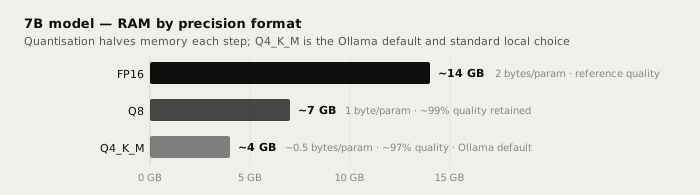
For a concrete 7B model at each precision:
| Precision | Bytes/param | 7B model | Quality vs FP16 |
|---|---|---|---|
| FP16 | 2.0 | ~14 GB | Reference (highest) |
| Q8 | 1.0 | ~7 GB | ~99% - negligible loss |
| Q4_K_M | ~0.5 | ~4 GB | ~97% - fine for everyday tasks |
| Q3_K_M | ~0.38 | ~3 GB | Noticeable drop on long outputs |
Q8 is worth the extra memory only if you have abundant VRAM or are pushing very long contexts at high temperatures. For interactive writing use cases, Q4_K_M is the practical standard.
RAM by model size at Q4
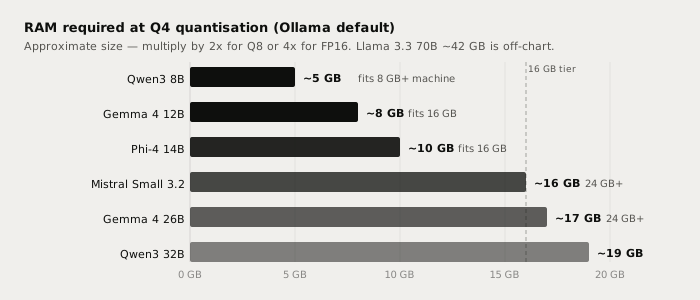
| Model | Params | RAM at Q4 | Min machine | Ollama tag |
|---|---|---|---|---|
| Llama 3.1 8B | 8B | ~5 GB | 8 GB | llama3.1:8b |
| Qwen3 8B | 8B | ~5 GB | 8 GB | qwen3:8b |
| Gemma 4 12B | 12B | ~8 GB | 16 GB | gemma4:12b |
| Phi-4 14B | 14B | ~10 GB | 16 GB | phi4:14b |
| Mistral Small 3.2 | 24B | ~16 GB | 24 GB | mistral-small3.2 |
| Gemma 4 26B A4B | 26B MoE | ~17 GB | 24 GB | gemma4:26b |
| Qwen3 32B | 32B | ~19 GB | 24 GB | qwen3:32b |
| Llama 3.3 70B | 70B | ~42 GB | 48 GB | llama3.3:70b |
"Min machine" is the minimum RAM or unified memory to fit the model with headroom for the OS. On a GPU setup, match available VRAM to the "RAM at Q4" column - if the model overflows into system RAM via CPU offload, speed drops from 30-80 tok/s to 1-5 tok/s.
Qwen3 30B-A3B is a useful outlier: 30B total parameters but only 3B active per token (mixture-of-experts design). It takes roughly 20 GB at Q4 and needs 24 GB of RAM, but generates tokens at 3B-model speeds with 30B-scale knowledge - faster throughput than Qwen3 32B for users who already have 24 GB.
Apple Silicon: RAM and VRAM are the same pool
On Apple Silicon (M1, M2, M3, M4), there is no separate GPU memory card. The CPU, GPU, and Neural Engine all draw from one unified memory pool. The practical effect on local LLMs:
- A 16 GB MacBook Air (M2 or M3) runs Qwen3 8B or Phi-4 14B at Q4 at roughly 15-30 tok/s with no discrete GPU and no hardware upgrade needed.
- A 24 GB Mac (M4 base, M3 Pro) fits Qwen3 32B or Gemma 4 26B at Q4. Gemma 4 26B on Apple Silicon benefits from Ollama v0.31.1's multi-token prediction, which speeds up token generation by up to 90% on M-series chips.
- At 36 GB or higher (M3 Pro, M4 Pro), the 24 GB models gain substantial headroom and Qwen3 32B runs at comfortable speeds with room for a longer context window.
On Windows and Linux with a discrete GPU, the model must fit entirely in VRAM to run at full speed. Overflow to system RAM via CPU offload technically works but is too slow for interactive use.
Context window and KV cache overhead
The 1.2 multiplier in the formula assumes a 4K token context. The KV cache grows with the context window, adding significant VRAM beyond the model size at long contexts:
| Context window | Extra VRAM (7-8B model, FP16 KV) |
|---|---|
| 4K tokens | ~0.5 GB |
| 16K tokens | ~2 GB |
| 32K tokens | ~4 GB |
| 128K tokens | ~16 GB |
If you regularly process long documents or meeting transcripts that exceed 16K tokens, plan for the extra overhead. The practical workaround: pick a model that fits with 4-6 GB of headroom, or reduce the model size tier and accept a narrower context. A full hour of meeting audio is roughly 6,000-8,000 tokens transcribed - within comfortable range for a 16 GB machine running an 8B model.
Hardware tiers in 2026
The minimum viable setup is 8 GB RAM with a Q4 model at 1-5 tok/s on CPU-only hardware. For interactive, responsive use, 16 GB of RAM or unified memory is the practical floor - it reaches 15-30 tok/s, the threshold where a local model feels fast rather than slow.
| Hardware | Speed (approx) | Recommended models at Q4 |
|---|---|---|
| 8 GB RAM, CPU only | 1-5 tok/s | Qwen3 8B, Llama 3.1 8B |
| 16 GB RAM, CPU only | 5-15 tok/s | Phi-4 14B, Qwen3 8B |
| 16 GB Apple Silicon | 15-30 tok/s | Phi-4 14B, Qwen3 8B |
| 24 GB Apple Silicon | 20-50 tok/s | Qwen3 32B, Gemma 4 26B |
| RTX 4060 Ti 16 GB | 30-50 tok/s | Phi-4 14B, Gemma 4 12B |
| RTX 4090 24 GB | 80-130 tok/s | Qwen3 32B |
| RTX 5060 Ti 16 GB | 40-60 tok/s | Phi-4 14B, Gemma 4 12B |
| RTX 5090 32 GB | 130-160 tok/s | Qwen3 32B, models up to ~45B |
| 48 GB+ unified memory | 30-70 tok/s | Llama 3.3 70B at Q4 |
The RTX 5090 (32 GB GDDR7, Blackwell) is the first consumer NVIDIA card with enough VRAM to fit a 45B+ model entirely on GPU at Q4. The RTX 5060 Ti 16 GB (~$500 in 2026) is the budget pick for 14B models: it handles Phi-4 14B at Q4 at around 40-60 tok/s.
For writing use cases (prose polish, rewrites, summaries), 30+ tok/s makes the model feel interactive. Below 10 tok/s it is usable but noticeable for longer outputs. For offline transcription with a local Whisper model, RAM requirements are separate and smaller: Whisper large-v3 needs about 10 GB, the turbo variant around 6 GB.
Running a local model with Typilot
Once you have confirmed your machine can fit a model, pulling it in Ollama takes one command:
ollama pull qwen3:8b       # ~5 GB at Q4 - any 16 GB machine
ollama pull phi4:14b       # ~10 GB at Q4 - 16 GB machine
ollama pull qwen3:32b      # ~19 GB at Q4 - 24 GB machine
Typilot connects to Ollama automatically at http://localhost:11434. Once a model is running, open Typilot and select it in Settings > General - no API key or URL change needed unless Ollama is on a separate machine. Typilot's writing commands (rewrite, polish, shorten, summarise, and 27 others) route to the local model and return results injected at the cursor in any app. No prompt leaves your device at any point in the pipeline.
Full setup steps are at /docs/ollama-setup. If you are new to Ollama, how to run a local AI assistant with Ollama covers the install and first model pull. For model quality comparisons by writing use case, see best local LLMs for writing in 2026. For an honest comparison of local models against Claude Sonnet and Fable on prose quality, see local LLM vs Claude.
The short version
RAM (GB) at Q4 = parameter count (B) × 0.5 × 1.2 overhead. A 7-8B model needs ~5 GB - any 16 GB machine. A 14B needs ~10 GB. A 32B needs ~19 GB and wants 24 GB available. On Apple Silicon, RAM and VRAM are one pool: a 24 GB Mac Mini M4 runs Qwen3 32B comfortably. On a discrete GPU, match model size to VRAM to stay off CPU offload. Typilot connects to any Ollama model on first launch (3-day free trial) and puts rewrite, polish, and 27 other writing commands on a hotkey in every app on your machine. The security page shows exactly what stays on your device and what never leaves it.
Common questions.
How much RAM do I need to run a 7B or 8B local LLM?+
A 7-8B model fits in roughly 5 GB at Q4_K_M quantisation and runs on any machine with 8 GB of RAM. For comfortable interactive use, 16 GB is the practical floor: it leaves headroom for the OS and reaches 15-30 tok/s on Apple Silicon. On a discrete GPU, a 6-8 GB card technically fits a 7-8B model at Q4, though 12-16 GB VRAM is the comfortable minimum for headroom.
How much VRAM do I need to run a local LLM on a GPU?+
At Q4: a 7-8B model needs about 5 GB, a 14B about 10 GB, a 32B about 19 GB, and a 70B about 42 GB. The model must fit entirely in VRAM to avoid CPU offload; overflow drops speed from 30-80 tok/s to 1-5 tok/s. An RTX 4090 (24 GB) runs Qwen3 32B at Q4 at around 80-130 tok/s. The RTX 5090 (32 GB, 2026 Blackwell) can fit models up to roughly 45B at Q4.
What is the difference between Q4 and Q8 quantisation for RAM use?+
Q8 uses 1 byte per parameter; Q4_K_M uses roughly 0.5 bytes per parameter, halving the memory requirement compared to Q8. For a 7B model: Q8 needs about 7 GB, Q4_K_M needs about 4 GB. Quality loss from Q4 versus FP16 is around 1-3% on perplexity benchmarks and effectively imperceptible on everyday prose and coding tasks. Q4_K_M is the Ollama default and the right choice for nearly all local inference.
Is Apple Silicon RAM the same as VRAM for local LLMs?+
Yes. On Apple Silicon (M1, M2, M3, M4), the CPU, GPU, and Neural Engine share one unified memory pool - there is no separate GPU memory card. A 16 GB MacBook Air runs a 14B model at Q4 at 15-30 tok/s with no discrete GPU, the same workload that would require a dedicated 12-16 GB GPU on Windows or Linux.