Run Whisper Locally for Dictation
Run Whisper locally for dictation: no cloud, no API key, no per-minute cost. whisper.cpp DIY setup or bundled app - with model size and WER comparison.
Running Whisper locally for dictation means your voice is transcribed entirely on your own hardware - no audio is sent to a cloud server, there is no API key, and there is no per-minute charge. OpenAI's Whisper model (and whisper.cpp, its C/C++ port with over 46,900 GitHub stars) installs in a few commands and reaches around 2.7% word error rate on clean English audio - comparable to mainstream cloud services such as Google Speech-to-Text.
Here is how to get local Whisper dictation working, from the raw terminal path to an integrated desktop app.
Why run Whisper locally for dictation
The reason to switch to local Whisper is architectural. Cloud dictation services - Google Docs Voice Typing, Wispr Flow, Otter - encode your audio on your device and send it to the vendor's servers on every request. Your voice may be retained for 30 to 90 days depending on the service and plan tier.
Local Whisper inverts this entirely: the model runs in RAM on your machine, audio stays on your device during processing, and nothing is transmitted. If you disconnected from the internet mid-session, a local setup would keep working without interruption.
Three practical consequences:
- Privacy. Sensitive recordings - medical consultations, legal depositions, NDA calls - stay off third-party servers by design.
- Cost. Cloud services charge per minute or per seat. Local inference costs nothing per request after the one-time model download. Bulk transcription of an hour of audio costs the same as a five-second phrase.
- Offline. Air-gapped environments, clinic networks, and airplane mode all work after the initial download.
The DIY path: whisper.cpp in the terminal
whisper.cpp is a lightweight C/C++ port of Whisper that runs without a full Python stack. On Apple Silicon it uses Apple's Metal GPU API; on NVIDIA hardware it uses CUDA; on CPU-only machines it falls back to BLAS.
Install and build
On macOS with Apple Silicon (Metal acceleration):
git clone https://github.com/ggml-org/whisper.cpp
cd whisper.cpp
WHISPER_METAL=1 make -j
On Windows with CUDA:
git clone https://github.com/ggml-org/whisper.cpp
cd whisper.cpp
cmake -B build -DGGML_CUDA=ON
cmake --build build --config Release
On Linux (CPU-only):
git clone https://github.com/ggml-org/whisper.cpp
cd whisper.cpp
make -j
Download a model
bash ./models/download-ggml-model.sh base.en
Replace base.en with small, medium, or large-v3 for higher accuracy (see the model table below). The .en suffix selects the English-only variant, which is roughly 10-15% faster than the multilingual version on English audio.
Quantised variants are also available - INT8 and 4-bit quantisation let you fit large-v3 into roughly 1.5-4 GB, making 8 GB laptops viable for the highest-accuracy model.
Transcribe an audio file
./main -m models/ggml-base.en.bin -f recording.wav
Whisper.cpp accepts WAV at 16 kHz mono. For live microphone dictation (continuous input piped in real time), whisper.cpp ships streaming examples in the repository - that is where a desktop application adds the most value by handling the mic capture and chunking loop for you.
Choosing a Whisper model
Whisper ships in five sizes. Accuracy improves with size; speed drops:
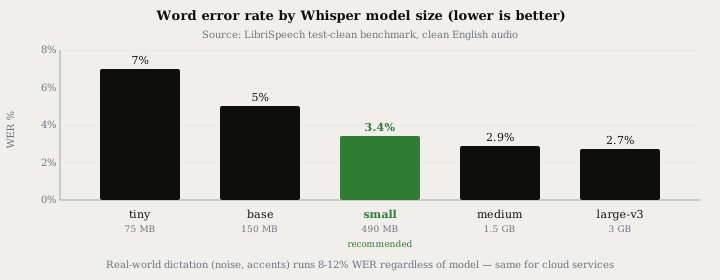
| Model | Disk | RAM | WER (clean English) | Real-time factor on M2 |
|---|---|---|---|---|
| tiny | ~75 MB | 1 GB | ~7% | 10x faster than real-time |
| base | ~150 MB | 1 GB | ~5% | 7x |
| small | ~490 MB | 2 GB | ~3.4% | 5x |
| medium | ~1.5 GB | 5 GB | ~2.9% | 3x |
| large-v3 | ~3 GB | 10 GB | ~2.7% | 1.5x |
WER figures are from the LibriSpeech test-clean benchmark on clean English speech. Real-world dictation with background noise, accents, or technical vocabulary typically runs 8-12% regardless of model size - that is the gap between lab conditions and a real office or home environment, and it applies equally to cloud services.
For most laptops: small (490 MB, ~3.4% WER) runs in real time on CPU-only hardware made after 2020. Step up to medium if you have 5 GB of free RAM and want better accuracy on accented or technical speech. large-v3-turbo (released October 2024) offers large-class accuracy at close to medium speed and is worth trying if disk space is not a constraint.
The integrated path: Typilot bundles Whisper
The whisper.cpp CLI transcribes files efficiently. For live dictation into any running application - your email client, Slack, VS Code, a terminal - you need a layer on top that handles microphone capture, voice activity detection, and text injection at the cursor in whatever app is active.
Typilot bundles a local Whisper runtime (no separate install required) and downloads models with one click from its Voice settings tab. The entire pipeline runs on-device:
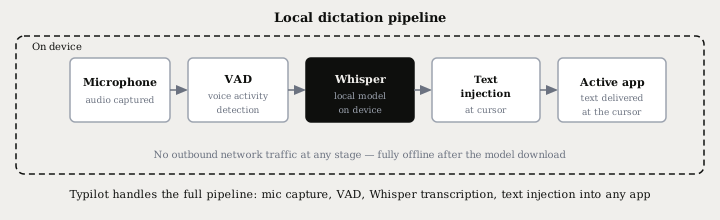
Activation works in three modes to suit different dictation styles:
- Hold - hold a key (default: Fn) to record, release to commit. Best for short phrases between other tasks.
- Toggle with VAD - press once to start; voice activity detection ends the recording automatically on silence. Best for longer passages without touching a key.
- Toggle manual - press to start, press again to stop. Best when you need precise control over exactly what is transcribed.
Voice activity detection trims silence before audio reaches Whisper, which prevents the hallucinated words that Whisper can produce on silent segments.
On top of dictation, you can route any transcribed phrase to a local Ollama model for instant editing. Say fix: and Typilot rewrites selected text; sum: summarises it; gen: generates new text from a voice prompt. The full 27-command reference is at /docs/commands. No text or audio leaves the device at any stage.
If you already run whisper.cpp manually, Typilot provides the dictation layer you would otherwise have to build yourself: mic capture, VAD, hotkey activation, model management, and text injection into any app, all in one UI.
Local Whisper vs faster alternatives
Whisper is not the only local speech model in 2026. For English-only workloads, NVIDIA's Parakeet family is worth knowing about:
| Model | WER (English) | Speed | Languages | Offline |
|---|---|---|---|---|
| Whisper large-v3 | ~2.7% | 1.5x real-time (M2) | 99+ | Yes |
| Whisper small | ~3.4% | 5x real-time (M2) | 99+ | Yes |
| Parakeet TDT 0.6B | ~6.3% | ~10x real-time (M2) | English only | Yes |
Parakeet is significantly faster on English - roughly 10x versus Whisper large - but is English-only and carries higher WER on clean audio. Whisper remains the right choice if you need multilingual support, non-English dictation, or the broadest hardware compatibility across Mac, Windows, and Linux.
For meeting transcription specifically, transcribing meetings locally covers how to combine local Whisper with speaker diarization for a full offline meeting workflow.
The short version
Running Whisper locally for dictation keeps your audio on your machine, costs nothing per request, and works offline after the model download. The DIY route - whisper.cpp built from source - handles file transcription in minutes. For live dictation into any running application, a desktop tool adds the microphone, VAD, and text injection layer that whisper.cpp does not include out of the box.
Typilot ships a 3-day free trial with local Whisper bundled - no Python environment, no separate whisper.cpp build. The security page documents exactly what stays on your device. If you want to understand how speaker separation works alongside Whisper transcription, how speaker diarization works covers the local pipeline in full.
Common questions.
How do I run Whisper locally for dictation?+
Install whisper.cpp (a C/C++ port of OpenAI Whisper with over 46,900 GitHub stars), download a model such as small or base, and pipe microphone audio through it. For live dictation into any running application, a desktop tool like Typilot bundles the Whisper runtime and handles mic capture, voice activity detection, and text injection at the cursor - no separate CLI setup required.
Which Whisper model should I use for local dictation?+
The small model (490 MB, ~3.4% word error rate) is the right starting point for most laptops: it runs in real time on CPU-only hardware made after 2020 and is accurate enough for everyday dictation. Step up to medium (~2.9% WER, ~1.5 GB) if you need higher accuracy on accented or technical speech. Large-v3 reaches ~2.7% WER but needs around 10 GB of RAM.
Does local Whisper dictation work offline?+
Yes. Once the Whisper model is downloaded, local dictation works with no internet connection. Audio is transcribed entirely in RAM by the local model and never transmitted anywhere. Air-gapped networks, clinic environments, and airplane mode all work after the initial one-time model download.
Is local Whisper as accurate as cloud dictation?+
Whisper large-v3 reaches ~2.7% word error rate on clean English audio (LibriSpeech test-clean), which is comparable to mainstream cloud services. On real-world audio with background noise or accents, both local and cloud tools typically run 8-12% WER. The small model (~3.4% WER, 490 MB) already outperforms most cloud dictation on clean audio and runs in real time on any modern laptop.