Run DeepSeek Locally and Privately
Running DeepSeek R1 via Ollama is fully private: prompts stay on your device at localhost:11434. The privacy concern is the cloud app, not the MIT-licensed open weights.
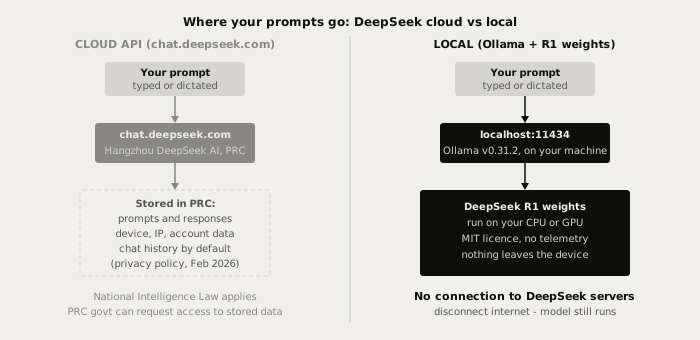
Running DeepSeek R1 locally via Ollama is completely private. When you pull the model weights to your machine and run them at localhost:11434, no prompt, no response, and no metadata ever reaches DeepSeek's servers or leaves your device. The privacy concern about DeepSeek applies to their cloud app and API, which stores data in the People's Republic of China under the terms of China's National Intelligence Law - not to the MIT-licensed open weights you run yourself.
Here is how to set it up, which size to pick for your hardware, and the one misconfiguration to avoid.
Two completely different privacy situations
The DeepSeek privacy story splits cleanly into two cases.
The cloud product (chat.deepseek.com) is operated by Hangzhou DeepSeek Artificial Intelligence Co., Ltd. Its privacy policy, updated February 2026, states that it collects your prompts, responses, device model, IP address, and chat history, and stores that data on servers in the PRC. Under China's 2017 National Intelligence Law, DeepSeek is legally required to cooperate with Chinese intelligence agencies on request. This is what has led to bans in several government and enterprise contexts.
The open-weight models are architecturally separate. DeepSeek published the R1 distill series weights under the MIT licence - the same model of release Meta uses for Llama and Google uses for Gemma. Weights are numerical files: they contain no telemetry, no network code, and no data collection. Once you pull them with Ollama, inference runs entirely on your CPU or GPU at localhost:11434. Disconnect your internet after the download and the model keeps working. That is the structural proof.
Which DeepSeek model actually runs on a laptop
The headline model, DeepSeek V4 Pro, is a 1.6-trillion-parameter mixture-of-experts model that requires 48-80 GB of VRAM across multiple server GPUs. It does not run on a MacBook or a single consumer GPU. The same is true of the earlier 671B full R1.
What you run locally is the R1 distill series. These are models DeepSeek trained to retain a significant portion of R1's chain-of-thought reasoning at a fraction of the parameter count. They are independently useful models, not reduced versions of the same download.
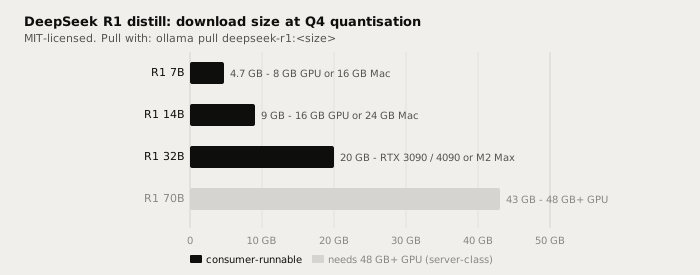
| Model | RAM at Q4 | Minimum hardware |
|---|---|---|
| deepseek-r1:7b | 5 GB | 8 GB GPU / 16 GB Mac |
| deepseek-r1:14b | 9 GB | 12 GB GPU / 16 GB Mac |
| deepseek-r1:32b | 20 GB | RTX 3090 or M2 Max (24 GB) |
| deepseek-r1:70b | 43 GB | 48 GB+ GPU - server-class |
The 14B is the best starting point for most machines. It fits on any Apple Silicon Mac with 16 GB of unified memory and on any GPU with 12-16 GB of VRAM, and the chain-of-thought quality is noticeably stronger than the 7B on structured prompts like rewrites and summaries.
Three commands to get running
Install Ollama from ollama.com (macOS, Windows, or Linux). Then pull the model:
ollama pull deepseek-r1:14b
Or start it immediately:
ollama run deepseek-r1:14b
For an 8 GB GPU or a 16 GB machine with limited headroom:
ollama run deepseek-r1:7b
Ollama downloads the quantised GGUF weights, verifies the checksum, and starts serving at localhost:11434. The initial download is the only time the network is used. After that the model runs entirely offline. The 7B distill is based on a Qwen2.5 fine-tune; the 14B and 32B distills are based on Qwen2.5 and Llama3 series respectively, all MIT-licensed.
The one risk: Ollama exposed to the network
Ollama defaults to listening on 127.0.0.1, which means only your own machine can reach the API. If you set OLLAMA_HOST=0.0.0.0 (to let another device on your network access it) or run Ollama in Docker with the port mapped outward, the API becomes reachable from your local network - or from the open internet if your machine is directly routable.
Researchers identified roughly 7,000 publicly exposed Ollama instances in early 2025, a significant proportion running DeepSeek models. The model weights are not the risk; the misconfigured server is.
The fix is straightforward: leave OLLAMA_HOST unset (the default is 127.0.0.1) or set it explicitly. To reach Ollama from another device on your network, use an SSH tunnel rather than binding to 0.0.0.0.
# safe default - only your machine reaches the API
OLLAMA_HOST=127.0.0.1 ollama serve

# risky - local network and potentially internet-accessible
# OLLAMA_HOST=0.0.0.0 ollama serve
The privacy concern about DeepSeek is about their cloud API, not the MIT-licensed open weights. Running R1 locally via Ollama sends nothing to DeepSeek's servers. The only real risk is OLLAMA_HOST misconfiguration - leave it unset and the API stays local-only.
Using DeepSeek R1 with Typilot
Typilot connects to any running Ollama model automatically at http://localhost:11434. Once Ollama is serving deepseek-r1:14b (or any other size), open Typilot and choose the model under Settings > General. No API key or URL change is needed.
With a local R1 model active, Typilot's full command set works in any text field across any application on your machine:
rew: this paragraph        → rewrite in place
fix: this sentence         → correct grammar and phrasing
sum: these meeting notes   → summarise into bullet points
gen: draft a reply to      → generate from a short prompt
imp: this draft            → improve structure and tone
The chain-of-thought design of R1 distills makes them particularly effective for commands that require reasoning before output - a "rewrite this to be more formal while keeping the technical specifics" prompt resolves more reliably than with a plain instruction-tuned model at the same size.
The Ollama setup docs have the full initial configuration. The run a local AI assistant guide is the recommended starting point if Ollama is not yet installed.
For a comparison of R1 against Qwen3, Gemma 4, and Phi-4 on writing tasks, see best local LLMs for writing in 2026. For the full privacy and licence picture on Chinese open-source models, see the guide to Chinese open-source LLMs.
The short version
The privacy concern about DeepSeek applies to their cloud app and API, which sends all your data to servers in China. It does not apply to the MIT-licensed open weights you run locally via Ollama. Pull deepseek-r1:14b and the model runs at localhost:11434 with no network connection to DeepSeek after the initial download. The 14B distill fits in 9 GB at Q4 and runs on any 16 GB Mac or 12-16 GB GPU; the 32B needs 24 GB. Leave OLLAMA_HOST at its default (127.0.0.1) and the API stays local-only. Typilot connects to any Ollama model on first launch and puts rewrite, polish, and 27 other AI commands on a hotkey across every app on your machine - 3-day free trial. The security page shows exactly what touches your hardware and what never does.
Common questions.
Is DeepSeek private if I run it locally via Ollama?+
Yes. Running DeepSeek R1 via Ollama means the model weights execute on your own CPU or GPU at localhost:11434. No prompt, response, or metadata reaches DeepSeek's servers. The privacy concern about DeepSeek applies to their cloud product, which stores data in China under the National Intelligence Law - not to the MIT-licensed open weights you run yourself. Disconnect your internet after the initial download and the model keeps working.
How much RAM do I need to run DeepSeek R1 locally?+
The DeepSeek R1 14B distill requires roughly 9 GB at Q4 quantisation and runs on any machine with 16 GB of unified memory (all Apple Silicon Macs) or 12-16 GB of VRAM on a discrete GPU. The 7B distill fits in 5 GB and runs on 8 GB GPUs. The 32B distill needs around 20 GB at Q4, requiring a 24 GB GPU (RTX 3090 or RTX 4090) or a high-RAM Apple Silicon Mac. The full DeepSeek V4 Pro requires 48-80 GB of VRAM and does not run on consumer hardware.
What is the difference between the DeepSeek cloud app and running it locally?+
The DeepSeek cloud app (chat.deepseek.com) is a SaaS product that sends your prompts and responses to servers in Hangzhou, China, stored under the terms of China's National Intelligence Law. Running DeepSeek R1 locally via Ollama downloads the MIT-licensed model weights to your machine; inference then runs entirely on your CPU or GPU - nothing is sent to DeepSeek or any other server after the initial download. The two products share a name but are architecturally separate.
Which DeepSeek R1 distill should I start with?+
Start with deepseek-r1:14b if your machine has 16 GB of RAM or more (any Apple Silicon Mac, or a GPU with 12+ GB VRAM). It gives stronger chain-of-thought reasoning than the 7B at a download size of roughly 9 GB at Q4. Use deepseek-r1:7b if you have an 8-12 GB GPU or a 16 GB machine with limited headroom. The 32B is the quality ceiling for consumer hardware but requires a 24 GB GPU or a high-RAM Mac.