Muse Glimmer 30B: Run Locally in Ollama
Meta Muse Glimmer is a 30B open-weight agent model available on Ollama in ~17 GB. Here is what it can do for private writing tasks and the honest gap versus Claude.
Meta Superintelligence Labs released Muse Glimmer on August 10, 2026 - a 30B open-weight model built for local agent workflows, immediately available via Ollama. The Q4_K_M quantisation weighs 17.31 GB and runs comfortably in 24 GB of unified memory or VRAM (M2 Pro, M3 Max, M4 Pro, RTX 3090, RTX 4090). The licence is Apache 2.0. It is the first 30B consumer-runnable model that ships with multi-step planning, tool calling, and self-correcting failure recovery built in from the start.
Here is what the model actually does, what hardware it needs, how it compares to Claude Sonnet on writing tasks, and how to connect it to Typilot.
What Muse Glimmer adds that other local 30B models do not
Most local models generate a response and stop. Muse Glimmer is architected around a full agent loop: it can plan a multi-step task, call tools you provide, check its own output against your criteria, and retry on failure - all within a single inference session on your machine. Meta calls this architecture "agentic", and the 30B weight class is the first time this loop has been baked into a model that runs locally on consumer hardware.
For writing, that changes what single-prompt commands can do. A simple Polish command still works as a one-shot rewrite. But you can also chain steps: draft an outline, expand each section in order, verify the result against a reference document, and self-edit for tone - all routed through Ollama at localhost:11434 with nothing leaving the device.
Muse Glimmer also accepts image input alongside text. You can attach a screenshot, a chart, or a page of notes as context for a writing task, and the model processes the image locally using its on-device vision encoder.
The model ships with two additional components beyond the base weights: a vision projector (1.40 GB) for image understanding and a DFlash speculative-decoding drafter (1.63 GB) that accelerates token generation. Both are bundled in the Ollama package - no separate setup required.
Hardware requirements
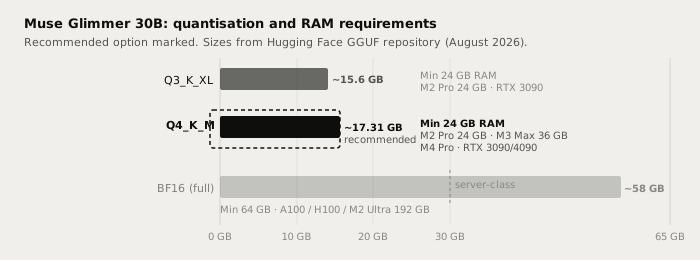
The table below shows verified sizes from the Hugging Face GGUF repository (meta-models/Muse-Glimmer-30B-GGUF, bartowski/Muse-Glimmer-30B-GGUF, August 2026).
| Quantisation | File size | Min RAM / VRAM | Suitable hardware |
|---|---|---|---|
| Q3_K_XL | ~15.6 GB | 24 GB | M2 Pro 24 GB, RTX 3090 (tight) |
| Q4_K_M (recommended) | ~17.31 GB | 24 GB | M2 Pro 24 GB, M3 Max, M4 Pro, RTX 3090/4090 |
| BF16 full precision | ~58 GB | 64 GB+ | A100, H100, M2 Ultra 192 GB |
The 24 GB envelope is realistic. At Q4_K_M, the base model (~17.31 GB) plus the vision projector (1.40 GB) and DFlash drafter (1.63 GB) total about 20.3 GB of loaded weight, leaving several gigabytes for the KV cache and runtime overhead within 24 GB. A 16 GB Mac (M1/M2/M3 base) is not sufficient for Q4_K_M - you need the 24 GB configuration or higher.
Running it in Ollama
Ollama v0.32.7 (released alongside Muse Glimmer) added native support. Update Ollama first, then pull the model:
# Update Ollama (macOS)
curl -fsSL https://ollama.com/install.sh | sh

# Pull the default Q4_K_M build (~17 GB download)
ollama pull muse-glimmer

# Apple Silicon: pull the MLX-optimised build for faster generation
ollama pull muse-glimmer:30b-mlx

# Run interactively to test
ollama run muse-glimmer
The MLX-optimised tag (muse-glimmer:30b-mlx) uses Apple's Metal Performance Shaders and multi-token prediction to accelerate generation on M-series chips. On an M3 Max it runs noticeably faster than the default GGUF build.
After pulling, verify in Typilot: open Preferences, navigate to Models, select Muse Glimmer from the list of downloaded Ollama models, and set it as the default for Polish or Notes commands (or run it per-command with the model flag in custom commands).
Writing tasks: where Muse Glimmer fits
Muse Glimmer is primarily an agent model - it was not benchmarked primarily on prose quality, and independent comparisons (kingy.ai, medium.com/data-science-in-your-pocket) show it trading blows with Qwen3 32B on general tasks, with Qwen3 ahead on coding benchmarks and Muse Glimmer stronger on instruction following and agentic task completion.
For everyday Typilot writing tasks - email drafts, prose polish, meeting note cleanup - a 30B model at Q4_K_M delivers quality comparable to what Qwen3 32B delivers. The gap with cloud frontier models (Claude Sonnet, Opus) is real and most visible on long creative generation and complex multi-step reasoning.
| Task | Muse Glimmer 30B local | Claude Sonnet / Opus (cloud) |
|---|---|---|
| Email drafting | Very good | Excellent |
| Prose polish and rewrite | Very good | Excellent |
| Meeting note cleanup | Very good | Excellent |
| Instruction following | Strong - a core architecture focus | Excellent |
| Multi-step agent tasks | Strong locally | Excellent |
| Long creative draft (3 000+ words) | Good - coherence can drift | Excellent |
| Complex multi-step reasoning | Good | Excellent |
| Image-to-text context | Yes - on-device vision encoder | Yes - cloud vision API |
| Audio and text leave device | Never | Always |
| Works offline | Yes | No |
| Per-request cost | $0 | Pay-per-token |
Muse Glimmer 30B is not as capable as Claude Sonnet or Opus on long creative generation and complex reasoning - that gap is real and should be stated plainly. What it adds over other local 30B models is a built-in agent loop (plan, tool call, self-check, retry) and on-device image understanding. Local wins on privacy, offline use, zero cost per request, and no rate limits. Concede the quality ceiling and decide whether it matters for the task.
Why the local path matters for this model
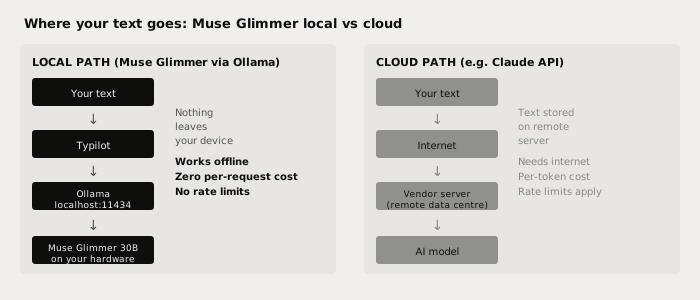
With a cloud model, your text travels to a vendor server on every request - that is true for every API call regardless of the vendor's privacy page. With Muse Glimmer running via Ollama, the entire pipeline stays on device. This includes the vision encoder: images you pass as context never leave the machine either.
For agent-loop tasks this matters more than for single-shot rewrites. A multi-step agent session might process dozens of intermediate outputs, tool calls, and self-corrections. With a local model, none of those intermediate states are transmitted anywhere. With a cloud model, every step of the loop goes to the vendor's server.
Verify it yourself: pull the model, disconnect your internet, and run a Polish command in Typilot. The model keeps working. That is not something any cloud dictation or AI-writing tool can match.
Using Muse Glimmer with Typilot
Typilot routes all AI commands through Ollama at localhost:11434. Once you have pulled the model, it appears in the Preferences - Models panel alongside any other downloaded Ollama models. You can:
- Set it as the default model for all Polish and Notes commands in Preferences - General - Default model.
- Override per-command using the
modelparameter in a custom command definition. - Use it for meeting transcription summaries by selecting it in the meeting recap settings.
The multimodal capability (image input) requires the DFlash drafter bundled in the default Ollama package - no extra configuration needed. If you want to test the vision capability directly, run ollama run muse-glimmer in a terminal and paste an image path into the prompt.
For a step-by-step Ollama setup guide that covers installation and first run, see how to run a local AI assistant with Ollama and Typilot and the Ollama setup docs.
If you want to understand how Muse Glimmer compares to other 30B-tier local models on the same machine, the Qwen vs Llama vs Gemma comparison covers the other mainstream options at this size.
The short version
Muse Glimmer is Meta's first model from the Superintelligence Labs team: 30B parameters, Apache 2.0, available via ollama pull muse-glimmer today. The Q4_K_M quantisation (~17.31 GB) fits a 24 GB Mac or consumer GPU. It is the first local 30B model with a built-in agent loop and on-device vision. For Typilot writing tasks, it delivers quality comparable to other 30B local models - strong on instruction following and iterative tasks, with a real gap versus Claude Sonnet and Opus on long creative generation and complex reasoning.
Every word you polish, every meeting note you summarise, every multi-step agent loop runs on your hardware with nothing sent to a vendor. That is the point of local-first AI. Try Typilot free for three days at /download and point it at Muse Glimmer the moment you land.
Common questions.
What is Meta Muse Glimmer and can I run it locally?+
Muse Glimmer is a 30B open-weight model released by Meta Superintelligence Labs on August 10, 2026, under an Apache 2.0 licence. It is available via Ollama using `ollama pull muse-glimmer`. The Q4_K_M quantisation weighs about 17.31 GB and runs on 24 GB of unified memory or VRAM - an M2 Pro, M3 Max, M4 Pro, RTX 3090, or RTX 4090. Nothing is sent to any server during inference.
How much RAM does Muse Glimmer 30B need?+
The recommended Q4_K_M quantisation weighs 17.31 GB. With the bundled vision projector (1.40 GB) and DFlash speculative-decoding drafter (1.63 GB), the full loaded stack totals around 20 GB, fitting within 24 GB of unified memory or VRAM. A 16 GB Mac is not sufficient. The smaller Q3_K_XL quantisation reduces the base model to about 15.6 GB but still requires 24 GB to leave room for the KV cache and runtime overhead.
How does Muse Glimmer compare to Claude Sonnet for writing?+
Muse Glimmer 30B is a strong local model but not equivalent to cloud frontier models. For short prose tasks - email drafts, rewrites, meeting note cleanup - quality is comparable to other 30B local models and very usable. The gap with Claude Sonnet and Opus becomes visible on long creative drafts (3,000+ words) and complex multi-step reasoning. The local advantage is absolute: your text never leaves the device, it works offline, and every request costs nothing.
How do I use Muse Glimmer with Typilot?+
After running `ollama pull muse-glimmer`, open Typilot Preferences and navigate to Models. Muse Glimmer appears alongside any other downloaded Ollama models. Set it as the default model for Polish and Notes commands in Preferences - General - Default model, or override it per command in a custom command definition. The vision capability (image input) is bundled and requires no additional configuration.