Ollama vs LM Studio for Local Writing
Ollama and LM Studio both run on llama.cpp. Compare interface, API, Apple Silicon MLX support, and which one works as the local backend for Typilot.
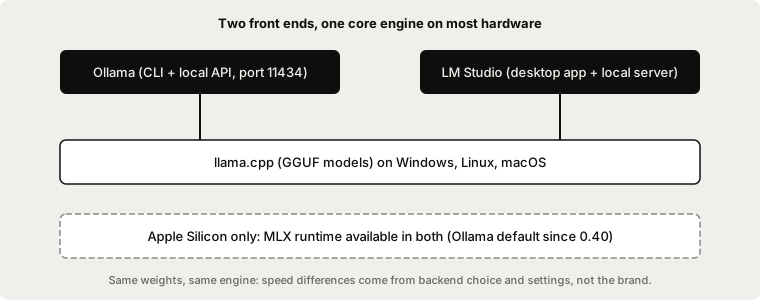
For a local writing assistant, use Ollama if you want local AI to work inside other apps, and LM Studio if you mainly want a desktop app to browse models and chat. Both run GGUF models on llama.cpp, so on the same hardware and the same model, speed and output quality are close. The real differences are the interface, the Apple Silicon runtime, and which tools can talk to them.
Typilot's Polish, Rewrite, and Notes commands use Ollama as their local backend, so Ollama is the one to install if you want those commands. Here is how the two compare for writing work.
What each tool actually is
Ollama is an MIT-licensed model runner with a command-line interface and a REST API on http://localhost:11434. It runs on macOS, Windows, and Linux, and ships an official Docker image (Ollama on GitHub).
LM Studio is a desktop app for macOS, Windows, and Linux. It browses and downloads models, includes a chat interface, and can serve models over OpenAI-style endpoints on your machine or your network. Its docs also describe llmster, a headless version that runs without the desktop app (LM Studio docs). Its pricing page lists a Free plan with local model support.
Side-by-side
| Ollama | LM Studio | |
|---|---|---|
| Main interface | CLI and background service | Desktop app with chat UI |
| Local API | REST on port 11434 | OpenAI-style endpoints, REST API (beta) |
| Engines | llama.cpp, MLX on Apple Silicon | llama.cpp, MLX on Apple Silicon |
| Headless use | Native (service, Docker image) | llmster headless mode |
| Platforms | macOS, Windows, Linux | macOS, Windows, Linux |
| Works with Typilot | Yes | No, Typilot expects an Ollama server |
Speed: mostly a wash
Because both wrap llama.cpp, throughput on an NVIDIA or AMD GPU is similar for the same model and quantisation. Published comparisons agree on this point but disagree on exact tokens-per-second figures, so we do not quote any: benchmark on your own machine instead (morphllm comparison, toolhalla comparison).
Apple Silicon is where it used to differ. LM Studio supports MLX alongside llama.cpp. Ollama made its MLX runner the default on Apple Silicon in 0.40, which narrows the gap; see Ollama 0.40: MLX Now Default on Apple Silicon.
Picking by workflow
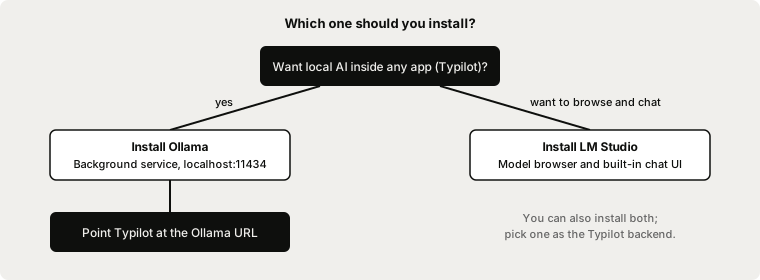
If your goal is dictation plus AI polish across every app, install Ollama. Typilot reads your text, sends it to your local Ollama model, and types the result back. LM Studio is a fine way to try models, but it is not a drop-in backend for Typilot.
- Pick Ollama if you want a background service that other tools call, scripted pulls, Docker, or Typilot's AI commands.
- Pick LM Studio if you want to browse models visually, compare them in a chat window, or test prompts before committing.
- Install both if you like. Nothing stops you running them on one machine, but only the Ollama model is used by Typilot.
Setting up Ollama for writing
# Pull a model sized for your RAM, then test it
ollama pull qwen3:8b
ollama run qwen3:8b "Rewrite this sentence to be more direct: ..."
Then follow the Ollama setup guide to connect Typilot. For model choice and memory needs, see best local LLMs for writing and how much RAM to run a local LLM. For the full Ollama-plus-Typilot walkthrough, read run a local AI assistant with Ollama.
Privacy: same answer for both
Both tools run models on your hardware, so prompts do not need to leave your device. That is the property that matters for private writing. For Ollama's data behaviour specifically, see does Ollama collect data. Check LM Studio's own privacy documentation for its behaviour; we have not audited it.
The short version
Ollama and LM Studio share the same llama.cpp core, so choose by workflow: Ollama for a background service and for Typilot, LM Studio for a visual model browser and chat. If you want local dictation and AI polish in any app, download Typilot (3-day free trial), install Ollama, and read how the architecture keeps your text on your device.
Common questions.
Is Ollama or LM Studio faster?+
On the same hardware, model, and quantisation they are close, because both run models on llama.cpp. Differences show up mainly on Apple Silicon, where both can use MLX (Ollama made it the default in 0.40). Published tokens-per-second figures conflict between sources, so benchmark on your own machine.
Can Typilot use LM Studio instead of Ollama?+
No. Typilot sends its Polish, Rewrite, and Notes prompts to a local Ollama server (default http://localhost:11434). LM Studio exposes OpenAI-style endpoints instead, so install Ollama if you want those commands.
Is Ollama free and open source?+
Yes. Ollama is MIT-licensed and runs on macOS, Windows, and Linux, with an official Docker image. Its REST API listens on port 11434 by default.
Can LM Studio run without the desktop app?+
Yes. LM Studio documents llmster, a headless version without the desktop app, aimed at servers and CI environments. It can also serve models over OpenAI-style endpoints on your machine or network.