Ollama 0.40: MLX Now Default on Apple Silicon
Ollama 0.40 makes the MLX runner default on Apple Silicon, adds decision models and new Qwen3/Gemma 4 models. What changed and what it means for local AI users.
Ollama 0.40 (September 25 2026, latest patch v0.40.4 on October 12) makes the MLX runner the default on Apple Silicon for all supported model architectures. Before this release, the MLX path was opt-in; from 0.40 onward, Ollama selects it automatically for any model it knows how to run through MLX on an M-series Mac. The same release added four new models to the library - gemma4, qwen3.5, qwen3.6, and qwen3.8 - and introduced a new category of decision models for text classification.
Here is what changed and what it means for local AI on a Mac.
What the MLX runner is
Apple's MLX is a machine learning framework designed for Apple Silicon's unified memory architecture. Unlike a conventional CPU and separate GPU setup where data moves across a memory bus between separate chips, an M-series Mac shares a single pool of high-bandwidth memory between the CPU, GPU, and Neural Engine. MLX schedules operations across all three compute units and avoids copying model weights between separate memory regions.
Ollama has included an MLX runtime path since late 2025. Before 0.40, you had to explicitly request it, either by pulling an MLX-specific model variant or by setting a runner flag. That friction meant many users stayed on the llama.cpp CPU/Metal path even on machines where MLX would have been faster.
What "default" actually means in 0.40
Starting in v0.40.0, Ollama detects the chip at startup and, for any model architecture it has validated in the MLX runtime, routes inference there automatically. You change nothing in your configuration.
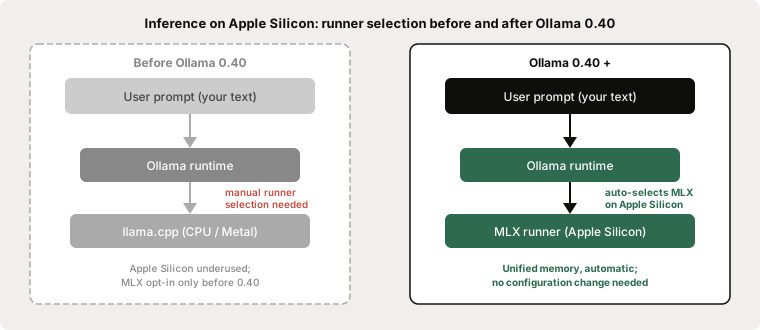
To confirm which runner is active for a loaded model, check the Ollama server log. When MLX is selected you will see a line noting the runner used at load time.
# Check your Ollama version
ollama --version
# should print: ollama version is 0.40.4 or later

# Update if needed - the menu-bar app also auto-updates on macOS
# Or download the latest installer from ollama.com

# Pull a model and let Ollama select the runner
ollama pull qwen3:8b
ollama run qwen3:8b
The Ollama team states they are "continuing to test and enable additional models." Not every architecture has MLX coverage yet; models on unsupported architectures fall back to the llama.cpp path transparently, so nothing breaks.
New models added in 0.40
Ollama 0.40.0 added four new models to the official library:
| Model | Pull command | Notes |
|---|---|---|
| gemma4 | ollama pull gemma4 | Google Gemma 4 family, multiple sizes |
| qwen3.5 | ollama pull qwen3.5 | Newer Qwen3 series from Alibaba |
| qwen3.6 | ollama pull qwen3.6 | Newer Qwen3 series, larger variant |
| qwen3.8 | ollama pull qwen3.8:27b | 27B dense multimodal (~16.8 GB Q4) |
qwen3.8:27b has its own dedicated post at run Qwen3.8 27B locally. For everyday writing and editing tasks, qwen3:8b (~5 GB Q4) fits any Mac with 8 GB of VRAM or 16 GB of unified memory and is a good starting point. gemma4:12b (~8 GB Q4) adds image input alongside text. For a full size table across models, see how much RAM to run a local LLM.
The embedding model embeddinggemma-2 also gained MLX support in 0.40.0 - relevant for any retrieval-augmented pipeline running on Apple Silicon.
Decision models: a new category in 0.40
Ollama 0.40 introduced decision models, a category of small specialised models designed for text classification rather than open-ended generation. Instead of producing a paragraph in response to a prompt, they answer structured questions about a piece of text.
The interface uses a new --ask flag:
ollama run nimble --ask "Is this message a refund request?" < customer_email.txt
Decision models can also score text against a rubric or assign labels. They are distinct from the generative models used for writing tasks - you would not use Nimble to draft an email, but you could use it to triage a batch of incoming messages automatically.
Ollama 0.40.4 added MLX support for decision models on Apple Silicon and native llama.cpp support so they run on CPU without a GPU. For most writing and productivity workflows the generative models remain the right choice; decision models are a useful addition for anyone building text processing pipelines alongside their writing setup.
ollama launch improvements in 0.40
ollama launch (introduced January 2026) configures AI coding tools - Claude Code, Codex, OpenCode, and Droid - against your local Ollama server without manual environment variable setup. The 0.40 patch series made several refinements:
- 0.40.2:
ollama launch claudenow passes the model's full context length instead of a truncated default - 0.40.4:
ollama launchworks with Ollama usage credits without requiring a paid plan upgrade;ollama launch codexincludes locally installed Ollama models in Codex's model picker (switch with/modelinside the Codex CLI)
If you use Claude Code or Codex for development and want to route some queries to a local model for privacy or cost reasons, ollama launch remains the zero-configuration path for that.
How this affects Typilot
Typilot's Polish, Rewrite, and Notes commands send constrained-format prompts to the local Ollama model you configure through the Ollama setup guide. From Ollama 0.40, that inference runs through the MLX runner on Apple Silicon automatically - no change is needed in Typilot's settings.
Update Ollama to 0.40 or later and restart the Ollama service. Typilot's Polish, Rewrite, and Notes commands will use the MLX path automatically on Apple Silicon on the next command. No setting change is needed in Typilot.
Ollama 0.40.4 also improved Gemma 4 prefill performance on NVIDIA GPUs via the MLX runner. If you use Typilot's AI commands on Windows with an NVIDIA GPU and run Gemma 4 locally, the same update applies.
For a comparison of which model to pair with Typilot's AI layer, see best local LLMs for writing. For the privacy architecture - what touches your hardware and what never does - see the security page.
The short version
Ollama 0.40 (September 25 2026, latest patch v0.40.4 on October 12) makes the MLX runner the default on Apple Silicon for supported model architectures - no configuration change needed, the runtime selection is automatic. Four new models were added: gemma4, qwen3.5, qwen3.6, and qwen3.8. A new decision-model category handles text classification via ollama run nimble --ask. For Typilot users on Apple Silicon, updating Ollama to 0.40 is a free performance improvement for Polish, Rewrite, and Notes commands. Typilot puts local AI commands on a hotkey in every app - 3-day free trial, audio and text never leave your device. The security page shows the full architecture.
Common questions.
What does the MLX runner change in Ollama 0.40 mean for my Mac?+
On Apple Silicon (M1 through M4), Ollama 0.40 now routes supported models through Apple's MLX compute framework automatically, with no manual setup. MLX is optimised for Apple Silicon's unified memory bus. To get the improvement, update to Ollama 0.40 or later - it applies automatically on the next model load.
Which models use the MLX runner by default in Ollama 0.40?+
Ollama 0.40 enables MLX by default for model architectures that have been validated in the MLX runtime, including the Gemma 4 and Qwen3 families. The Ollama team is continuing to add support for additional architectures. Models on architectures not yet supported fall back to the llama.cpp path transparently.
What are decision models in Ollama 0.40?+
Decision models are a new category of small, specialised models for text classification rather than open-ended generation. Run them with `ollama run nimble --ask "Is a refund being requested?" < input.txt`. They answer yes/no questions and can score text against a rubric. Ollama 0.40.4 added MLX support for them on Apple Silicon.
Does updating to Ollama 0.40 improve Typilot?+
Yes, automatically. Typilot sends Polish, Rewrite, and Notes commands through the local Ollama model you have configured. From Ollama 0.40, that inference uses the MLX runner on Apple Silicon without any setting change in Typilot. Update Ollama to 0.40 or later and restart the Ollama service.