Run Gemma 4 Locally With Ollama
Google Gemma 4 has five Apache 2.0 variants from 1.5 GB CPU (E2B) to 17 GB MoE (26B). Pick a size, pull it with Ollama, and run every Polish and Notes command privately on your device.
Google Gemma 4 runs on any hardware from a CPU-only laptop (E2B at 1.5 GB) up to a single consumer GPU (26B MoE at ~17 GB). All five variants are Apache 2.0, offline-capable, and available on Ollama - pull one command, connect to Typilot, and every Polish command and Notes summary stays on your machine.
Here is which variant to pick, the exact RAM requirements, and how to wire it up.
Which Gemma 4 variant should you run?
Gemma 4 is Google DeepMind's open model family released April 2, 2026 (Apache 2.0). The family spans five sizes: two edge models (E2B and E4B), a mid-range 12B, a Mixture-of-Experts 26B, and a dense 31B workstation model. The 12B joined the family on June 3, 2026 as the first Gemma with native audio understanding.
| Variant | Ollama tag | Q4_K_M size | Minimum hardware |
|---|---|---|---|
| E2B | gemma4:e2b | ~1.5 GB | Any laptop, CPU only |
| E4B | gemma4:e4b | ~3 GB | Any 8 GB+ system RAM |
| 12B | gemma4:12b | ~8 GB | RTX 3060 12 GB or 16 GB Mac |
| 26B MoE | gemma4:26b | ~17 GB | RTX 4090 24 GB or M2 Pro 24 GB |
| 31B Dense | gemma4:31b | ~20 GB | RTX 4090 24 GB or M3 Pro 36 GB |
For most writing tasks - email drafts, meeting notes, document polish - the 12B is the sweet spot: it fits on a mid-range gaming GPU, scores 77.2% on MMLU Pro, and runs at 40-55 tokens per second (RTX 3060 12 GB).
Hardware requirements
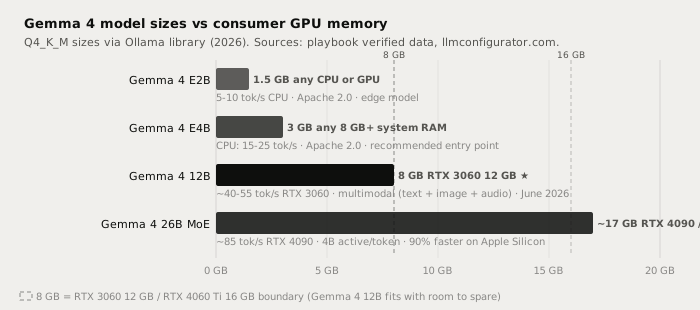
The E2B and E4B are genuine edge models. Google's "Effective" architecture uses knowledge distillation and structured pruning to pack 12B-class reasoning into a 1.5-3 GB shell - you can run E4B on integrated graphics or an older MacBook with 8 GB RAM (source: bestllmfor.com/catalog/gemma4-e4b, gemma4.dev, 2026).
The 26B MoE activates only 4 billion parameters per token despite carrying 26 billion in total. That means it runs at roughly 4B-class speed (85 tok/s on an RTX 4090) while producing output comparable to a dense 12B model. Ollama v0.31.1 added multi-token prediction for Gemma 4 on Apple Silicon, cutting generation time by ~90% on M-series hardware.
Running it with Ollama
Current Ollama stable is v0.35.0 (September 28, 2026).
# Pull the recommended mid-range model (~8 GB download)
ollama pull gemma4:12b

# Or the entry-point edge model (~3 GB download)
ollama pull gemma4:e4b

# Or the high-end MoE model (~17 GB download)
ollama pull gemma4:26b

# Run interactively to test
ollama run gemma4:12b

# Quick test: structured note summary
ollama run gemma4:12b "Summarise the following meeting notes in three bullet points: [paste text]"
After pulling, connect to Typilot: open Preferences, go to Models, select the Gemma 4 variant from the list of downloaded Ollama models, and set it as the default for Polish or Notes commands.
For the full Ollama setup walkthrough see how to run a local AI assistant with Ollama and Typilot and the Ollama setup docs.
Writing quality: where each variant fits

| Task | E4B | 12B | 26B MoE | Cloud (Claude Sonnet) |
|---|---|---|---|---|
| Short email draft | Good | Very good | Excellent | Excellent |
| Meeting note cleanup | Good | Very good | Excellent | Excellent |
| Document summary | Fair | Very good | Excellent | Excellent |
| Code comment dictation | Fair | Good | Very good | Excellent |
| Long creative prose | Fair | Good | Very good | Excellent |
| Audio and text leave device | Never | Never | Never | Always |
| Works offline | Yes | Yes | Yes | No |
| Per-request cost | $0 | $0 | $0 | Pay-per-token |
The honest gap: a 26B MoE model running locally is not as fluent as Claude Sonnet or Opus on complex, long-form creative tasks. The local win is on privacy (nothing leaves the device), offline availability, and zero per-token cost - not raw reasoning quality. For email, notes, and formatted documents, the 12B and 26B produce reliably good output.
Gemma 4 12B scores 77.2% on MMLU Pro - a result that beats last year's Gemma 3 27B (67.6% on the same benchmark). The 26B MoE delivers 12B-class quality at 4B-class inference speed because only 4B parameters activate per token. For Typilot Polish and Notes commands the 12B is the practical default; if you have a 24 GB GPU or an M2 Pro Mac, the 26B raises the ceiling without requiring more inference time. Source: Google DeepMind model card, rits.shanghai.nyu.edu (2026).
The 12B multimodal audio feature
Gemma 4 12B is the first mid-sized Gemma with a native audio encoder - it can process speech, environmental audio, and images in the same decoder-only pass without separate pipeline steps. This is context for future Typilot features rather than the current release: today Typilot's Polish and Notes commands feed Gemma text prompts via Ollama. The multimodal capability is available if you use the model directly through the Ollama API.
Why local inference matters
A cloud writing assistant sends every prompt - your email drafts, meeting transcripts, private notes - to a vendor server on every request. That is true regardless of privacy policies.
Gemma 4 running via Ollama processes everything at localhost:11434. The weights, your prompts, and every result stay on your device.
Verify it: pull the model, disconnect your internet, and run a Polish command in Typilot. The model keeps working.
See the security page for a full architecture proof of how Typilot keeps audio and text local.
The short version
Gemma 4 is Google's best open model family for local use: Apache 2.0, five consumer-accessible sizes, offline-capable. Pull ollama pull gemma4:12b (8 GB, any 12 GB+ GPU) for the best writing quality-to-hardware trade-off, or gemma4:e4b (3 GB) for CPU-only machines. The 26B MoE (~17 GB) matches dense 12B-class output at higher speed thanks to its MoE architecture, and runs at ~85 tok/s on an RTX 4090. All variants run entirely at localhost:11434 - audio and text never reach an external server.
That is what private AI assistance looks like. Try Typilot with Gemma 4 free for three days at /download.
Common questions.
Which Gemma 4 model should I run locally for writing?+
Gemma 4 12B is the practical default for most machines: it weighs ~8 GB at Q4_K_M quantisation, fits on any 12 GB+ GPU (RTX 3060 and up) or a 16 GB Mac, and scores 77.2% on MMLU Pro. If you have a 24 GB GPU or an M2 Pro Mac with 24 GB unified memory, the 26B MoE (~17 GB) raises quality at similar inference speed because only 4B parameters activate per token.
Can I run Gemma 4 on a CPU without a GPU?+
Yes. Gemma 4 E2B (~1.5 GB) and E4B (~3 GB) are designed for edge inference and run on any modern laptop CPU via Ollama without a dedicated GPU. E2B delivers 5-10 tok/s on CPU; E4B reaches 15-25 tok/s. Both are Apache 2.0 and fully offline.
Is Gemma 4 private when used with Typilot?+
Yes. Gemma 4 runs entirely on your device via Ollama at localhost:11434. Nothing - not your prompts, not the text you dictate, not the model outputs - reaches an external server. Verify it by disconnecting your internet and running a Polish command: the model keeps working.
What is the difference between Gemma 4 26B MoE and the 31B Dense model?+
The 26B is a Mixture-of-Experts model that activates only ~4B parameters per token, making it fast (~85 tok/s on an RTX 4090) while producing output comparable to a dense 12B. The 31B Dense activates all 31B parameters on every token, yielding higher quality on complex tasks at the cost of slower inference (~20 GB at Q4). For most writing workloads the 26B MoE is the better choice.