Run Apertus Locally: Swiss Open-Source LLM
Run Apertus 8B locally via Ollama - the Swiss AI open-source model from ETH Zurich and EPFL, Apache 2.0, ~6 GB RAM, 21.5 tok/s on M4, prompts never leave your device.
Running Apertus 8B locally via Ollama is straightforward and completely private. The model runs at localhost:11434, nothing leaves your machine after the initial download, and the Apache 2.0 licence places no restrictions on use. On an M4 MacBook Air with 16 GB of unified memory, the community GGUF reaches 21.5 tokens per second at Q4 quantisation.
Here is what Apertus is, which version to run right now, and how to get it started in under five minutes.
What Apertus is
Apertus is an open-source large language model from the Swiss AI Initiative - a publicly funded research consortium involving ETH Zurich, EPFL, and the Swiss National Supercomputing Centre (CSCS). The project's stated goal is a fully transparent, fully open, non-commercial AI model that anyone can inspect, reproduce, and run.
The v1.0 release (Apertus-8B-Instruct-2509, shipped September 2025) trained on over 15 trillion tokens across 1,500 languages, with roughly 40 per cent non-English content. It was the first large open-weight model to incorporate regulatory compliance as a design principle - the training data was filtered to exclude personal information and to honour opt-out signals from content sources.
Both the 8B and 70B weights are published under Apache 2.0 with no commercial restrictions.
Which version to run right now
Apertus has two releases, and only one of them runs in Ollama today.
v1.0 (2509, September 2025) - text-only, available via community GGUF on Ollama. This is the version you run today.
v1.5 (July 2026) - added image and audio inputs, a 262,144-token context window, and a chain-of-thought reasoning mode. The multimodal architecture is not yet supported by llama.cpp, Ollama, or LM Studio. Community text-only GGUF conversions exist but they strip the image and audio towers, removing the reason to upgrade - and they run slightly slower than v1.0 (18.7 vs 21.5 tok/s on the same hardware).
The practical recommendation is to use v1.0 now and watch the official Apertus Ollama guide (apertus-ai.org/docs/guides/ollama) for the v1.5 GGUF when tooling support arrives.
Apertus 1.5 is not yet runnable in Ollama. Community GGUF builds drop the multimodal components and run slower than 1.0. Use v1.0 until official Ollama support ships.
Hardware requirements
| Model | Quantisation | RAM at load | Minimum hardware |
|---|---|---|---|
| Apertus 8B | Q4_K_M | ~6 GB | 8 GB GPU / 16 GB Mac |
| Apertus 8B | Q8_0 | ~10 GB | 16 GB GPU / 24 GB Mac |
| Apertus 70B | Q4_K_M | ~42 GB | 48 GB+ GPU - server-class |
The 8B at Q4_K_M is the practical choice for almost everyone. It fits in any Apple Silicon Mac with 16 GB of unified memory and in any GPU with 8 GB or more of VRAM.
The 70B needs 48 GB of VRAM to run entirely in GPU memory - that means a workstation-class card (RTX 6000 Ada, A6000) or a Mac Studio M2 Ultra or newer. On consumer hardware it falls back to CPU offloading with a significant throughput penalty.
Three commands to get running
There is no official Ollama library tag for Apertus yet. The community GGUF by MichelRosselli is the recommended path and mirrors the official Apache 2.0 weights:
ollama run MichelRosselli/apertus:8b-instruct-2509-q4_k_m
Ollama downloads the GGUF, verifies the checksum, and starts the model at localhost:11434. After the initial download, Apertus runs entirely offline.
For the 70B on workstation hardware (48 GB+ VRAM):
ollama run MichelRosselli/apertus:70b-instruct-2509-q4_k_m
To use a different quantisation for a smaller footprint on an 8 GB GPU (slightly lower quality):
ollama run MichelRosselli/apertus:8b-instruct-2509-q4_k_m
The Q4_K_M tag is recommended as the best balance of size and quality for the 8B.
Why privacy holds locally
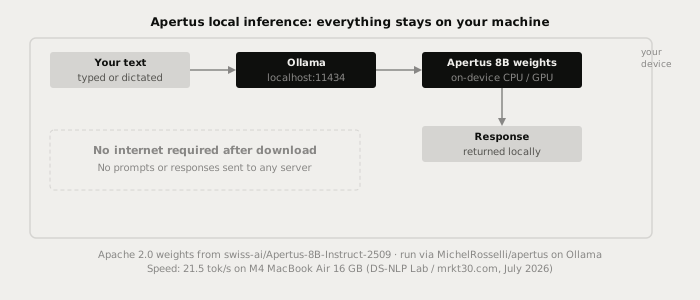
The privacy concern with most AI services is the cloud API - your prompts travel to a vendor's servers, get logged, and may inform future training. That concern does not apply to Apertus local weights.
Open weights are numerical files: they contain no network code, no telemetry, and no data collection. Once you pull the GGUF, every inference call runs at localhost:11434 on your own CPU or GPU. The Swiss AI Initiative's servers are not involved. Disconnect your internet after the download and the model keeps working indefinitely.
Apertus adds one further layer of transparency: its training data was filtered to exclude personal information, and the project operates under Swiss data law (Federal Act on Data Protection, FADP). For organisations that need to document AI compliance under Swiss or EU law, the training provenance is unusually clear - the Swiss AI Initiative publishes the data cards alongside the weights.
For comparison: running Chinese open-source models locally (DeepSeek, Qwen) provides the same structural guarantee - weights run offline send nothing to the vendor. Apertus is the European counterpart with a publicly auditable training record. See the guide to running Chinese LLMs locally for the full licence and sovereignty picture across model families.
Apertus 8B vs peer 8B models: honest comparison
Apertus 8B is not the strongest all-round 8B model for English writing tasks. Independent benchmarking (DS-NLP Lab, July 2026; mrkt30.com) found:
- Speed: Apertus 8B reaches 21.5 tokens per second on an M4 MacBook Air 16 GB, roughly 30 per cent faster than Qwen3 8B on the same machine.
- Constrained English tasks: Qwen3 8B shows stronger compliance on strict formatting requirements (exact word counts, specific structure).
- European multilingual: Apertus leads on German and Romansh coverage. The 70B consistently outperforms Llama-3.3-70B on German-to-Romansh translation.
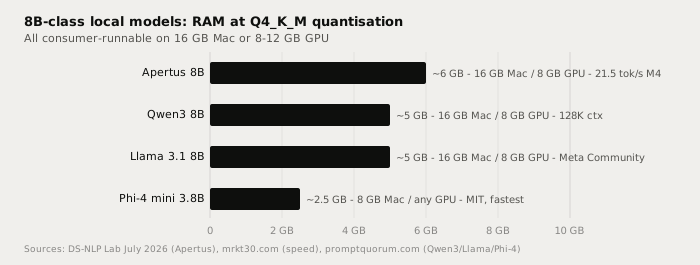
| Model | VRAM Q4 | Speed (M4 Air) | Strengths | Licence |
|---|---|---|---|---|
| Apertus 8B | ~6 GB | 21.5 tok/s | European multilingual, speed | Apache 2.0 |
| Qwen3 8B | ~5 GB | ~16.5 tok/s | Constrained English, 128K ctx | Apache 2.0 |
| Llama 3.1 8B | ~5 GB | ~20 tok/s | General English, ecosystem breadth | Meta Community |
| Phi-4 mini 3.8B | ~2.5 GB | 30+ tok/s | Low-RAM machines, speed | MIT |
Recommendation: if your writing involves Swiss German, French, Italian, or Romansh, Apertus 8B is the best pick. For English-dominant work, Qwen3 8B or Llama 3.1 8B are stronger general choices. See Qwen vs Llama vs Gemma for local use for a deeper comparison of the mainstream open-weight families.
Using Apertus with Typilot
Typilot connects to any running Ollama model automatically at http://localhost:11434. Once Ollama is serving the Apertus model, open Typilot and set the model under Settings > General to MichelRosselli/apertus:8b-instruct-2509-q4_k_m. No API key or URL change is needed.
All Typilot commands then run against local Apertus weights:
rew: this paragraph        → rewrite in place
fix: this sentence         → correct grammar and phrasing
sum: these meeting notes   → summarise into bullets
imp: this draft            → improve structure and tone
Apertus 8B's speed advantage (21.5 tok/s) reduces latency on longer rewrite and summarise commands, which matters in a live dictation session. See how to set up Ollama with Typilot and the full local AI assistant guide if Ollama is not yet installed.
The short version
Apertus is a Swiss open-source LLM from ETH Zurich, EPFL, and the Swiss National Supercomputing Centre, released under Apache 2.0. The 8B text model (v1.0) runs in Ollama via MichelRosselli/apertus:8b-instruct-2509-q4_k_m, needs roughly 6 GB at Q4, and reaches 21.5 tok/s on a 16 GB M4 Mac. Running via Ollama means your prompts never reach any server after the initial download. Apertus 1.5 (July 2026) adds multimodal capabilities but is not yet supported in Ollama or llama.cpp - use v1.0 until official support ships. Typilot connects to any Ollama model automatically and puts rewrite, polish, and notes commands on a global hotkey across every app on your machine - 3-day free trial. The security page shows exactly what touches your hardware and what never does.
Common questions.
Is Apertus private to run locally?+
Yes, structurally. When you run Apertus via Ollama, inference happens entirely at localhost:11434. No prompt, response, or metadata is sent to the Swiss AI Initiative or any server after the initial model download. The model is open weights (Apache 2.0) with no telemetry or network code - privacy is architectural, not policy-dependent.
What hardware do I need to run Apertus 8B?+
The 8B model at Q4_K_M quantisation needs approximately 6 GB of VRAM or unified memory. It runs on any Mac with 16 GB or more of unified memory and on any GPU with 8 GB or more of VRAM. On an M4 MacBook Air 16 GB, the community GGUF reaches 21.5 tokens per second.
Can I run Apertus 1.5 in Ollama?+
Not yet. Apertus 1.5 (July 2026) added image and audio inputs using an architecture that llama.cpp, Ollama, and LM Studio do not yet support. Community text-only GGUF builds exist but omit the multimodal towers and run slower than v1.0. Use the original text model (v1.0 / 2509) via the MichelRosselli community GGUF for now.
How does Apertus 8B compare to Qwen3 8B for writing?+
Apertus 8B v1.0 is approximately 30% faster than Qwen3 8B on the same Apple Silicon hardware, reaching 21.5 tok/s on an M4 MacBook Air. On constrained English writing tasks such as strict word counts or specific formatting, Qwen3 8B shows stronger compliance. Apertus leads on European multilingual coverage, particularly German and Romansh variants.