Qwen3.8-27B: Run It Locally in Ollama
Qwen3.8-27B is Apache 2.0, on Ollama now via qwen3.8:27b. Multimodal 27B dense model, 262k context, ~16.8 GB at Q4_K_M - fits 24 GB of unified memory or VRAM.
Alibaba released Qwen3.8-27B on August 14, 2026, under an Apache 2.0 licence - a dense 27.78B-parameter multimodal model that accepts text, images, and video as input. It is available on Ollama today via ollama pull qwen3.8:27b. The Q4_K_M quantisation weighs about 16.8 GB and fits comfortably in 24 GB of unified memory or VRAM (M2 Pro, M3 Max, M4 Pro, RTX 4090, RTX 3090). The native context window is 262,144 tokens - four times larger than most local 27B models - and the model shows large gains over the Qwen3 generation on agentic coding and computer-use benchmarks.
Here is what is new, what hardware it needs, and how to connect it to Typilot.
What Qwen3.8 adds over the Qwen3 family
The Qwen3 generation (Qwen3 8B, 14B, 32B) shipped as text-only dense models. Qwen3.8-27B is a different branch: a native multimodal dense model with a built-in vision encoder, meaning it processes images and video frames alongside text during a single inference pass on your machine. Attach a screenshot, a diagram, or a page of notes as context for a rewrite or summary command, and the model handles the visual input locally - nothing is uploaded.
The 262,144-token context window is the other meaningful difference. At Q4_K_M, that lets the model hold the equivalent of roughly 200 pages of text in a single prompt. For long-document editing, meeting transcript cleanup, or chaining several drafts together in one session, the larger context is practically useful.
Benchmark improvements over Qwen3.6-27B are large (from the official Alibaba model card):
| Benchmark | Qwen3.6-27B | Qwen3.8-27B | Change |
|---|---|---|---|
| Terminal-Bench 2.1 | 63.4 | 73.0 | +9.6 |
| DeepSWE 1.1 | 13.3 | 42.2 | +28.9 |
| OSWorld-Verified | 63.9 | 84.3 | +20.4 |
| SWE-MM | 25.7 | 38.6 | +12.9 |
These are agent and computer-use benchmarks, not prose writing benchmarks. For everyday text editing and rewriting, the quality improvement over Qwen3-32B is incremental rather than dramatic - but the model is smaller and faster for those tasks.
Hardware requirements
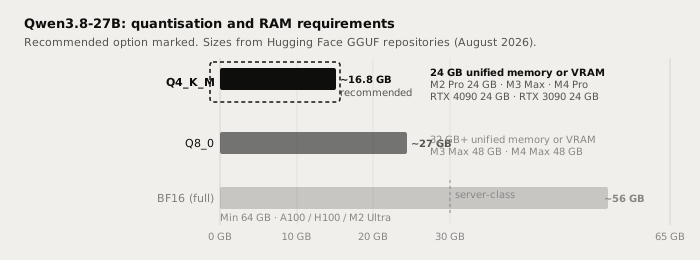
The table below covers the three practical quantisation tiers.
| Quantisation | File size | Min hardware | Notes |
|---|---|---|---|
| Q4_K_M (recommended) | ~16.8 GB | 24 GB unified memory or VRAM | M2 Pro 24 GB, M3 Max, M4 Pro; RTX 4090, RTX 3090 |
| Q8_0 | ~27 GB | 32 GB unified memory or VRAM | M3 Max 48 GB, M4 Max 48 GB; server GPUs |
| BF16 full precision | ~56 GB | 64 GB+ | A100, H100, M2 Ultra or M3 Ultra |
A 16 GB Mac (M1/M2/M3 base or M2 Pro 16 GB) is not sufficient for Q4_K_M - the model weights and KV cache share the same unified memory pool on Apple Silicon, and 16.8 GB of weights alone exceeds what the remaining memory can absorb after the OS. On a discrete NVIDIA GPU with 16 GB VRAM (RTX 4080 16 GB, RTX 4070 Ti 16 GB), Ollama can offload some layers to system RAM, but inference speed drops noticeably. The 24 GB tier is where Q4_K_M runs cleanly.
For the RAM sizing formula behind these numbers, see the how much RAM to run a local LLM guide.
Running it in Ollama
Qwen3.8-27B is in the Ollama library as qwen3.8:27b. Pull and run it:
# Pull the default Q4_K_M build (~16.8 GB download)
ollama pull qwen3.8:27b

# Run interactively to test
ollama run qwen3.8:27b

# Test vision input by passing an image path in the prompt
ollama run qwen3.8:27b "Describe this image: /path/to/image.png"
After pulling, the model appears in Typilot's Preferences under Models alongside any other Ollama models you have downloaded. Set it as the default for Polish or Notes commands, or select it per-command from the model picker in custom command definitions.
For a first-time Ollama setup, the how to run a local AI assistant with Ollama and Typilot walkthrough covers installation and the first test end to end, and the Ollama setup docs cover the Typilot-specific configuration steps.
Writing tasks: where Qwen3.8-27B fits
Qwen3.8-27B is primarily a vision-language and agentic model, but its 27B parameter count and quality training make it a solid local option for everyday prose tasks. The honest comparison with cloud frontier models:
| Task | Qwen3.8-27B local | Claude Sonnet / Opus (cloud) |
|---|---|---|
| Email drafting | Very good | Excellent |
| Prose polish and rewrite | Very good | Excellent |
| Meeting note cleanup | Very good | Excellent |
| Image-to-text context (e.g. screenshot) | Yes - on-device vision encoder | Yes - cloud vision API |
| Long document editing (262k tokens) | Yes - fits in one context | Yes |
| Agentic coding tasks | Strong (DeepSWE 42.2) | Excellent |
| Complex multi-file reasoning | Good | Excellent |
| Audio and text leave device | Never | Always |
| Works offline | Yes | No |
| Per-request cost | $0 | Pay-per-token |
The gap with Claude Sonnet and Opus is real on complex reasoning and long creative generation. Concede it and decide whether it matters for the task at hand. For private, offline, high-volume writing at zero marginal cost, a local 27B model at Q4_K_M closes most of that gap for everyday work.
Compared to Qwen3-32B: Qwen3.8-27B is smaller (16.8 GB vs ~19 GB at Q4_K_M), runs faster on the same hardware, adds multimodal input and a much larger context window, and is significantly stronger on agentic and computer-use tasks. For plain text rewriting the two are comparable. If you are choosing between them and your Mac or GPU is at the 24 GB boundary, Qwen3.8-27B is the better fit.
Qwen3.8-27B is not as capable as Claude Sonnet or Opus on long creative generation and complex multi-step reasoning - that gap is real. What it offers over other local 27B models is native multimodal input (images and video locally, no upload) and a 262k-token context window. Local wins on privacy, offline use, zero per-request cost, and no rate limits. State the ceiling plainly and pick the tool that fits the task.
Why the local path matters
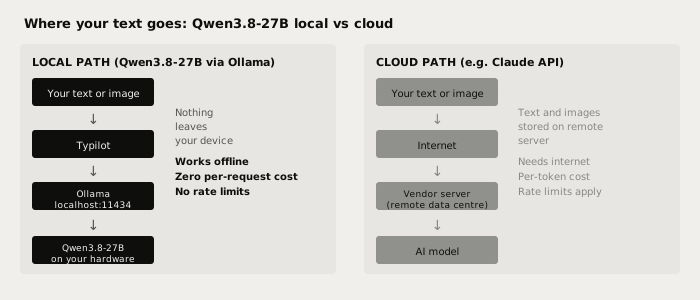
With a cloud model, every request - including any images you attach as context - travels to a vendor server. With Qwen3.8-27B running via Ollama on your machine, the vision encoder, the LLM inference, and all intermediate outputs stay local. Nothing leaves the device during inference.
This includes image input. When you pass a screenshot or diagram as context through Typilot's img: command or through a custom Ollama prompt, the image is processed locally by the on-device vision encoder. The image never goes to any server.
Verify it yourself: pull the model, disconnect your internet, and run a Polish or Notes command in Typilot. The model keeps working. That is not something any cloud AI writing tool can match.
For the technical architecture behind Typilot's local-first approach, see the security and architecture page.
Using Qwen3.8-27B with Typilot
Typilot routes all AI commands through Ollama at localhost:11434. Once you have pulled qwen3.8:27b, it appears in Preferences - Models alongside any other downloaded Ollama models. You can:
- Set it as the default model for all Polish and Notes commands in Preferences - General - Default model.
- Override per-command by selecting it in a custom command definition.
- Use it as the model for meeting transcription summaries.
The vision capability works through Typilot's img: command, which captures a screenshot of the active region and passes it alongside your prompt. With Qwen3.8-27B selected as the active model, that image is processed on-device.
For context on how Qwen3.8 compares to other mainstream open-weight models at the same size tier, the Qwen vs Llama vs Gemma comparison covers the Qwen3 family alongside Llama and Gemma in detail.
The short version
Qwen3.8-27B is Alibaba's latest open-weight release: 27.78B parameters, Apache 2.0, multimodal (text + images + video), 262k-token context window, available via ollama pull qwen3.8:27b today. The Q4_K_M quantisation (~16.8 GB) fits in 24 GB of unified memory or VRAM. It is stronger than the Qwen3 generation on agentic tasks, smaller than Qwen3-32B, and adds native on-device vision that no previous Qwen local model had.
Every word you write, every screenshot you pass as context, every meeting note you summarise - it all runs on your hardware with nothing sent to a vendor. That is what local-first AI means in practice. Try Typilot free for three days at /download and point it at Qwen3.8-27B on day one.
Common questions.
What is Qwen3.8-27B and is it free to use locally?+
Qwen3.8-27B is a 27.78B-parameter dense multimodal model released by Alibaba on August 14, 2026, under the Apache 2.0 licence. It accepts text, images, and video, has a 262,144-token native context window, and is available on Ollama as `ollama pull qwen3.8:27b`. The weights are free to download and run locally - nothing is sent to any Alibaba server during inference.
How much RAM or VRAM does Qwen3.8-27B need?+
The recommended Q4_K_M quantisation weighs about 16.8 GB. You need at least 24 GB of unified memory for Apple Silicon (the model weights and KV cache share the same pool), or a 24 GB discrete GPU like the RTX 4090 or RTX 3090. A 16 GB Mac is not sufficient for Q4_K_M. On a 16 GB NVIDIA GPU, the weights fit in VRAM but the KV cache spills to system RAM, reducing inference speed noticeably.
How does Qwen3.8-27B compare to Qwen3-32B for writing tasks?+
Qwen3.8-27B is smaller (16.8 GB vs ~19 GB at Q4_K_M), runs faster on the same hardware, adds native multimodal input (images and video processed locally), and has a much larger 262k-token context window. On prose quality for everyday rewriting tasks the two are comparable. Qwen3.8-27B is significantly stronger on agentic coding tasks (DeepSWE 1.1: 42.2 vs 13.3 for the previous 27B generation).
Does running Qwen3.8-27B through Ollama send data to Alibaba?+
No. The Apache 2.0 weights run entirely on your machine through Ollama's local server at localhost:11434. No data is sent to Alibaba or any third party during inference. This is different from the cloud Qwen API (qwen-plus, qwen-max), which processes data on Alibaba's servers. Verify it yourself: pull the model, disconnect your internet, and run a prompt - it responds fully offline.