Which Whisper Model Size for Dictation?
Which Whisper model for dictation: tiny, base, small, medium, large or turbo. Real RAM, speed and word error rate, plus the .en models.
Pick the Whisper model by how much memory you can spare, not by the biggest name. For most laptops, small (about 2 GB, 244M parameters) is the dictation sweet spot, base fits tight machines, medium helps with accents and technical terms, and large (about 10 GB) is for noisy audio or many languages. The .en variants are slightly better if you only dictate English.
Here is the full breakdown: what each size costs, how accurate it is, and the one speed number that actually matters for dictation.
The six sizes at a glance
OpenAI publishes the parameter counts, VRAM and relative speed for each Whisper size in the Whisper README. The speed column is measured on an A100 GPU relative to large, so treat it as a ranking, not a promise for your laptop.
| Size | Parameters | English-only model | VRAM | Relative speed |
|---|---|---|---|---|
| tiny | 39M | tiny.en | ~1 GB | ~10x |
| base | 74M | base.en | ~1 GB | ~7x |
| small | 244M | small.en | ~2 GB | ~4x |
| medium | 769M | medium.en | ~5 GB | ~2x |
| large | 1550M | none | ~10 GB | 1x |
| turbo | 809M | none | ~6 GB | ~8x |
Turbo is an optimised version of large-v3 that transcribes much faster with minimal accuracy loss. It is not trained for translation, so it is the wrong pick if you need non-English speech translated into English.
How much accuracy do you buy?
Accuracy climbs fast at the small end and flattens at the top. On clean English audio (LibriSpeech test-clean, as summarised by MetaWhisp, May 2026), word error rate drops from 13.0% for tiny to 5.7% for small, then only to 3.5% for large-v3.
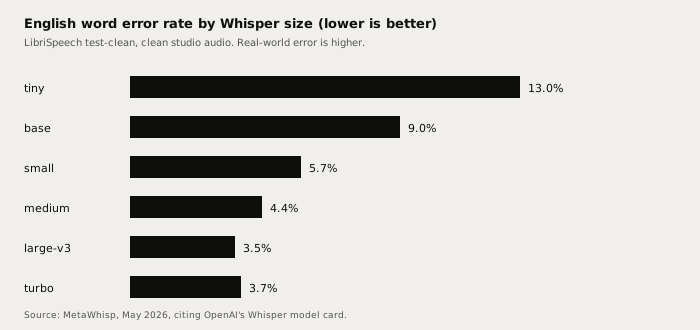
Two caveats keep this honest. These are clean studio recordings, and real microphones, rooms and accents push every number up. And error rate is not the same as "needs fixing": at 5.7% you still correct roughly one word in eighteen, which is why jargon-heavy writers often step up to medium.
Memory and speed on a real laptop
Dictation is live, so what matters is whether the model transcribes faster than you speak. MetaWhisp measured whisper.cpp with quantised models on Apple Silicon over a 60-minute English clip. A real-time factor above 1x means faster than real time.
| Size | Peak RAM | M1 Air (8 GB) | M2 MacBook Pro (16 GB) |
|---|---|---|---|
| tiny | ~1.0 GB | 23x | 28x |
| base | ~1.2 GB | 16x | 19x |
| small | ~2.1 GB | 6.4x | 7.8x |
| medium | ~5.0 GB | 2.1x | 2.7x |
| large-v3 | ~10.0 GB | 0.9x | 1.1x |
| turbo | ~6.0 GB | 6.2x | 7.4x |
The pattern is clear. Large-v3 is not practical for live use on an 8 GB machine: it runs slower than real time and pushes the system into swap. Small and turbo both clear 6x, and medium is fine on 16 GB. Speeds on Windows and Linux depend on your GPU and runtime, so check yours rather than copying these numbers.
Which size should you pick?
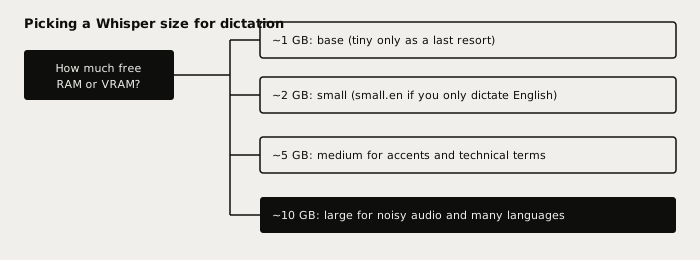
Use this as a starting point, then move one step up or down based on what you see:
- 8 GB laptop: start with small. Drop to base only if other apps are starving for memory.
- 16 GB laptop: medium is comfortable full time. Choose it if you dictate names, product terms or code vocabulary.
- Noisy rooms, strong accents, many languages: go to large if you have around 10 GB free, since larger models cope better with hard audio.
- English only: try the
.enmodel of the same size. OpenAI notes the English-only models tend to perform better, with the biggest gain on tiny and base and a smaller one on small and medium.
Do not pick tiny for daily dictation. At 13.0% error on clean audio it will mangle names and punctuation, and the time you save on speed you spend fixing text. Tiny is a fast fallback, not a default.
A bigger model does not fix every error
Model size changes accuracy on the words it hears. It does not stop Whisper inventing text on silence, which is a separate problem covered in fixing Whisper hallucinations. It also will not rescue a bad microphone or a loud fan. A closer mic often beats a model upgrade.
If you are comparing engines rather than sizes, read Whisper large-v3-turbo vs Parakeet and the best local speech-to-text model in 2026. For the DIY command-line route, see run Whisper locally for dictation.
Choosing a model in Typilot
Typilot runs Whisper on your device and lets you manage the model in the voice settings: tiny, base, small, medium and large are available, and tiny downloads automatically the first time you enable voice. That default is a quick start, not a recommendation, so open the voice settings and download small or medium once you are set up. Audio is transcribed locally and never uploaded. See dictation for how it works.
The short version
Choose the Whisper size by memory: base for about 1 GB, small for about 2 GB (the dictation default for most laptops), medium for about 5 GB, large for about 10 GB. Use the .en model if you only speak English, and avoid tiny for daily use. Larger models are more accurate but only the ones faster than real time are usable for live dictation.
Try Typilot free for three days at /download. The architecture proof is at /security.
Common questions.
Which Whisper model is best for dictation?+
For most laptops, small (244M parameters, about 2 GB of VRAM per the OpenAI README) is the best balance of accuracy and live speed. Choose medium (about 5 GB) if you dictate accents or technical vocabulary and have 16 GB of RAM, and base (about 1 GB) only on very tight machines.
How much RAM do I need for each Whisper model?+
OpenAI lists roughly 1 GB for tiny and base, 2 GB for small, 5 GB for medium, 6 GB for turbo and 10 GB for large. Measured peak RAM with quantised models on a Mac was about 1.0, 1.2, 2.1, 5.0, 6.0 and 10.0 GB respectively, so leave headroom for your other apps.
Are the English-only .en Whisper models better?+
Yes, slightly, for English. OpenAI notes the .en models tend to perform better, with the biggest advantage on tiny.en and base.en and a smaller one on small.en and medium.en. Turbo and large have no English-only version, so use a multilingual model if you dictate in more than one language.
Is Whisper large too slow for live dictation?+
On an 8 GB laptop, usually yes. In a whisper.cpp test on Apple Silicon, large-v3 ran at about 0.9x real time on an M1 Air with 8 GB, meaning slower than you speak, while small ran at 6.4x. Large needs about 10 GB of memory, so it suits machines with plenty of RAM or a strong GPU.