Run Nemotron 3.5 Bolt E4B Locally
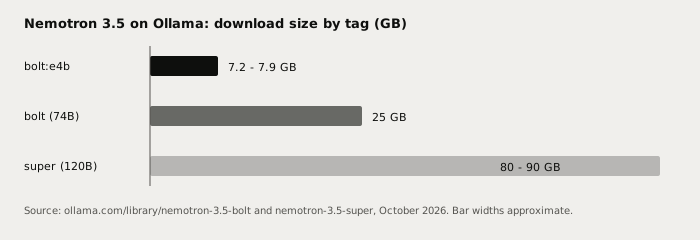
NVIDIA Nemotron 3.5 Bolt E4B (8B, 4B effective, post-trained from Gemma 4 E4B) is a 7.2 - 7.9 GB Ollama download. Run it on a 16 GB laptop, no GPU needed. OpenMDW-1.1.
NVIDIA Nemotron 3.5 Bolt E4B is an 8-billion-parameter model (4 billion effective) that NVIDIA post-trained from Gemma 4 E4B, and it is the small sibling of the 74B Bolt. The Ollama tag nemotron-3.5-bolt:e4b is 7.2 - 7.9 GB, so it fits a 16 GB laptop with room to spare, with no dedicated GPU required. Run it with ollama run nemotron-3.5-bolt:e4b after updating Ollama to the latest version.
Here is what it is, what hardware it needs, where it falls short, and how to use it for Polish and Notes in Typilot.
What Nemotron 3.5 Bolt E4B is
NVIDIA's model card describes Bolt E4B as "8B (4B effective)" and says it was "further post-trained from Gemma-4-E4B-it by NVIDIA". The Ollama page puts the intent in one line: it is "designed for fast local conversations, instruction following, and multi-turn tool use". The Hugging Face release is dated October 23, 2026.
It is not the 74B model. The big Bolt is a 74B-A9B mixture-of-experts that needs a 24 GB GPU slot, covered in run Nemotron 3.5 Bolt locally. E4B shares the name and the post-training approach but is a different, much smaller model that runs on ordinary laptops.
Specs at a glance
| Item | Nemotron 3.5 Bolt E4B |
|---|---|
| Parameters | 8B total, 4B effective |
| Base | Gemma 4 E4B (post-trained by NVIDIA) |
| Ollama tag | nemotron-3.5-bolt:e4b |
| Download size | 7.2 - 7.9 GB |
| Context (Ollama listing) | 128K |
| Context (model card) | up to 64K input and 64K output |
| Input on the model card | Text |
| Licence | OpenMDW-1.1 (Gemma 4 itself is Apache 2.0, per the card) |
| Speculative decoding | Companion DFlash drafter published by NVIDIA |
| Platforms | Windows, Linux, and Apple Silicon (per Ollama) |
The Ollama page and the model card disagree on context: Ollama lists 128K, the card says 64K in and 64K out. Treat 64K as the safe working number until the two agree. The Ollama page also tags the model with vision, and the card's Transformers sample passes an image, but the card lists text input and output, so this post treats it as a text model.
Hardware: what actually runs it
A 7.2 - 7.9 GB file plus KV cache and OS overhead is the whole story. These are sizing guidelines derived from the file size, not NVIDIA-published minimums.
| Machine | Memory | Verdict |
|---|---|---|
| 8 GB laptop | 8 GB | Too tight, the weights alone are close to total RAM |
| 16 GB laptop or Mac | 16 GB | Comfortable at normal context lengths |
| 24 GB+ Mac or 12 GB GPU | 12 - 24 GB | Plenty of headroom for long context |
If you only have 8 GB, a smaller model is the better pick. See how much RAM you need to run a local LLM and running a local LLM without a GPU for sizing across the range.
Running it in Ollama
# Update Ollama first, then pull and run the E4B tag
ollama run nemotron-3.5-bolt:e4b

# Or pull without starting a session
ollama pull nemotron-3.5-bolt:e4b
Do not use the bare nemotron-3.5-bolt name if you want the small model: the default tag is the 25 GB 74B build.
Once it is pulled, open Preferences, go to Models, and pick it from the list of downloaded Ollama models. The Ollama setup docs cover the connection flow.
How good is it? The honest version
NVIDIA's own table, measured under its harness, shows Bolt E4B beating Gemma 4 E4B-it on every listed benchmark except EQ-Bench v3. One example: MultiChallenge, 53.10 against 42.08. It also trails Qwen3.5 4B on several rows. On RULER at 64K, NVIDIA lists 86.99 for Bolt E4B against 95.15 for Qwen3.5 4B.
Two caveats matter. These are vendor-run numbers, not independent ones. And the card says the model is "intended primarily for customization and post-training rather than direct production inference", with "local voice and device assistants, interactive personas, and embedded interfaces" as its best-for list. It is a fast instruction follower, not a prose specialist.
A 4B-effective model is not in the same league as Claude Opus or Sonnet for long, careful writing, and it does not beat a 27B local model on prose. Pick Bolt E4B when you want fast, private Polish, short rewrites, and tool-style commands on a modest machine. For longer drafts, a larger local model such as those in our best local LLM for writing ranking is a better fit.
| Task | Bolt E4B (local) | Cloud frontier model |
|---|---|---|
| Quick polish and rewrites | Good | Excellent |
| Instruction following | Good | Excellent |
| Long creative drafts | Limited | Excellent |
| Hard multi-step reasoning | Limited | Excellent |
| Text leaves your device | Never | Always |
| Works offline | Yes | No |
| Per-request cost | $0 | Pay per token |
Why run a small model locally
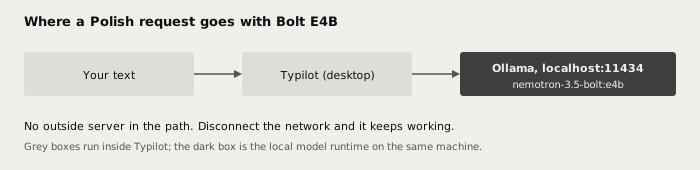
The advantage is not raw quality, it is where your words go. A Polish command on a cloud model sends your draft to a vendor server. With Bolt E4B behind Ollama at localhost:11434, the draft is processed on your machine, there is no per-token bill, and there are no rate limits.
You can check this yourself: pull the model, turn off your network, and run a Polish command. It keeps working. For the full data-flow argument see why Typilot is local-first.
Using it with Typilot
Typilot sends its AI commands, such as Polish and Notes, to the Ollama model you select. Pull the tag above, choose it in Preferences > Models, and set it as the default for Polish. The general walkthrough is in run a local AI assistant with Ollama. If you want the bigger sibling on a 24 GB GPU, see run Nemotron 3.5 Bolt locally.
The short version
Nemotron 3.5 Bolt E4B is NVIDIA's 8B (4B effective) post-train of Gemma 4 E4B, released October 23, 2026 under OpenMDW-1.1 and available as ollama run nemotron-3.5-bolt:e4b. At 7.2 - 7.9 GB it runs on a 16 GB laptop. It is quick and private, and weaker than larger models on long writing, so use it for short, frequent edits.
Every Polish and Notes request stays on your device. Try Typilot free for three days at /download, and read the architecture proof to see exactly what stays local.
Common questions.
How do I run Nemotron 3.5 Bolt E4B with Ollama?+
Update Ollama, then run ollama run nemotron-3.5-bolt:e4b. The e4b suffix matters: the default nemotron-3.5-bolt tag is the 25 GB 74B model. The E4B download is 7.2 - 7.9 GB according to the Ollama library page. Once pulled, it appears in Typilot under Preferences > Models.
How much RAM does Nemotron 3.5 Bolt E4B need?+
The Ollama download is 7.2 - 7.9 GB, so a 16 GB laptop or Mac runs it comfortably at normal context lengths. An 8 GB machine is too tight because the weights alone are close to total memory. This is a sizing guideline derived from the file size, not an NVIDIA-published minimum.
What is the difference between Nemotron 3.5 Bolt E4B and the 74B Bolt?+
Bolt E4B is an 8B-parameter model (4B effective) post-trained from Gemma 4 E4B, about 7.2 - 7.9 GB on Ollama. The 74B-A9B Bolt is a mixture-of-experts model of about 25 GB that needs a 24 GB GPU or a 36 GB Mac. E4B is for fast, private edits on ordinary laptops; the 74B is for heavier agent and reasoning work.
Is Nemotron 3.5 Bolt E4B as good as Claude for writing?+
No. A 4B-effective local model is weaker than Claude Opus or Sonnet on long, careful writing, and NVIDIA says the model is intended primarily for customization and post-training. It is a good fit for short polish and rewrites where privacy, offline use and zero per-token cost matter more than peak quality.