Run Nemotron 3.5 Bolt Locally
NVIDIA Nemotron 3.5 Bolt 74B-A9B fits 24 GB via native 2-bit quantisation. Run the top US open-weight VLM locally with Ollama on an RTX 4090 or M4 Max. OpenMDW-1.1.
NVIDIA Nemotron 3.5 Bolt 74B-A9B was released on October 15, 2026, and it runs on a single RTX 4090 or a 36 GB Mac via Ollama. NVIDIA's native 2-bit quantisation packs 74 billion parameters into roughly 24 GB - the same slot occupied by a 30B Q4_K_M model - while the model activates approximately 9 billion parameters per forward pass. Pull it now with ollama run nemotron-3.5-bolt.
Here is the hardware breakdown, what the quality ceiling looks like, and how to wire it into Typilot.
What Nemotron 3.5 Bolt is
Nemotron 3.5 Bolt 74B-A9B is a 74-billion-parameter mixture-of-experts model with approximately 9 billion active parameters per token. NVIDIA designed it as an agentic and vision-language model (VLM) targeting single-consumer-GPU deployment - "Bolt" denotes the 24 GB tier, as distinct from Nemotron 3.5 Super VL (120B), which is datacenter-class.
The compression is NVIDIA's NVFP4 format, which packages each weight in approximately two bits. The result is a 22 GB weight file plus a 1.73 GB vision projector - around 24 GB total on disk. Despite the extreme quantisation, Artificial Analysis scores it 21.4 on its Intelligence Index, placing it 4th among all sub-100B parameter open-weight models and 1st among US models in that tier (artificialanalysis.ai, October 2026).
It handles text and image inputs in the same prompt. For local writing and agent tasks through Typilot, text-only use is the primary path; image input works via the same Ollama endpoint for describing screenshots or diagrams.
A smaller sibling, Bolt E4B, is scheduled for release on October 23, 2026 in a roughly 4 GB footprint designed for edge and conversational-assistant use.
Hardware requirements
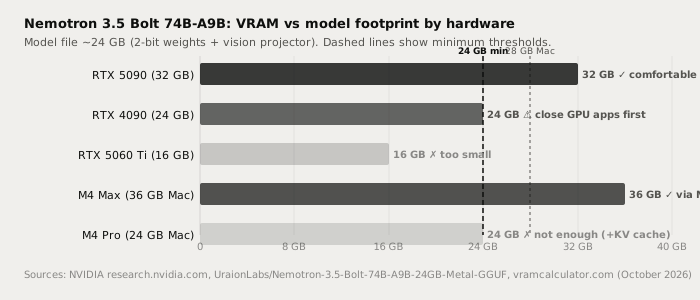
The GGUF totals approximately 24 GB on disk. For inference, add KV cache (1-2 GB at short context, up to several GB at 256K) and OS overhead. The practical hardware breakdown:
| Hardware | VRAM | Result |
|---|---|---|
| RTX 5090 | 32 GB | Comfortable; full 256K context available |
| RTX 4090 / RTX PRO 24G | 24 GB | Fits; close GPU-heavy apps first |
| RTX 5060 Ti | 16 GB | Too small for the 24 GB file |
| M4 Max / M5 Pro / M5 Max (36 GB+) | 36 GB | Fits via community Metal repack |
| M4 Pro (24 GB Mac) | 24 GB | Insufficient; weights plus KV cache exceed available memory |
RTX 4090 note: Windows display overhead consumes 1-2.5 GB of VRAM, leaving 21-23 GB free on a 24 GB card. The model loads, but at short context (8K) only. At the full 256K context window, VRAM pressure exceeds 24 GB. Close GPU-heavy applications and Discord overlays before loading. A 32 GB card removes that friction entirely.
Mac note: Ollama's packaged GGUF uses the NVFP4 format. Apple's Metal runtime does not yet support NVFP4 natively - llama.cpp upstream has a Metal NVFP4 kernel in development but it has not shipped as of October 2026. A community Q8_0 conversion (UraionLabs/Nemotron-3.5-Bolt-74B-A9B-24GB-Metal-GGUF on Hugging Face) runs on Apple Silicon at 12-24 tok/s on an M5 Pro 64 GB. Plan on at least 28 GB of free unified memory (weights plus KV cache). An M4 Pro with 24 GB unified memory is not sufficient.
Running it in Ollama
Ollama v0.40.5 (October 14, 2026) added Nemotron 3.5 Bolt to the library.
# Pull and run (downloads ~24 GB on first run)
ollama run nemotron-3.5-bolt

# Or pull without starting a session
ollama pull nemotron-3.5-bolt

# Check your version first - update if below 0.40.5
ollama --version
The model tag is nemotron-3.5-bolt - no version suffix needed for the production build.
After pulling, connect it to Typilot: open Preferences, go to Models, select Nemotron 3.5 Bolt from the list of downloaded Ollama models, and set it as the default for Polish or Notes commands. The Ollama setup docs cover the full connection flow.
Writing and agent quality
Nemotron 3.5 Bolt is an agent-first model. NVIDIA's published benchmarks put it at GPQA Diamond 86.43, Terminal-Bench 2.1 50.98, and PinchBench 87.82 (vendor-reported, developer.nvidia.com, October 2026). Third-party Artificial Analysis scores it 21.4 on its Intelligence Index - 4th among sub-100B models overall, and the top US open-weight model in that class.
One genuine trade-off is throughput. The 2-bit NVFP4 weights require specialised decoding, and third-party benchmarks place Bolt's generation speed below both Qwen3.6-35B-A3B and Gemma 4 26B-A4B on identical hardware (artificialanalysis.ai). Expect token rates comparable to a fast 9B dense model.
| Task | Nemotron 3.5 Bolt | Claude Sonnet / Opus (cloud) |
|---|---|---|
| Email drafting | Good | Excellent |
| Prose polish and rewrite | Good | Excellent |
| Meeting note cleanup | Good | Excellent |
| Agent tasks and tool calling | Strong | Excellent |
| Image and text (VLM) | Supported locally | Supported via API |
| Long creative draft (3 000+ words) | Good - coherence can drift | Excellent |
| Complex multi-step reasoning | Very good for local | Excellent |
| Audio and text leave device | Never | Always |
| Works offline | Yes | No |
| Per-request cost | $0 | Pay-per-token |
Nemotron 3.5 Bolt is not as capable as Claude Sonnet or Opus on long creative generation - that gap is real and NVIDIA's benchmarks do not measure prose quality. Its edge is fitting 74B total parameters, multimodal vision input, and a 256K context window into a single consumer GPU slot. For pure writing on the same hardware, Qwen3.8-27B and Muse Glimmer 30B produce stronger prose. Pick Bolt when you need agent loops, tool calling, or on-device image analysis to stay local.
Why local inference matters here
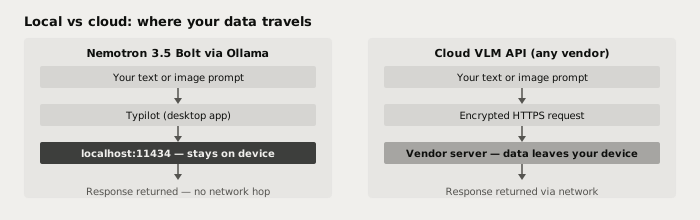
A cloud vision-language model - including Meta's Muse Spark Open API or any OpenAI vision model - sends every text prompt and every image you attach to a vendor server. Nemotron 3.5 Bolt running via Ollama processes both at localhost:11434. Nothing leaves the device: your prompts, your images, and the intermediate state of any multi-step agent loop all stay local.
For agent tasks, the 256K context window means Bolt can hold an entire document, several tool-call results, and a long conversation history in a single local session. No cloud model can offer that without every token leaving your machine.
Verify it: pull the model, disconnect your internet, and run a Polish command in Typilot. The model keeps working.
Using it with Typilot
Typilot routes all AI commands through Ollama at localhost:11434. Once Nemotron 3.5 Bolt is pulled, it appears in Preferences > Models alongside any other downloaded Ollama models.
For setup and configuration, see how to run a local AI assistant with Ollama and Typilot and the Ollama setup docs.
For hardware sizing across the full model range, see how much RAM you need to run a local LLM.
For the smaller Nemotron option - 30B/3B MoE in 25 GB Q4_K_M or 17.8 GB MLX, faster throughput, text-only - see run Nemotron 3.5 Lightning locally.
The short version
Nemotron 3.5 Bolt 74B-A9B is NVIDIA's multimodal agent model for consumer hardware: 74B/9B MoE, OpenMDW-1.1, available since October 15, 2026 via ollama run nemotron-3.5-bolt. The native 2-bit GGUF (~24 GB) fits an RTX 4090 (tight - close GPU apps) or RTX 5090 (comfortable). On Mac, use the community Metal repack and plan for 36 GB+ unified memory. Throughput is moderate; the edge is breadth - 256K context, image input, and 74B-class reasoning all in a single 24 GB slot.
Every Polish command, Notes summary, and agent-loop task runs at localhost with nothing sent to a server. That is what local-first AI means in practice. Try Typilot free for three days at /download and run it on Nemotron 3.5 Bolt from day one.
Common questions.
Can I run Nemotron 3.5 Bolt on an RTX 4090?+
Yes, but it is tight. The GGUF is approximately 24 GB and Windows display overhead consumes 1-2.5 GB of VRAM on a 24 GB card. The model loads but context is limited to roughly 8K tokens. Close GPU-heavy applications before loading. An RTX 5090 (32 GB) removes that constraint and runs the full 256K context window comfortably.
Does Nemotron 3.5 Bolt run on Apple Silicon Macs?+
Yes, but you need 36 GB or more of unified memory and a community Metal repack. The official Ollama GGUF uses NVFP4 format, which the Metal runtime does not yet support natively. The UraionLabs community Q8_0 conversion (on Hugging Face) runs at 12-24 tok/s on an M5 Pro 64 GB. An M4 Pro with 24 GB is not enough: weights plus KV cache exceed available memory.
What is the difference between Nemotron 3.5 Bolt and Nemotron 3.5 Lightning?+
Lightning is 30B total / 3B active MoE at 25 GB Q4_K_M (or 17.8 GB MLX for Apple Silicon) - faster throughput, text-only, available since August 2026. Bolt is 74B total / 9B active MoE at 24 GB via 2-bit quantisation - multimodal (text + images), 256K context, stronger benchmark scores, but slower token generation. Pick Lightning for speed and pure text; pick Bolt for broader reasoning, image input, or longer context windows on the same hardware.
Is Nemotron 3.5 Bolt free for commercial use?+
It is released under the OpenMDW-1.1 licence (Open Model Data and Weights licence version 1.1), the same licence as Nemotron 3.5 Lightning. OpenMDW-1.1 allows personal and commercial use including local inference; the primary restrictions are attribution and prohibitions on deceptive or harmful use.