Run LFM2.5-24B Locally: Liquid AI's Agent Model
LFM2.5-24B-A2B (October 2026) fits in 14.5 GB at Q4_K_M. Not a transformer - its SSM architecture keeps KV-cache flat at 131K context. Setup guide for llama.cpp, LM Studio, and Ollama.
LFM2.5-24B-A2B from Liquid AI (released October 13, 2026) runs fully on-device on any GPU with 24 GB of VRAM or an Apple Silicon Mac with 32 GB of unified memory. At Q4_K_M quantisation the weights are approximately 14.5 GB. Unlike standard transformer models, LFM2.5 uses a structured state-space architecture - KV-cache memory stays roughly constant regardless of context length, which matters when you pipe long documents through Typilot's Notes or summarisation commands at 131,072-token context.
Here is what hardware it needs, how to set it up via llama.cpp or LM Studio, and how it compares honestly to Qwen3.8-27B at the same VRAM tier.
What LFM2.5-24B-A2B is
Liquid AI, based in Cambridge (Massachusetts), released LFM2.5-24B-A2B on October 13, 2026. It is the largest model in the LFM2.5 family. The 24B total parameter count uses a Mixture-of-Experts (MoE) design with approximately 2.45 billion parameters activated per token - so compute per token is closer to a 2-3B dense model, while the stored capacity spans the full 24B.
The critical difference from transformer MoE models like Qwen3 or Gemma 4 is the architecture. LFM stands for Liquid Foundation Model, a hybrid structured state-space model (SSM) design. The implications for local use:
- Constant KV-cache memory. Transformer KV-cache grows linearly with context length - a 128K context on a 27B model can add 6-10 GB of VRAM. LFM2.5's SSM recurrence compresses past tokens into a fixed-size hidden state instead, so memory usage stays roughly flat across the full 131K context.
- Lower first-token latency. SSM inference prefill can be faster than transformer self-attention on long inputs, since the recurrence processes tokens sequentially rather than computing full attention across every prior token.
These properties make LFM2.5 a better fit than comparable transformer models if you regularly send long documents (meeting transcripts, pasted articles, large code files) to Typilot's Notes or Rewrite commands.
Which hardware can run it
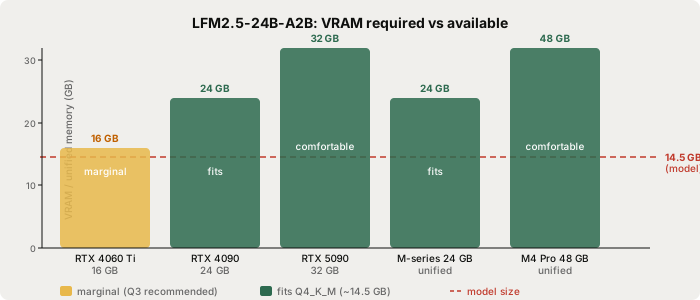
| Hardware | VRAM / unified memory | Q4_K_M fit | Notes |
|---|---|---|---|
| RTX 4060 / 4060 Ti 16 GB | 16 GB | Marginal | Q3_K_M (~11 GB) recommended |
| RTX 3090 / 4090 24 GB | 24 GB | Yes | ~9.5 GB headroom at 8K context |
| RTX 5090 32 GB | 32 GB | Comfortable | ample headroom at full context |
| Mac M2 Pro / M3 / M4 16 GB | 16 GB | Marginal | Q3_K_M recommended |
| Mac M2 Pro / M3 / M4 24 GB | 24 GB | Yes | matches the RTX 4090 tier |
| Mac M4 Pro 48 GB | 48 GB | Comfortable | Q8 (~24 GB) also feasible |
| Mac M4 Max 128 GB | 128 GB | Excellent | runs at full BF16 precision |
The Q3_K_M GGUF is approximately 11.0 GB and runs on 16 GB hardware with a modest quality reduction. Q4_K_M is the recommended default on 24 GB hardware.
Set it up
The weights are available through the LiquidAI organisation on Hugging Face. Search for "LFM2.5-24B-A2B-GGUF" to find Liquid AI's official quantised builds. Both GGUF (for llama.cpp and LM Studio) and MLX (for Apple Silicon) formats are available.
Option 1: llama.cpp (terminal)
Install llama.cpp from the ggml-org/llama.cpp releases on GitHub (pre-built binaries available for macOS, Windows, and Linux). Then start the model server directly from Hugging Face:
llama-server -hf LiquidAI/LFM2.5-24B-A2B-GGUF:Q4_K_M --port 8080
The -hf flag downloads the weights to ~/.cache/huggingface/hub/ on first run (~14.5 GB transfer). Subsequent runs load from the local cache. The server starts at http://localhost:8080 with a chat interface and an OpenAI-compatible API endpoint.
To pull a Q3_K_M build for 16 GB hardware:
llama-server -hf LiquidAI/LFM2.5-24B-A2B-GGUF:Q3_K_M --port 8080
Option 2: LM Studio (GUI)
Download LM Studio (macOS, Windows, Linux). In the search bar, type "LFM2.5" and filter to the LiquidAI source. Select the Q4_K_M build and click Download. Once loaded, LM Studio's built-in server exposes an OpenAI-compatible endpoint that Typilot can connect to.
Option 3: Ollama
An lfm2:24b-a2b tag exists in the Ollama library for the LFM2 model family. Check ollama.com/library/lfm2 to confirm whether the tag serves the new LFM2.5 release or the earlier LFM2 build. If the tag is current:
ollama pull lfm2:24b-a2b
Note that the Ollama tag currently supports a 32K context window. For the full 131K context that LFM2.5 provides, use llama.cpp or LM Studio directly from the Hugging Face GGUF.
Privacy and the licence
LFM2.5-24B-A2B is released under the LFM Open License v1.0. The key terms:
- Personal use: free, no restrictions.
- Commercial use under $10 million annual revenue: free.
- Commercial use above $10 million annual revenue: requires a commercial licence from Liquid AI.
For nearly all Typilot users this is effectively free. The licence is not Apache 2.0 - the revenue cap is a real restriction for larger businesses - but for personal and early-stage commercial use it imposes no cost.
The privacy story is independent of the licence. Once the weights are downloaded, inference is entirely local. The GGUF files contain numerical tensors only - no telemetry, no network code, and no connection to Liquid AI's infrastructure. Verify it yourself: disconnect your internet after the initial download and run a Typilot Polish command. The model keeps working.
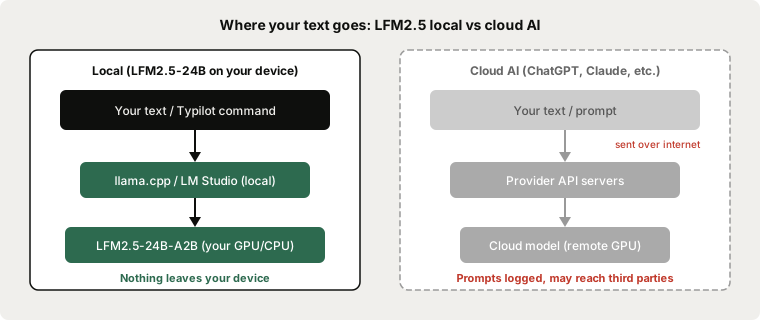
Every prompt Typilot sends to a locally-running LFM2.5-24B-A2B stays on your hardware. Disconnect from the internet after the first model download to confirm: the model runs at localhost and requires no network connection for inference.
Honest comparison: LFM2.5 vs Qwen3.8-27B
Both models fit in 24 GB of VRAM at Q4 and target the same hardware tier.
| LFM2.5-24B-A2B | Qwen3.8-27B | |
|---|---|---|
| Parameters | 24B total / ~2.45B active | 27.78B dense |
| VRAM at Q4_K_M | ~14.5 GB | ~16.8 GB |
| Context window | 131,072 tokens | 262,144 tokens |
| GPQA Diamond | 74.42 (vendor-reported) | ~82+ |
| MATH-500 | 96.04 (vendor-reported) | ~97+ |
| SWE-bench Verified | 51.00 (vendor-reported) | ~66+ |
| Architecture | Structured SSM | Transformer |
| Licence | LFM Open v1.0 | Apache 2.0 |
Qwen3.8-27B scores higher on reasoning (GPQA Diamond) and coding tasks (SWE-bench). Its Apache 2.0 licence is also more permissive for commercial use with no revenue ceiling.
LFM2.5-24B-A2B uses less VRAM (~2.3 GB less at Q4) and its SSM architecture keeps memory flat at long context. If you regularly pass transcripts or documents exceeding 32K tokens to Typilot's Notes or Rewrite commands, LFM2.5 handles the full 131K context without the memory spike a transformer model incurs. Qwen3.8-27B's 262K context is longer on paper, but transformer KV-cache growth means you need significantly more VRAM to use it at full length.
For standard writing tasks - short Polish commands, commit messages, brief summaries - the quality difference in practice is modest. Qwen3.8-27B is the stronger choice on pure benchmark quality. LFM2.5-24B-A2B is the better fit when memory efficiency or long-document handling matters.
Using LFM2.5 with Typilot
Typilot connects to any model that exposes an OpenAI-compatible API. With LFM2.5 running via llama.cpp at localhost:8080, open Typilot and go to Settings > General. Set the model endpoint to http://localhost:8080/v1 and select the model.
For Ollama, no endpoint configuration is needed - Typilot detects models at localhost:11434 automatically.
With the model active, Typilot's full command set runs on-device in any text field:
pol: this paragraph    → polish tone and flow
rew: this draft        → rewrite from scratch
sum: these notes       → bullet-point summary
gen: draft a reply to  → generate from a prompt
For a full walkthrough of connecting a local model, see the Ollama setup guide. For a RAM and VRAM breakdown across all local model sizes, see how much RAM to run a local LLM. For a comparison of open-source LLMs at each hardware tier, see best local LLMs for writing.
The short version
LFM2.5-24B-A2B (Liquid AI, October 13, 2026) is a 24B structured state-space model that fits in ~14.5 GB at Q4_K_M - well inside a 24 GB GPU or Mac. Its non-transformer architecture keeps KV-cache memory flat across the full 131K context window, which matters if you pass long meeting transcripts or documents to Typilot's Notes commands. Qwen3.8-27B leads on raw benchmark scores and carries a fully permissive Apache 2.0 licence; LFM2.5 is the better pick when VRAM headroom or long-context memory efficiency is the priority. The LFM Open License v1.0 is free for personal use and businesses under $10M annual revenue. Download Typilot for a 3-day free trial - every dictation, Polish command, and Notes summary runs on your hardware. See the security page for the full data-flow architecture.
Common questions.
How much VRAM does LFM2.5-24B-A2B need to run locally?+
At Q4_K_M quantisation, LFM2.5-24B-A2B requires approximately 14.5 GB of VRAM. It fits comfortably on a 24 GB GPU (RTX 3090, RTX 4090, RTX 5090) or an Apple Silicon Mac with 24 GB or more of unified memory. For 16 GB hardware, use the Q3_K_M build (~11 GB) instead.
What makes LFM2.5 different from Qwen or Gemma locally?+
LFM2.5 uses a structured state-space architecture rather than a transformer. The main practical difference is KV-cache memory: transformer models grow their cache linearly with context length, which can add several GB at 32K-128K context. LFM2.5's SSM recurrence compresses past tokens into a fixed-size state, so memory stays roughly flat across the full 131,072-token context window.
Is LFM2.5-24B-A2B free to use?+
LFM2.5-24B-A2B is released under the LFM Open License v1.0. It is free for personal use and for businesses with annual revenue under $10 million. Commercial use above that threshold requires a paid licence from Liquid AI. This is more restrictive than Apache 2.0 but permissive for most individual and early-stage commercial users.
Can LFM2.5-24B-A2B run completely offline?+
Yes. After the initial weight download (~14.5 GB), inference runs entirely at localhost with no network connection required. The GGUF files contain no telemetry or network code. You can verify this by disconnecting your internet after the download and running a prompt - the model keeps working.