Run Nemotron 3.5 Lightning Locally
NVIDIA Nemotron 3.5 Lightning 30B/3B MoE runs on a single consumer GPU via Ollama. Hardware requirements, real speeds, writing quality vs Claude, and how to wire it into Typilot.
NVIDIA released Nemotron 3.5 Lightning on August 11, 2026 - a 30B mixture-of-experts model with only 3B active parameters per token, available the same day via ollama pull nemotron-3.5-lightning. The default Q4_K_M quantisation weighs 25 GB and fits on an RTX 5090 (32 GB) or any Mac with 36 GB+ unified memory; an Apple Silicon MLX build (nemotron-3.5-lightning:30b-mlx) at 17.8 GB brings it within reach of an M4 Pro (24 GB). The licence is OpenMDW-1.1, which publishes the weights, training data, and training recipes. It is NVIDIA's fastest 30B-tier open model for agent and tool-calling tasks.
Here is the hardware breakdown, how to run it, and where its quality sits for writing and Typilot commands.
What the model is
Nemotron 3.5 Lightning is a sparse mixture-of-experts model: 30B total parameters, 3B active per forward pass. That split matters for local use. The model occupies the memory of a 25 GB quantised build at rest but processes tokens at speeds closer to a 3B dense model, because only 3B parameters participate in each token prediction. NVIDIA built it as the execution layer for always-on agents - tasks that involve tool calling, multi-step planning, and long-running loops with large context. It is distilled from NVIDIA's Nemotron 3 Ultra and inherits the larger model's instruction-following quality at a fraction of the inference cost.
The 1M token context window is fully available at 48 GB+ VRAM. At 24 GB to 32 GB, Ollama caps context dynamically - 4K at less than 24 GB, 32K at 24-48 GB. The full 1M window needs a Mac Studio M4 Ultra or a multi-GPU workstation.
Hardware requirements
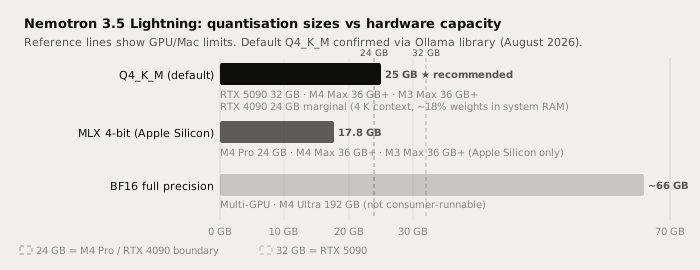
| Quantisation | Size | Hardware | Context |
|---|---|---|---|
| Q4_K_M (default) | 25 GB | RTX 5090 32 GB; M4 Max 36 GB+; M3 Max 36 GB+ | 32K |
| MLX 4-bit (Apple Silicon) | 17.8 GB | M4 Pro 24 GB; M4 Max 36 GB+; M3 Max 36 GB+ | 32K |
| BF16 full precision | ~66 GB | Multi-GPU; M4 Ultra 192 GB | 1M |
RTX 4090 note: the 24 GB VRAM falls just below the 25 GB default model. Ollama will load it with roughly 18% of weights in system RAM, capping context to about 4K tokens. That handles short Polish commands but misses the long-context capability. If you have a 24 GB NVIDIA GPU, Qwen3.8-27B at ~16.8 GB is a better fit for single-GPU use without context trade-offs.
Running it in Ollama
Current Ollama stable is v0.34.4 (September 23, 2026). Nemotron 3.5 Lightning has been in the Ollama library since August 11, 2026, with 180K+ downloads.
# Pull the default Q4_K_M build (~25 GB download)
ollama pull nemotron-3.5-lightning

# Apple Silicon: pull the MLX build for Metal acceleration (~17.8 GB)
ollama pull nemotron-3.5-lightning:30b-mlx

# Run interactively
ollama run nemotron-3.5-lightning

# Run with thinking mode (chain-of-thought pass before final answer)
ollama run nemotron-3.5-lightning --think
Thinking mode adds a reasoning pass before the final response. It improves accuracy on complex multi-step rewrites at the cost of extra latency - disable it for quick Polish commands on short text.
After pulling, connect to Typilot: open Preferences, go to Models, select Nemotron 3.5 Lightning from the list of downloaded Ollama models, and set it as the default for Polish or Notes commands.
Writing quality: where it fits
Nemotron 3.5 Lightning is primarily an agent model, not a prose model. NVIDIA's published benchmarks show strong instruction-following performance (GPQA Diamond 75.44, MMLU Pro 81.94, SWE-bench Verified 51.56 - developer.nvidia.com, August 2026). Its architecture strength is executing instructions accurately and completing multi-step tasks quickly, rather than stylistic prose quality.
For Typilot writing commands, that distinction matters:
| Task | Nemotron 3.5 Lightning | Claude Sonnet / Opus (cloud) |
|---|---|---|
| Email drafting | Good | Excellent |
| Prose polish and rewrite | Good - instruction-following strength | Excellent |
| Meeting note cleanup | Good | Excellent |
| Multi-step agent tasks | Strong - architecture focus | Excellent |
| Tool calling and structured output | Strong - built-in capability | Excellent |
| Long creative draft (3,000+ words) | Good - coherence can drift | Excellent |
| Complex multi-step reasoning | Good | Excellent |
| Audio and text leave device | Never | Always |
| Works offline | Yes | No |
| Per-request cost | $0 | Pay-per-token |
Nemotron 3.5 Lightning is not as capable as Claude Sonnet or Opus on long creative generation - that gap is real. Its edge over other local 30B models is throughput: NVIDIA benchmarks show 4x higher throughput and 30% faster task completion versus comparable open models (developer.nvidia.com). Local wins on privacy, offline use, and zero cost per request - concede the quality ceiling and decide whether it matters for the task.
Why local inference matters here
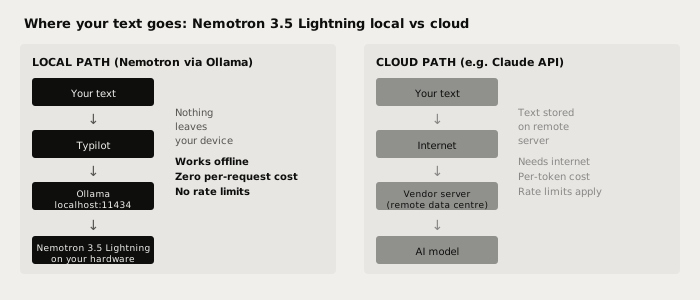
A cloud model sends every prompt to a vendor server on every request - that is true regardless of the vendor's privacy policy. Nemotron 3.5 Lightning running via Ollama processes everything at localhost:11434. The weights, your prompts, and the intermediate states of any multi-step agent loop stay on your machine.
The 1M context window means a local agent session can hold a very long conversation, multiple tool-call results, or a full document in context without truncating - and all of that stays local. That is not something any cloud writing assistant can match.
Verify it: pull the model, disconnect your internet, and run a Polish command in Typilot. The model keeps working.
Using it with Typilot
Typilot routes all AI commands through Ollama at localhost:11434. Once you have pulled the model, it appears in Preferences > Models alongside any other downloaded Ollama models. You can:
- Set it as the default model for all Polish and Notes commands in Preferences > General > Default model.
- Override per-command using the
modelparameter in a custom command definition. - Enable thinking mode in Preferences > General > AI settings for complex rewriting tasks.
For a step-by-step Ollama setup guide, see how to run a local AI assistant with Ollama and Typilot and the Ollama setup docs.
For how RAM requirements break down across the full range of model sizes and quantisations, see how much RAM you need to run a local LLM.
If you want to compare Nemotron 3.5 Lightning to other 30B local models on the same hardware, Muse Glimmer 30B fits on the same 24 GB Mac (M4 Pro) via its MLX build and focuses more on multimodal agent tasks.
The short version
Nemotron 3.5 Lightning is NVIDIA's open agent model: 30B/3B MoE, OpenMDW-1.1, in Ollama since August 11, 2026 with ollama pull nemotron-3.5-lightning. The Q4_K_M default (25 GB) fits an RTX 5090 or M4 Max; the Apple Silicon MLX build (17.8 GB) fits M4 Pro. It runs at near 3B speeds with 30B-class instruction following - strong for tool-calling and multi-step tasks, honest ceiling below Claude Sonnet on pure prose quality.
Every Polish command, every Notes summary, every agent-loop task runs on your hardware with nothing sent to a server. That is what local-first AI looks like in practice. Try Typilot free for three days at /download and run it on Nemotron 3.5 Lightning from day one.
Common questions.
Can I run Nemotron 3.5 Lightning on an RTX 4090?+
Not comfortably at full quality. The Q4_K_M default is 25 GB, which exceeds the RTX 4090's 24 GB VRAM. Ollama will load it with about 18% of weights in system RAM, capping context to roughly 4K tokens. For a 24 GB NVIDIA GPU, Qwen3.8-27B at ~16.8 GB is a better fit. On Apple Silicon, the 17.8 GB MLX build runs well on an M4 Pro.
What is the OpenMDW-1.1 licence?+
OpenMDW-1.1 (Open Model Data and Weights licence version 1.1) is NVIDIA's open licence that publishes model weights, training data, and training recipes. It allows personal and commercial use including running the model locally; the primary restrictions are attribution and prohibitions on deceptive or harmful use.
How does Nemotron 3.5 Lightning compare to Muse Glimmer or Qwen3 for writing tasks?+
Nemotron 3.5 Lightning is stronger on agent and tool-calling tasks; Qwen3.8-27B and Muse Glimmer tend to be slightly stronger on open-ended prose generation. For Typilot Polish commands on short text, all three perform similarly. Nemotron's main advantage is throughput: NVIDIA benchmarks show 4x higher throughput versus comparable open models because only 3B parameters are active per token.
What is thinking mode in Nemotron 3.5 Lightning?+
Thinking mode activates a chain-of-thought reasoning pass before the model generates its final answer. It improves accuracy on complex multi-step rewrites and structured tasks at the cost of higher latency. For quick Polish commands on short text, disable it. Enable it with the --think flag in Ollama or via the AI settings in Typilot Preferences.