Run a Local LLM Without a GPU
Run a local LLM on CPU with no GPU: Phi-4-mini (2.5 GB, 12 tok/s), Gemma 4 E2B (1.5 GB). Setup, honest speed benchmarks, and how to use with Typilot for private writing.
You can run a local LLM without a GPU in 2026. Phi-4-mini (3.8B, ~2.5 GB RAM) runs at 4-12 tokens per second via Ollama on any laptop CPU made after 2018, Gemma 4 E2B goes even lighter at ~1.5 GB, and Llama 3.2 3B sits between the two. Speed is slower than a dedicated graphics card, but short writing tasks - polishing a paragraph, summarising a note, generating a quick reply - are fully practical without one.
Here is the full breakdown: which models work, what speed to expect, and how to wire them into a desktop assistant.
Why CPU inference is viable now
Three years ago, running a useful language model without a GPU was not realistic. The models that fit in CPU RAM were too small to produce coherent output. That changed when Microsoft, Google, and Meta started releasing sub-4B models explicitly tuned for quality at small sizes.
Phi-4-mini (Microsoft, MIT licence, 3.8B parameters) achieves 68% on MMLU and 70% on HumanEval - performance that would have required a 13B model in 2023. Gemma 4 E2B (Google, Apache 2.0) fits in 1.5 GB and runs on a Raspberry Pi 5. The efficiency gap between a small model and a useful model has closed.
The other change is quantisation. At Q4_K_M, a 3.8B model weights only 2.5 GB. Modern CPUs with AVX2 or AVX-512 instructions run quantised inference directly - no GPU path needed. Ollama handles this automatically: it detects your hardware, picks the right execution path, and falls back to CPU if no compatible GPU is found.
The best CPU-only models
| Model | Licence | Size at Q4 | CPU speed | Ollama tag |
|---|---|---|---|---|
| Phi-4-mini | MIT | ~2.5 GB | 4-12 tok/s | phi4-mini |
| Gemma 4 E2B | Apache 2.0 | ~1.5 GB | 5-10 tok/s | gemma4:e2b |
| Llama 3.2 3B | Meta Community | ~2 GB | 8-10 tok/s | llama3.2:3b |
All three run offline once downloaded. No API key, no account, no data leaves the machine.
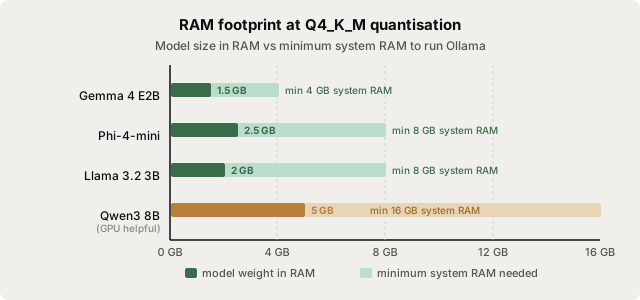
Phi-4-mini is the strongest all-round pick: MIT licence, 128K context, good reasoning for its size. If you are on an 8 GB machine and every gigabyte counts, Gemma 4 E2B's 1.5 GB footprint is hard to beat - it even handles images and audio (though image context is slower on CPU). Llama 3.2 3B is the familiar choice if you are already using Llama models elsewhere.
What to expect from CPU inference
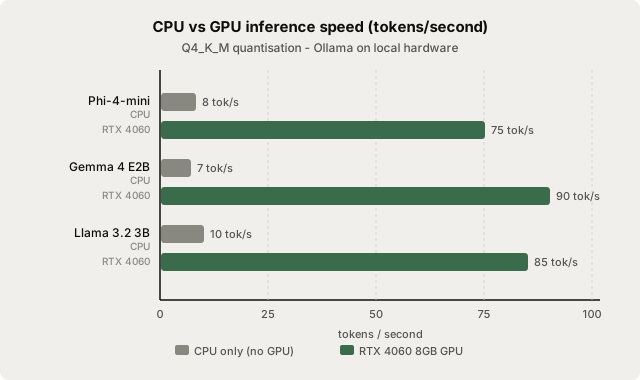
CPU inference is noticeably slower than a GPU. A 200-word paragraph takes 60-90 seconds on CPU versus 5-10 seconds on an RTX 4060. That is the honest trade-off.
| Task | CPU (Phi-4-mini) | GPU (Phi-4-mini, RTX 4060) |
|---|---|---|
| Single paragraph polish (100 words) | ~30-45 s | ~3-5 s |
| Email reply generation (~150 words) | ~50-75 s | ~5-8 s |
| Bullet-point summary (5 bullets) | ~20-30 s | ~2-3 s |
| Full page rewrite (500 words) | ~3-5 min | ~20-30 s |
For short, discrete tasks - polishing a sentence, expanding a note, generating a subject line - CPU inference is usable. For long documents or real-time autocomplete, the latency gets uncomfortable and a GPU makes a bigger practical difference.
If you have an integrated GPU (Apple Silicon, AMD Radeon 780M, Intel Arc), Ollama uses it automatically with Metal or Vulkan, giving 2-5x the CPU speed. These are not dedicated GPUs, but they dramatically close the gap for 3-4B models.
Setting up Ollama without a GPU
Install Ollama from ollama.com for macOS, Windows, or Linux - the installer detects your hardware automatically. Then pull a CPU-friendly model:
ollama pull phi4-mini
Test it immediately:
ollama run phi4-mini
Type a short prompt. On a modern CPU you should see output within 5-10 seconds. If it is significantly slower, check that your CPU supports AVX2:
# Linux / macOS
grep -m1 avx2 /proc/cpuinfo    # Linux
sysctl -a | grep -i avx2       # macOS
For Gemma 4 E2B on an especially RAM-constrained machine:
ollama pull gemma4:e2b
Both models run on any CPU with at least 8 GB total system RAM (the model itself is smaller, but the OS and Ollama need headroom).
Connecting to Typilot
Typilot connects to Ollama at localhost:11434 automatically - no extra configuration needed. Once Ollama is running with a model pulled, open Typilot settings and set your default model to phi4-mini or gemma4:e2b.
Commands like fix:, imp:, and sum: all route through Ollama. CPU inference means you will wait 30-60 seconds for a paragraph-length result, but everything stays on your machine. No audio, no text, and no prompts ever leave the device - the security page documents the full data flow.
For voice mode, Typilot's speech-to-text runs a separate Whisper model that is independent of Ollama. You can use the lightweight Whisper tiny model for dictation (auto-downloaded on first use) with any CPU-runnable Ollama model for the AI layer - both on-device, both offline.
When a GPU actually helps
CPU-only inference makes sense when:
- You have 8-16 GB of RAM and no compatible GPU
- Privacy matters and cloud is not an option
- Tasks are short (single sentences to short paragraphs)
- You are on a Linux desktop or older Windows machine
A GPU (dedicated or integrated) meaningfully helps when:
- You use real-time autocomplete (latency over 2-3 seconds breaks the flow)
- You rewrite long documents regularly
- You want to run a 7B or larger model for better quality
- You want to run voice and AI in parallel without stutter
The good news is that you do not need an RTX card to start. An M-series Mac, a machine with an AMD Radeon iGPU, or any system with Intel Arc Xe graphics all accelerate Ollama inference automatically. See the run-local-ai-assistant-with-ollama guide for the full Ollama setup and the how-much-ram-to-run-local-llm guide for a complete model-size reference.
The short version
Phi-4-mini via ollama pull phi4-mini runs on any 8 GB laptop CPU - 4-12 tokens per second, 2.5 GB RAM, no GPU required. Typilot connects to it automatically for private AI writing on macOS, Windows, and Linux. For a faster experience, an integrated GPU (Apple Silicon, AMD Radeon iGPU) doubles or triples the speed with no extra setup. See the security architecture for how nothing leaves your machine.
Common questions.
Can you run a local LLM without a GPU?+
Yes. Phi-4-mini (3.8B, ~2.5 GB RAM) runs at 4-12 tokens per second on any modern laptop CPU via Ollama - no dedicated GPU required. Gemma 4 E2B is even lighter at ~1.5 GB. Both run fully offline after the initial model download, with no audio or text sent to any server.
Which local LLM is best for a CPU-only machine?+
Phi-4-mini is the strongest CPU-only model in 2026 (3.8B parameters, MIT licence, ~2.5 GB at Q4_K_M, 128K context, 68% MMLU). Pull it with `ollama pull phi4-mini`. For the lightest possible footprint - 8 GB total RAM, Raspberry Pi, or older hardware - use Gemma 4 E2B (~1.5 GB, Apache 2.0, `ollama pull gemma4:e2b`).
How slow is CPU-only inference compared to a GPU?+
Substantially slower but usable for short tasks. Phi-4-mini on a modern 8-core CPU generates roughly 4-12 tokens per second, versus 50-100 tokens per second on an RTX 4060. A 100-word paragraph takes about 30-45 seconds on CPU versus 3-5 seconds on a mid-range GPU. Single-sentence polish and short summaries are practical; long rewrites of full documents are uncomfortable on CPU.
Does Typilot work with CPU-only Ollama models?+
Yes. Typilot connects to Ollama at localhost:11434 and works with any pulled model, regardless of whether inference runs on CPU or GPU. Set your default model to phi4-mini or gemma4:e2b in Typilot settings. CPU tasks take a few extra seconds, but no text or audio ever leaves the device.