Does Ollama Collect Your Data?
Ollama sends zero prompt data from local models. What its privacy policy says, the cloud model exception to know, and how Typilot adds nothing on top.
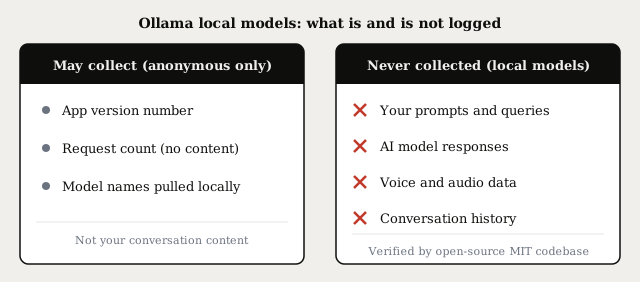
When you run a local model through Ollama, no prompts, responses, or voice data leave your machine - inference is entirely on-device. Ollama may log a small amount of anonymous usage metadata (app version, aggregate request counts), but nothing about what you said or asked. The one real exception is cloud-tagged models, which route inference to Ollama's servers and do require an internet connection.
Here is exactly what Ollama's privacy policy covers, what the cloud model exception means, and how Typilot builds on Ollama without adding any data collection of its own.
What local-model inference actually sends
When Ollama runs a local model, inference happens inside a process on your own hardware, listening on localhost:11434. Every request from an app - including Typilot - is a loopback call from one process on your machine to another. Packet captures of a running Ollama session confirm zero outbound network traffic for local inference: after the initial model download, no data leaves the device.
Ollama's privacy policy (last updated March 2026 at ollama.com/privacy) states it explicitly: Ollama does not collect, store, transmit, or have access to your prompts, responses, model interactions, or any other content you process locally.
This is an architecture consequence, not just a promise. Ollama is open-source software under the MIT licence - the codebase is publicly auditable on GitHub. Any outbound call would be visible in the code and in a network trace. Local inference has no server to send data to.
What Ollama may log
Ollama may collect limited, anonymous usage metadata - things like the app version installed and aggregated request counts. This does not include the content of your prompts or responses.
A community discussion in the Ollama repository raised questions about telemetry collection in early 2024. The privacy policy response makes the key distinction clear: only anonymised metadata is gathered, not conversational content. Ollama commits to not selling your data and to deleting or anonymising information once there is no ongoing legitimate need to retain it.
For environments that require zero outbound traffic - air-gapped networks, compliance deployments - Ollama can run entirely offline after the initial model download. The model weights are just files on disk once pulled.
The cloud model exception
Ollama introduced cloud-tagged models as an optional tier. Any model whose tag ends in -cloud runs inference on Ollama's datacenter hardware rather than on your device. The trade-off is clear:
- Your prompt travels to Ollama's servers for processing
- Ollama processes it transiently and does not retain it after the request completes
- You need an active internet connection for every inference call
For privacy-sensitive work - legal calls, medical notes, M&A conversations, anything under an NDA - the distinction is simple: if the model tag ends in -cloud, the prompt leaves your device. If it does not, everything stays local.
A related consideration: some cloud-tagged models that rely on third-party inference providers may be subject to the relevant provider's data policy in addition to Ollama's. Check the model card on ollama.com before using a cloud-tagged model with sensitive content.
Local model (no -cloud suffix) | Cloud model (-cloud suffix) | |
|---|---|---|
| Inference runs on | Your machine | Ollama's servers |
| Prompt leaves your device | No - never | Yes, for each request |
| Internet required | Initial download only | Every request |
| Data retained by Ollama | No | No (transient only) |
| Works offline | Yes | No |
| Privacy guarantee | Architectural | Policy-based |
How Typilot connects to Ollama
Typilot talks to Ollama at http://localhost:11434, the default local endpoint documented in the Ollama setup guide. Every AI request Typilot makes is a local HTTP call over the loopback interface - no internet hop, no third-party server.
The data path for a Typilot request looks like this:
- You type a command prefix (
gen:,fix:,sum:) or speak into the microphone. - Typilot prepares the prompt and sends it to
localhost:11434. - Ollama routes it to the local model you have installed.
- The response returns over the same loopback and is injected into the active app.
Nothing in that chain touches the internet, and Typilot does not collect command content or audio externally. Your command history is stored locally in the app's database, retention defaults to 30 days, and you can delete everything from Settings > System at any time. The security page documents exactly what is stored where and what Typilot never touches.
For more on why the local stack is built this way, why we built Typilot local-first covers the reasoning in full.
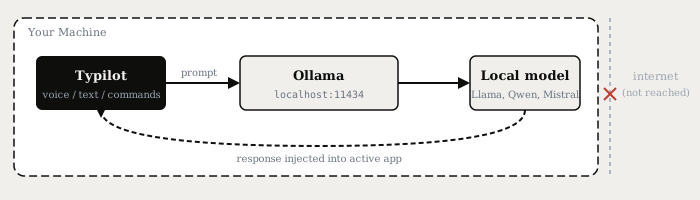
The privacy guarantee for a Typilot + Ollama setup is structural. The only outbound requests are the initial model downloads. Once a local model is on your machine, every inference call is a localhost round-trip with no third party involved - not a policy you have to trust, but an architecture you can verify.
Does Ollama need the internet after setup?
For local models, no. Once ollama pull <model> has completed, the model weights are cached on disk. Every subsequent inference call is fully offline - no internet connection is required.
Ollama initiates a network request only in two cases after initial setup:
ollama pullorollama update- to download or update a model- Cloud-tagged models - every inference call routes to Ollama's servers
Everything else - running the daemon, loading a model, streaming a response, querying from Typilot - is entirely local and generates no outbound traffic.
If you run Ollama in a container or behind a firewall with outbound traffic blocked, local-model inference continues to work. Only the model download step fails if the pull target is unreachable.
Picking a model without a cloud tag
Any model on the Ollama library that does not have a -cloud suffix in its tag runs fully locally. The defaults you would pull for use with Typilot are all local:
ollama pull llama3.1
ollama pull qwen2.5:0.5b
ollama pull mistral
None of these generate outbound traffic during inference. The run a local AI assistant with Ollama post covers model selection by RAM and use case in more detail.
The short version
Running local Ollama models with Typilot sends zero prompt or response data anywhere. Ollama may collect anonymous usage metadata (version, request counts) but not your conversation content - its open-source codebase makes this verifiable. The only exception is cloud-tagged models (ending in -cloud), which process inference remotely and transiently. For everything else, the pipeline from your keyboard or microphone to the model response is a localhost round-trip that never reaches the internet.
To see the full architecture of what Typilot stores and never touches, visit the security page. To run it yourself, download Typilot and pair it with a local Ollama model - 3-day free trial, no upload required.
Common questions.
Does Ollama collect my prompts or responses?+
No. When you run local models, Ollama does not collect, store, or transmit your prompts, responses, or any conversational content. Inference happens entirely on your device at localhost:11434. The only data Ollama may log is anonymous usage metadata such as app version and aggregate request counts - not what you said or asked.
Does Ollama send telemetry or usage data?+
Ollama may collect limited anonymous metadata such as the installed app version and aggregate request counts. This does not include the content of your prompts or AI responses. The codebase is open-source under the MIT license, so any data collection is publicly auditable on GitHub.
What is the Ollama cloud model exception?+
Models with a tag ending in -cloud run inference on Ollama's servers rather than your device, so your prompt travels to their servers for each request. Ollama processes it transiently and does not retain it, but the prompt does leave your machine. Local models (no -cloud suffix) never send prompt data anywhere.
Does Ollama need the internet after setup?+
For local models, no. Once you have run ollama pull to download a model, every subsequent inference call is fully offline. Ollama only connects to the internet for model downloads (ollama pull) and when using cloud-tagged models.