Run JetBrains Mellum 2.1 Locally: Coding Agent LLM
JetBrains Mellum 2.1 Thinking (12B/2.5B MoE, Apache 2.0) fits 8.1 GB at Q4_K_M. Run the October 2026 coding agent model locally via Ollama on any 12 GB GPU or 16 GB Mac.
JetBrains released Mellum 2.1 Thinking on October 8, 2026 - a 12B mixture-of-experts model with approximately 2.5 billion active parameters per token, purpose-built for coding agents. At Q4_K_M quantisation, the GGUF file is 8.1 GB. That fits a 12 GB consumer GPU or a 16 GB Mac, and the Apache 2.0 licence means you can use it commercially at no cost. For short context tasks (under 32K tokens), a 12 GB card is sufficient; for the full 131K context window, plan on 16 GB or more to keep KV-cache pressure manageable.
Here is the hardware breakdown, what the quality ceiling looks like, and how to wire it into Typilot.
What Mellum 2.1 Thinking is
Mellum 2.1 Thinking is JetBrains' second major open-weight model release. "Thinking" denotes a chain-of-thought reasoning mode: the model works through multi-step problems internally before producing its final answer, similar to reasoning-mode models from other labs.
The architecture is a mixture-of-experts Transformer with 12 billion total parameters and approximately 2.5 billion active per forward pass, organised as 64 experts with 8 chosen per token across 28 layers. The context window is 131,072 tokens. JetBrains built it as an agentic coding model rather than a general-purpose assistant - the benchmark anchoring its performance claims is SWE-Bench Verified, where it scores 47% (JetBrains blog, marktechpost.com, October 2026). For context: Qwen3 8B and Gemma 4 12B produce better prose output for writing tasks, but Mellum 2.1 Thinking outperforms similarly-sized general-purpose models on code review and patch generation.
Hardware requirements
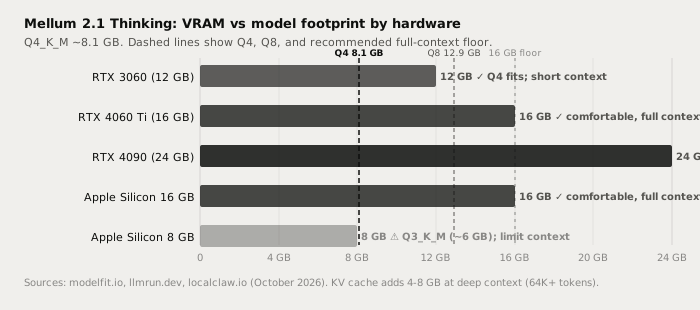
The Q4_K_M GGUF is approximately 8.1 GB on disk. For short context tasks, a 12 GB GPU is sufficient. For the full 131K context window, KV-cache memory adds 4-8 GB at moderate context depth - so 16 GB is the practical floor for comfortable long-context use (modelfit.io, October 2026).
| Hardware | VRAM | Result |
|---|---|---|
| RTX 3060 12 GB | 12 GB | Q4_K_M fits; short to mid context practical |
| RTX 4060 Ti / RTX 5060 16 GB | 16 GB | Comfortable at any context depth |
| RTX 4090 24 GB | 24 GB | Q8_0 (~12.9 GB) also fits; full context with headroom |
| Apple Silicon 16 GB (M2/M3/M4) | 16 GB | Q4_K_M fits; full 131K context comfortable |
| Apple Silicon 8 GB (M1/M2 base) | 8 GB | Use Q3_K_M (~6 GB); limit context to ~32K |
On Windows, close Chrome tabs and GPU-heavy applications before loading the model on a 12 GB card. On Mac, unified memory is shared with the OS; plan on roughly 10 GB free for a comfortable load.
Running it in Ollama
Mellum 2.1 Thinking does not yet have an official Ollama library tag. Pull it directly from JetBrains' Hugging Face GGUF repository:
# Pull and run Q4_K_M (recommended, ~8.1 GB download)
ollama run hf.co/JetBrains/Mellum2.1-12B-A2.5B-Thinking-GGUF:Q4_K_M

# Pull without starting an interactive session
ollama pull hf.co/JetBrains/Mellum2.1-12B-A2.5B-Thinking-GGUF:Q4_K_M

# On 16 GB hardware, Q8_0 is higher quality (~12.9 GB)
ollama pull hf.co/JetBrains/Mellum2.1-12B-A2.5B-Thinking-GGUF:Q8_0
Ollama downloads the GGUF from Hugging Face and registers it locally. After pulling, the model works like any native library model: it appears in Typilot under Preferences > Models alongside other downloaded Ollama models.
Context window default: Ollama uses a 4,096-token context by default. Raise it for code review tasks:
# Set context to 32K for typical code review
OLLAMA_NUM_CTX=32768 ollama run hf.co/JetBrains/Mellum2.1-12B-A2.5B-Thinking-GGUF:Q4_K_M
Or create a named alias with context baked in:
# Write a Modelfile
cat <<'EOF' > Modelfile
FROM hf.co/JetBrains/Mellum2.1-12B-A2.5B-Thinking-GGUF:Q4_K_M
PARAMETER num_ctx 32768
EOF

# Create the alias and run it
ollama create mellum2.1 -f Modelfile
ollama run mellum2.1
After creating the alias, mellum2.1 appears in Typilot's model list.
Coding and writing quality
Mellum 2.1 Thinking is purpose-tuned for software-engineering workflows. At 47% on SWE-Bench Verified, it places above most 7-8B dense models and above general-purpose models at similar quantised sizes (marktechpost.com, byteiota.com, October 2026). SWE-Bench Verified tests whether a model can identify and patch a real GitHub issue from first principles - a direct measure of coding-agent utility rather than benchmark-optimised benchmarking.
For writing tasks outside code - prose polish, email drafting, meeting note cleanup - it is functional but not its strong suit. Qwen3 8B at Q4_K_M produces better general prose output on the same hardware.
| Task | Mellum 2.1 Thinking | Claude Sonnet / Opus (cloud) |
|---|---|---|
| Code review and bug identification | Very good | Excellent |
| Commit message drafting | Very good | Excellent |
| Code comment generation | Very good | Excellent |
| Multi-step coding agent tasks | Strong (47% SWE-Bench) | Excellent |
| Prose polish and rewrites | Good | Excellent |
| Meeting note cleanup | Good | Excellent |
| Long creative writing | Fair | Excellent |
| Multimodal (images) | Not supported | Via API |
| Audio and text leave device | Never | Always |
| Works offline | Yes | No |
| Per-request cost | $0 | Pay-per-token |
Mellum 2.1 Thinking is not as capable as Claude Sonnet or Opus for general writing - that gap is real and expected. A 2.5B active-parameter model running locally will not match a frontier cloud model on prose quality or long creative generation. Mellum's edge is coding: it produces better code reviews and patches than similarly-sized general-purpose models, and the full stack runs on hardware most developers already own.
Why local inference matters for code
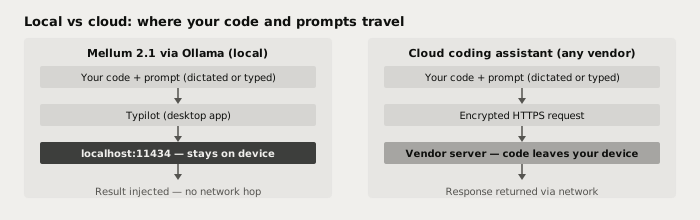
A cloud coding assistant - GitHub Copilot, any API-backed editor plugin - sends your code, comments, and prompts to a vendor server on every request. Mellum 2.1 Thinking running via Ollama processes everything at localhost:11434. Your source code, commit messages, and inline comments never leave the machine.
For codebases under an NDA, in a regulated industry, or not yet ready for external exposure, local inference is the right architecture. There is no API key to rotate, no data-retention policy to check, and no per-token fee that scales with how thoroughly you document your code.
Verify it: pull the model, disconnect your internet, and run a Polish command in Typilot. The model keeps working.
Using it with Typilot
Typilot routes all AI commands - Polish, Notes, and custom command prefixes - through Ollama at localhost:11434. Once Mellum 2.1 Thinking is registered (either via the hf.co/... pull or the mellum2.1 alias), it appears in Preferences > Models.
Set it as the default model for Polish commands when working in a code editor. Dictate a code comment or commit message draft with voice input, then apply Polish to tighten it - everything stays local. For the full dictation-to-code workflow, see how to dictate code comments and commit messages locally.
For broader Ollama setup, see how to run a local AI assistant with Ollama and Typilot and the Ollama setup docs.
For hardware sizing across the full model range, see how much RAM you need to run a local LLM.
For comparison of local vs cloud on general writing tasks, see local LLM vs Claude Opus / Sonnet.
The short version
Mellum 2.1 Thinking is JetBrains' open-weight coding agent model: 12B/2.5B MoE, Apache 2.0, released October 8, 2026. At Q4_K_M, the GGUF is 8.1 GB - it fits a 12 GB GPU or a 16 GB Mac, making it one of the most accessible high-quality coding LLMs for local use. For the full 131K context, plan on 16 GB or more. There is no official Ollama library tag yet: pull via ollama run hf.co/JetBrains/Mellum2.1-12B-A2.5B-Thinking-GGUF:Q4_K_M.
Every Polish command and code annotation runs at localhost with nothing sent to a server. That is what local-first AI means in practice. Try Typilot free for three days at /download and use Mellum 2.1 Thinking as your on-device coding assistant from day one.
Common questions.
How much VRAM does Mellum 2.1 Thinking need to run locally?+
At Q4_K_M quantisation, Mellum 2.1 Thinking requires approximately 8.1 GB of VRAM for the model weights. For short context tasks (under 32K tokens), a 12 GB GPU is sufficient. For the full 131K context window, plan on 16 GB or more to keep KV-cache memory pressure manageable.
Is there an official Ollama tag for Mellum 2.1 Thinking?+
There is no official Ollama library tag as of October 2026. Pull it directly from Hugging Face with: ollama run hf.co/JetBrains/Mellum2.1-12B-A2.5B-Thinking-GGUF:Q4_K_M. Once pulled, it appears in Typilot under Preferences > Models alongside other Ollama models. If an official tag is added to the Ollama library, ollama pull mellum2.1 will become the simpler path.
How good is Mellum 2.1 Thinking for coding compared to other local models?+
Mellum 2.1 Thinking scores 47% on SWE-Bench Verified (vendor-reported, October 2026), which is strong for a 2.5B active-parameter model and above most similarly-sized general-purpose models. For pure prose and writing tasks, Qwen3 8B or Gemma 4 12B are better choices. For code review, commit message drafting, and agentic coding workflows, Mellum 2.1 Thinking is the strongest option in the 8-13 GB VRAM range.
Can Mellum 2.1 Thinking run completely offline?+
Yes. After the initial GGUF download (~8.1 GB), inference runs entirely at localhost with no network connection required. Disconnect your internet after downloading and the model continues working - your code, prompts, and responses never leave the device.