Dictate Code Comments and Commit Messages
Dictate git commit messages, code comments, and PR descriptions with local Whisper - offline, no audio uploaded, 8-12 seconds per commit versus 40-60 seconds typed.
You can dictate git commit messages, code comments, PR descriptions, and documentation into any application using a local Whisper-based tool - no audio upload, no API key, fully offline. A thorough commit message that takes 40-60 seconds to type takes 8-12 seconds to dictate. On a local Whisper model, developer prose transcribes at around 3-5% word error rate on clean audio - accurate enough for daily use without a keyboard correction pass after every phrase.
Here is the full workflow: what to dictate, how to route it into VS Code and the terminal, and where the voice path saves the most time.
What developer writing gains most from voice
Documentation, commit messages, PR descriptions, and code review comments account for 30-40% of a developer's writing time (Source: developer dictation workflow research, aidictation.com). These are natural-language prose tasks - exactly where voice is 2-3x faster than typing. The code-vocabulary problem - camelCase identifiers, package names, operator sequences - is real but affects a different category of text than commit messages or documentation.
Good candidates for voice
- Commit messages, especially multiline ones (subject, body,
Closes #123) - Code comments and docstrings that explain intent rather than identifiers
- PR descriptions and GitHub review comments
- Slack threads, issue descriptions, and ticket comments
- README and documentation prose
Keep on the keyboard
- Variable names, function names, and camelCase identifiers
- Shell commands in an active terminal prompt - a misrecognised character in
rm -rfor a piped redirect can be destructive. Dictate only into text fields, not into the live shell. - Inline code: package names, import paths, language keywords
Commit message workflow
In VS Code
Open the Source Control panel (Ctrl+Shift+G / Cmd+Shift+G), click into the commit message field, and activate your dictation tool. A one-liner takes about 5 seconds. For a multiline commit:
- Dictate the subject line.
- Press
Enterto start a new paragraph. - Dictate the body - "explains why the retry interval was increased from five seconds to thirty" lands cleanly as prose.
- Press
Entertwice, then dictateCloses #followed by the issue number.
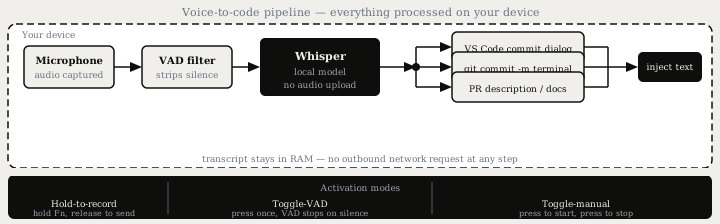
Text lands directly at the cursor via the OS accessibility layer - no copy-paste step.
In the terminal
Do not dictate into an active shell prompt. The safe path is to open a second text field (a scratch note, a VS Code editor tab, or a GUI commit dialog), dictate there, then paste:
git commit -m "refactor: move session timeout to config"
Or commit with the editor flag and dictate into the opened file:
git commit # opens $EDITOR - dictate in the editor window
The git commit -F <file> pattern also works if you prefer to dictate into a plain-text scratch file first.
Code comments and docstrings
For comments that explain why rather than what, voice is especially natural. "This retry logic exists because the upstream service returns 429 after three rapid requests" is faster to speak than to type and produces no identifier-accuracy issues. The output lands as a standard code comment because the tool injects plain text at the cursor.
For docstrings, dictate the description and parameter intent verbally:
def calculate_retry_delay(attempt: int) -> float:
    # Exponential backoff: wait 2^attempt seconds, capped at 60.
    # Used by the job queue on transient failures only.
    return min(2 ** attempt, 60)
Dictating that comment block takes around 10-12 seconds versus 25-30 seconds to type. Long docstrings with parameter lists are one of the biggest per-word gains.
Time comparison
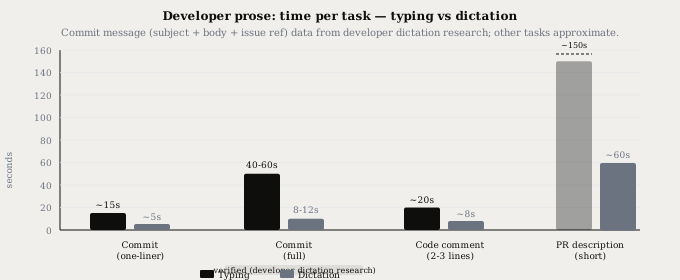
A thorough commit message (subject line, body, and issue reference) takes 40-60 seconds to type and 8-12 seconds to dictate - roughly a 5x reduction. Across all developer prose, voice is consistently 2-3x faster than typing, saving an estimated 1-2 hours per week for developers who write documentation and reviews regularly.
Local vs cloud for developer code
The privacy question for developer dictation is specific: code context, architectural decisions in PR descriptions, and variable names in docstrings should not reach vendor servers under most NDAs and compliance regimes.
| Factor | Cloud (Wispr Flow, Willow) | Local (Typilot, OpenWhispr, HyperVoice) |
|---|---|---|
| Audio destination | Vendor servers on every request | Device RAM only, deleted after transcription |
| Code context in prose | Transcribed remotely | Never leaves the device |
| Data retention | 30-90 days depending on plan | None - no server |
| Compliance | SOC 2 / HIPAA certifications | Architectural guarantee, no server to configure |
| Linux support | No | Yes |
| Offline use | No | Yes, after one-time model download |
Developer dictation tools
| Tool | Platform | Processing | Developer notes | Price |
|---|---|---|---|---|
| Typilot | Mac, Windows, Linux | Local Whisper + local Ollama | 27 AI shortcuts (gen:, imp:, rew:, chk:), any-app injection | 3-day free trial |
| OpenWhispr | Mac, Windows, Linux | Local Whisper + Parakeet | Open source, free unlimited local processing | Free (local unlimited) |
| HyperVoice | Windows, Linux | Local Whisper | GPU-accelerated, BYOK AI cleanup, free tier 500 words/day | Free / from $6.67/mo |
| Wispr Flow | Mac, Windows, iOS | Cloud | Native VS Code, Cursor, Windsurf integrations, no local option | $15/mo |
| DictaFlow | Mac, Windows, iOS | Hybrid (local Whisper + cloud AI layer opt-in) | App-Aware context, Knowledge Base for custom vocab | $7/mo |
VS Code ships a built-in VS Code Speech extension (launched with VS Code 1.87 in February 2024) that runs a local model, but it works only inside VS Code - it does not reach the terminal, browser, or Slack. System-wide tools like Typilot, OpenWhispr, and HyperVoice inject text at the cursor in any running application via the OS accessibility layer.
For AI-assisted cleanup on top of dictation, Typilot routes commands to a local Ollama model with no cloud call. A useful pair: hold to dictate a rough explanation, then press imp: (improve) or rew: (rewrite) to clean it up before it lands in the commit field. The gen: command with a voice prompt also works for boilerplate docstrings - speak the parameter names and intent, get a structured block back. See Wispr Flow vs Typilot for a full side-by-side of cloud vs local developer dictation.
The vocabulary accuracy gap between cloud and local tools matters most for camelCase identifiers and package names. For natural-language developer prose - commit messages, code comments explaining decisions, PR descriptions - standard local Whisper at 3-5% WER on clean audio is accurate enough that most sessions require no correction. Dictate the English; type the identifiers.
The short version
Voice saves the most time on developer prose that is already natural language: commit messages, code comments that explain decisions, PR descriptions, and review threads. A full commit takes 8-12 seconds to dictate versus 40-60 seconds to type. The practical rule: dictate text fields, keep identifiers and live shell commands on the keyboard.
For a local setup with no audio upload, Typilot ships a 3-day free trial with hold-to-record, toggle-VAD, and toggle-manual modes on Mac, Windows, and Linux. The security page documents the full on-device pipeline, and /features covers the AI command layer that turns dictation into an editing workflow. For connecting a local AI model for post-dictation cleanup, see the Ollama setup guide and the run a local AI assistant with Ollama walkthrough.
Common questions.
Can I dictate git commit messages by voice?+
Yes. Open the commit message field in VS Code's Source Control panel or in any GUI client, activate a system-wide dictation tool such as Typilot or OpenWhispr, and speak the message. Text is injected at the cursor via the OS accessibility layer. A full commit message (subject line, body, and issue reference) takes 8-12 seconds to dictate versus 40-60 seconds to type. Avoid dictating directly into an active terminal shell prompt - use a text field and paste the result.
What developer writing tasks benefit most from voice dictation?+
Natural-language prose tasks gain the most: commit messages, code comments that explain intent rather than identifiers, PR descriptions, GitHub review comments, issue descriptions, and documentation. Standard local Whisper handles developer prose at around 3-5% word error rate on clean audio. The gap widens for camelCase identifiers, package names, and operator sequences - keep those on the keyboard.
Which dictation tools work for developer code prose on Linux?+
Typilot (Mac, Windows, Linux), OpenWhispr (Mac, Windows, Linux), and HyperVoice (Windows, Linux) all support Linux and run Whisper locally, so audio never leaves the device. Cloud tools such as Wispr Flow and DictaFlow do not have Linux builds. Handy (free, open source) also runs on Linux but provides transcription only with no AI command layer.
Is it safe to use cloud dictation for commit messages with proprietary code?+
Cloud dictation services such as Wispr Flow and Willow process audio on vendor servers where it may be retained for 30-90 days depending on the service tier. Code context, architectural decisions in PR descriptions, and module names that appear in commit messages all reach vendor servers. Local tools such as Typilot and OpenWhispr process audio in device RAM and delete it after transcription - no data reaches a remote server at any point.