Run gpt-oss Locally with Ollama
gpt-oss-20b: OpenAI's open-weight model (Apache 2.0, 21B MoE). Run privately via Ollama with ~12.8 GB VRAM - nothing reaches OpenAI after the initial download.
gpt-oss-20b (OpenAI's open-weight model, 21B parameters, MoE, Apache 2.0 licence) runs completely privately via Ollama with around 12.8 GB of VRAM at Q4 quantisation. Once the weights are on your machine, no prompt, no response, and no metadata ever reaches OpenAI - the model runs at localhost:11434 with the internet disconnected. Pull it with ollama pull gpt-oss:20b on any machine with 16 GB of RAM.
Here is what to expect, which size to use, and how gpt-oss compares to other local models you may already be running.
What gpt-oss is
OpenAI released gpt-oss-20b and gpt-oss-120b on August 5, 2025 under the Apache 2.0 licence - their first open-weight release since GPT-2. Both are Mixture-of-Experts (MoE) transformers, where a small subset of expert sub-networks is activated per token rather than the full parameter count. The result is that the 20B model activates only 3.6B parameters per token, giving it inference speed closer to a 4B dense model while retaining the capacity of a much larger one.
The 120B variant (117B total, 5.1B active) requires 80 GB of VRAM across multiple server-class GPUs. It is not a consumer workload. This post focuses entirely on the 20B.
Which variant actually runs on your hardware
| Model | Parameters | VRAM (Q4_K_M) | Minimum hardware |
|---|---|---|---|
| gpt-oss:20b | 21B total / 3.6B active | ~12.8 GB | RTX 4060 Ti 16 GB, M2 Pro 24 GB |
| gpt-oss:120b | 117B total / 5.1B active | ~80 GB+ | Multi-GPU server only |
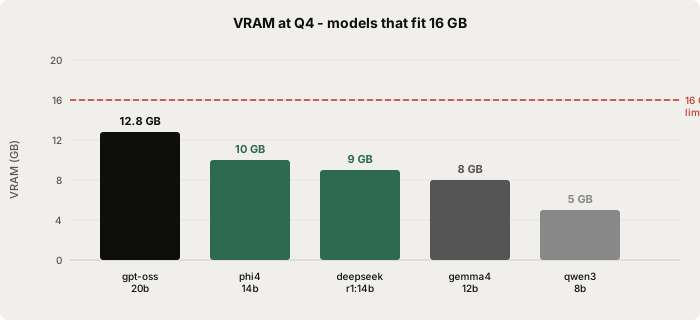
The 20B at Q4_K_M needs roughly 12.7 GB of VRAM: 11.2 GB for the weights plus KV cache and runtime overhead at 8K context. This fits on an RTX 4060 Ti 16 GB and on any Apple Silicon Mac with 24 GB of unified memory. On a 16 GB Mac there is almost no headroom - if you have 16 GB unified memory use a shorter context window (8K or less) to keep the KV cache small.
For an RTX 4070 12 GB, Q4_K_M overflows slightly. Use the IQ3_M quantisation instead:
ollama pull gpt-oss:20b-q3_k_m
The context limit is where gpt-oss-20b has a practical constraint. The model supports 128K natively, but KV cache grows linearly with context: 8K adds ~0.4 GB, 32K adds ~1.5 GB, and 128K adds ~6 GB on top of the weights. On a 16 GB card, push context beyond 32K and you will hit the ceiling. For writing and polish tasks in Typilot, 8-32K is comfortably sufficient.
Three commands to get running
Install Ollama from ollama.com (macOS, Windows, or Linux installer, about 500 MB). Then pull gpt-oss-20b - the download is 13.3 GB:
ollama pull gpt-oss:20b
Or pull and start an interactive session in one step:
ollama run gpt-oss:20b
Once the model is running, verify it is serving at the local endpoint:
curl http://localhost:11434/api/tags
You should see gpt-oss:20b in the model list. At that point the model is fully offline - you can disconnect from the internet and it keeps working. The initial download is the only time the network is used.
Privacy: what gpt-oss knows about you when run locally
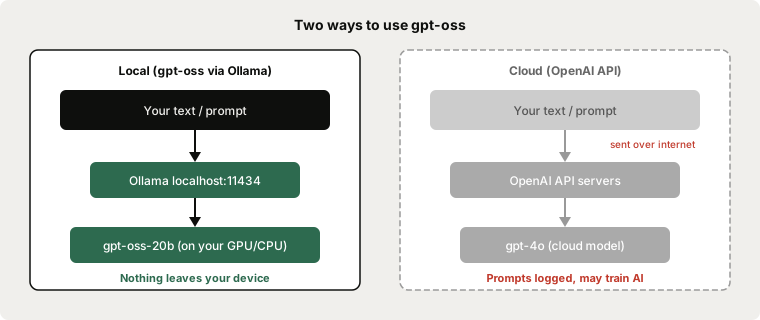
OpenAI's cloud products (ChatGPT, the API, and the o-series endpoints) send your prompts to OpenAI's servers, which log requests and may use them to improve models. That is the cloud product. The open-weight models are architecturally separate.
gpt-oss-20b is a set of GGUF weight files. They contain numerical tensors and no telemetry, no network code, and no connection to OpenAI's infrastructure. Ollama loads those weights into your GPU's VRAM and runs inference at localhost:11434. There is no phone-home, no token counter, and no registration required.
The Apache 2.0 licence also means there is no usage restriction or reporting obligation for commercial use - unlike some other model licences that require attribution or limit commercial deployment.
Running gpt-oss-20b locally via Ollama sends nothing to OpenAI. The weights are static files on your disk; inference stays at localhost:11434. The only privacy surface is the same as any local Ollama model: do not expose the API port to the internet with OLLAMA_HOST=0.0.0.0.
Honest quality comparison
gpt-oss-20b is a capable general-purpose model, but it is not the strongest option at the 16 GB tier. The Artificial Analysis Intelligence Index places gpt-oss-20b at 15, compared to Qwen3.6-27B at 38. For pure writing quality and general reasoning, Qwen3.6-27B or Qwen3-32B are the stronger picks if your hardware has 24-32 GB of VRAM.
Where gpt-oss-20b stands out is speed and familiarity. At 175 tokens per second on an RTX 4090, it is faster than Gemma 4 26B (157 tok/s) and close to Qwen3-coder:30b (219 tok/s). And for teams already using OpenAI's API in their tools, gpt-oss uses the same tokeniser, system-prompt format, and tool-call schema - making local substitution almost drop-in.
| Model | VRAM (Q4) | Speed (RTX 4090) | Artificial Analysis Index | Licence |
|---|---|---|---|---|
| gpt-oss:20b | ~12.8 GB | 175 tok/s | 15 | Apache 2.0 |
| qwen3:8b | ~5 GB | - | - | Apache 2.0 |
| phi4:14b | ~10 GB | - | - | MIT |
| deepseek-r1:14b | ~9 GB | - | - | MIT |
| gemma4:12b | ~8 GB | - | - | Apache 2.0 |
| qwen3.6:27b | ~17 GB | - | 38 | Apache 2.0 |
For writing, polish, and summarisation tasks - the main use cases in Typilot - the quality gap between gpt-oss-20b and a 27-32B model is modest. For complex reasoning, coding, and long-document analysis, the 27-32B models are noticeably stronger and worth the extra VRAM if you have it.
If you do not have 16 GB of VRAM but want a local model for Typilot's Polish and Notes commands, qwen3:8b at 5 GB is an excellent starting point that fits comfortably on any 8-12 GB GPU.
Using gpt-oss with Typilot
Typilot connects to any running Ollama model automatically. Once ollama run gpt-oss:20b is serving at localhost:11434, open Typilot and select the model under Settings > General. No API key or URL configuration is required.
With gpt-oss-20b active, Typilot's full command set runs on-device in any text field:
rew: this email        → rewrite in place
fix: this paragraph    → grammar and phrasing
sum: these notes       → bullet-point summary
gen: draft a reply to  → generate from a prompt
imp: this draft        → improve structure and tone
Because gpt-oss-20b uses the same OpenAI-compatible chat format, it integrates with Typilot's command layer without any additional configuration beyond selecting it in the model picker.
The Ollama setup guide covers the initial configuration. The local AI assistant walkthrough is the best starting point if Ollama is not yet installed. For a broader comparison of local models for writing tasks, see best local LLMs for writing. For the RAM and VRAM requirements across all model sizes, see how much RAM to run a local LLM.
The short version
gpt-oss-20b is OpenAI's first open-weight model since GPT-2 - Apache 2.0, 21B MoE parameters, 3.6B active per token - and it runs completely privately via Ollama on any machine with 16 GB of RAM or GPU memory. Pull it once with ollama pull gpt-oss:20b (13.3 GB), and all inference runs at localhost:11434 with zero connection to OpenAI. Quality-wise it is capable but not the strongest at the 16 GB tier - Qwen3.6-27B scores roughly 2.5x higher on the Artificial Analysis Intelligence Index if your hardware has 24+ GB. The local wins are what matter here: complete privacy, offline operation, zero per-prompt cost, and no rate limits. Typilot connects to any Ollama model automatically and puts rewrite, polish, and AI commands on a hotkey across every app on your machine - 3-day free trial, no cloud required. The security page shows exactly what touches your hardware and what never does.
Common questions.
Is gpt-oss private when run locally?+
Yes. gpt-oss-20b is a set of Apache 2.0 weight files that run entirely on your machine via Ollama at localhost:11434. No prompt, response, or metadata is sent to OpenAI during inference. The only network activity is the one-time model download (~13.3 GB). After that the model runs fully offline.
How much RAM or VRAM does gpt-oss-20b need?+
At Q4_K_M quantisation, gpt-oss-20b needs roughly 12.8 GB of VRAM (11.2 GB weights plus KV cache and overhead at 8K context). You need at least 16 GB of system RAM. It fits on an RTX 4060 Ti 16 GB and on Apple Silicon with 24 GB of unified memory. On an RTX 4070 12 GB, use the IQ3_M quantisation instead.
How does gpt-oss-20b compare to Qwen3 or Phi-4 for local writing?+
gpt-oss-20b (21B MoE, 3.6B active) runs at about 175 tok/s on an RTX 4090 - faster than Gemma 4 26B. On general intelligence benchmarks it scores lower than Qwen3.6-27B (Artificial Analysis Index: 15 vs 38). For writing and polish tasks the quality gap is modest; for complex reasoning, 27-32B models are noticeably stronger. The main advantage of gpt-oss-20b is its OpenAI-compatible prompt format and tool-call schema.
Can I run gpt-oss-20b on a Mac?+
Yes. A Mac with 24 GB of Apple Silicon unified memory runs gpt-oss-20b comfortably at Q4_K_M. A 16 GB Mac can run it but with very little headroom for KV cache - keep your context under 8K tokens. M2 Pro 24 GB, M3 Max, and M4 Pro are ideal. Pull it with `ollama pull gpt-oss:20b` once Ollama is installed.