Mistral Small 4: Run Locally in Ollama
Run Mistral Small 4 locally: 119B MoE, Apache 2.0, 262K context, ~6.5B active params. Needs ~75 GB at Q4_K_M - Mac Studio M4 Max (96 GB) is the consumer path.
Mistral Small 4 (119B MoE, Apache 2.0, March 2026) is available on Ollama via ollama pull mistral-small. The model activates only ~6.5B parameters per token, so once it is loaded inference runs at the speed of a 7B model. The challenge is that all 119B weights must reside in memory before the router can select which experts to activate - that is around 75 GB at Q4_K_M quantisation. A Mac Studio M4 Max configured with 96 GB of unified memory is the most accessible consumer path. Here is what hardware works, what writing quality to expect, and how to connect it to Typilot.
Here is the full guide.
What Mistral Small 4 is
Mistral AI released Mistral Small 4 in March 2026 under an Apache 2.0 licence. The architecture is Mixture-of-Experts (MoE): 119B total parameters split across a set of specialised expert sub-networks, with a router that picks the two most relevant experts for each token. Only those experts run - roughly 6.5B parameters activate per token.
The practical implication is a split: loading is expensive (all 119B weights need to be in memory), but inference is fast (only 6.5B activate per forward pass, giving speed comparable to a dense 7B model).
The other headline figure is context length: 262,144 tokens natively. That is large enough to load a full codebase or a long document and query it in a single session without chunking. For writing tasks this matters when you want to polish or summarise something longer than a typical AI context window allows.
The memory challenge
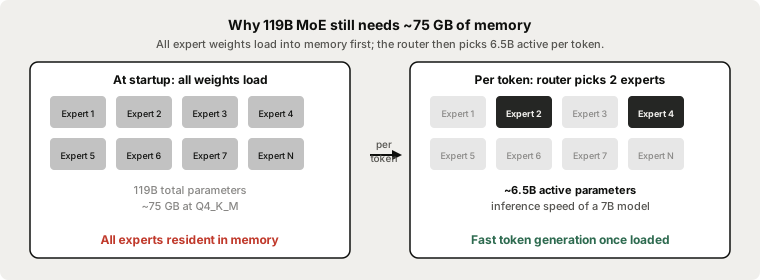
The distinction between total and active parameters is real at inference time but irrelevant at load time. The MoE router needs to see all expert weight tensors to decide which two to activate. If Expert 47 is not in memory, the router cannot route to it - so every expert must be resident before the first token generates.
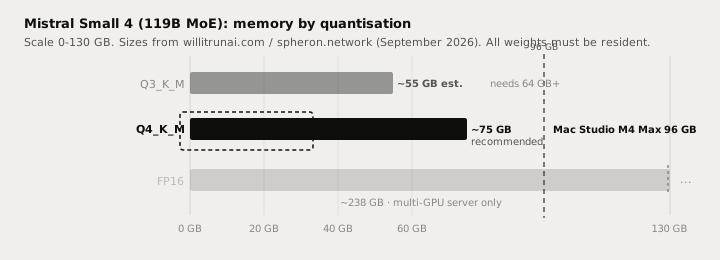
At Q4_K_M, Mistral Small 4 requires approximately 72-79 GB of memory for the weights alone, plus a few gigabytes for the KV cache and runtime overhead depending on context length. Plan for 80 GB minimum in practice.
| Quantisation | Approx. size | Minimum hardware |
|---|---|---|
| Q4_K_M (recommended) | ~75 GB | Mac Studio M4 Max 96 GB, Mac Pro, Mac Studio M2 Ultra |
| Q3_K_M (quality trade-off) | ~55 GB est. | Mac Studio M3 Max 64 GB (tight), M2 Ultra |
| FP16 (full precision) | ~238 GB | Multi-GPU server only |
A single RTX 4090 (24 GB of VRAM) is not sufficient at any standard Q4 quantisation - you would need an aggressive Q2 that significantly degrades quality. Multi-GPU NVIDIA setups starting at 80 GB of aggregate VRAM can work with the right frameworks, but that is not a typical home setup.
For most users the realistic consumer path is Apple Silicon with at least 96 GB of unified memory (Mac Studio M4 Max, configure-to-order from around $2,000 at 96 GB). The Mac Studio M4 Max generates around 8-12 tokens per second at Q4_K_M (runaihome.com, September 2026). That is slower than smaller local models but adequate for rewriting and summarisation tasks where you are waiting on output anyway.
Running it in Ollama
Ollama v0.33.3 is the current stable release (September 2, 2026). Update Ollama before pulling:
# macOS / Linux
curl -fsSL https://ollama.com/install.sh | sh

# Pull Mistral Small 4 (Ollama library tag: mistral-small)
# ~75 GB download - runs from the Ollama library
ollama pull mistral-small

# Start an interactive session to verify
ollama run mistral-small
On Apple Silicon, Ollama uses Metal GPU acceleration automatically. The model runs in unified memory - no VRAM/RAM distinction applies.
After pulling, verify the model is available:
curl http://localhost:11434/api/tags
You should see mistral-small in the model list. Once confirmed, disconnect from the internet - the model runs fully offline. No connection to Mistral AI's servers is made during inference.
Note: ollama pull mistral-small3.2 is the older 24B dense model (Mistral Small 3.2, March 2025). The current mistral-small tag points to Mistral Small 4. Confirm the tag on the Ollama library page before a large download.
Writing quality
With 6.5B parameters active per token, Mistral Small 4's inference quality sits above a 7B dense model - MoE training exposes each expert to a broader distribution of tasks than a single dense model of equivalent active size, which typically yields stronger specialisation. Mistral's own benchmarks show it competitive with 24B dense models on reasoning and instruction-following tasks.
The honest comparison for everyday writing in Typilot:
| Task | Mistral Small 4 local | Claude Sonnet / Opus (cloud) |
|---|---|---|
| Email drafting and rewrite | Good | Excellent |
| Prose polish (short text) | Good | Excellent |
| Meeting note cleanup | Good | Excellent |
| Long document summarisation | Good - 262K ctx helps | Excellent |
| Complex multi-step reasoning | Above 7B, below 32B dense | Excellent |
| Long creative draft (3 000+ words) | Coherence can drift | Excellent |
| Audio and text leave device | Never | Always |
| Works offline | Yes | No |
| Per-request cost | $0 | Pay-per-token |
The gap versus cloud frontier models (Claude Sonnet, Opus) is real, especially on long creative generation and complex multi-step reasoning. The local wins are the point: complete privacy, offline operation, zero per-token cost, and no rate limits.
Mistral Small 4 requires about 75 GB of memory at Q4_K_M - all 119B MoE weights must be resident before any token generates. A Mac Studio M4 Max with 96 GB is the lowest-cost consumer option. For most setups with less than 64 GB, Qwen3 8B (~5 GB) or Gemma 4 12B (~8 GB) deliver better hardware fit. The 262K context window and fast per-token inference are the reasons to choose this model if you have the hardware.
Why the 262K context window matters
Most local models in the 7-32B range offer 32-128K context natively, with quality degrading toward the upper end. Mistral Small 4's 262K native window lets you load an entire long document, a full transcript, or a sizeable codebase into a single session context.
For writing tasks this means you can ask for a summary of a 150-page report, or ask Typilot to polish an entire long-form draft without splitting it into chunks and stitching results back together. The KV cache for a 64K context adds roughly 3-5 GB on top of the weight footprint - well within the headroom on a 96 GB machine.
Privacy and the local path
Running Mistral Small 4 via Ollama means every token generates at localhost:11434 on your machine. No prompt, no intermediate result, and no response is transmitted to Mistral AI or any other party. The Apache 2.0 licence places no usage restrictions or reporting obligations on local inference.
Verify it yourself: pull the model, disconnect your internet, and run a rewrite command in Typilot. The model responds fully offline. That verification is not possible with any cloud dictation or AI-writing service.
Using Mistral Small 4 with Typilot
Typilot routes all AI commands through Ollama at localhost:11434. Once ollama pull mistral-small has completed, the model appears in Typilot's Preferences - Models panel. You can set it as the default for Polish and Notes commands, or override it per command.
The full command set works without any additional configuration:
rew: this paragraph     → rewrite in place
fix: this email         → grammar and phrasing
sum: these meeting notes → bullet-point summary
gen: draft a reply to   → generate from a prompt
imp: this draft         → improve structure and tone
For 262K-context tasks - loading a long document and querying it - use the gen: command with the document pasted into your text field. The model handles the full context on-device.
For setup details, see how to run a local AI assistant with Ollama and Typilot and the Ollama setup docs. For a RAM and hardware comparison across all local model sizes, see how much RAM to run a local LLM. For other models in this weight class, the Qwen vs Llama vs Gemma comparison covers the mainstream options.
The short version
Mistral Small 4 is a 119B MoE model from Mistral AI: Apache 2.0, March 2026, 262K context, available via ollama pull mistral-small. The MoE design means inference runs on only 6.5B active parameters per token - fast once loaded. The constraint is memory: all 119B weights must be resident, requiring around 75 GB at Q4_K_M. The Mac Studio M4 Max (96 GB unified memory) is the most practical consumer option, generating around 8-12 tokens per second. For setups with less than 64 GB, Qwen3 8B or Gemma 4 12B are better fits. If you have the hardware, the large context window (262K tokens) and above-7B writing quality make it worth running locally.
Every rewrite, every summary, every Polish command runs on your hardware with nothing sent to any server. That is what local-first means. Try Typilot free for three days at /download and connect it to any Ollama model in under a minute. The security page shows exactly what touches your device and what never does.
Common questions.
How much RAM does Mistral Small 4 need to run locally?+
At Q4_K_M quantisation, Mistral Small 4 requires approximately 72-79 GB of memory for the weights, plus a few gigabytes for the KV cache and runtime overhead. Plan for at least 80 GB total. A Mac Studio M4 Max with 96 GB of unified memory is the most accessible consumer option. A single RTX 4090 (24 GB) is not sufficient at standard Q4 quantisation.
If only 6.5B parameters are active per token, why does it need 75 GB of memory?+
The MoE router picks which experts to activate for each token, but it can only make that choice if all expert weight tensors are resident in memory. All 119B parameters must be loaded before the first token generates. Once loaded, inference runs on only the 6.5B active parameters per token - giving the speed of a 7B model. Loading is expensive; inference is not.
Is Mistral Small 4 private when run locally via Ollama?+
Yes. The Apache 2.0 weights run entirely on your machine via Ollama at localhost:11434. No prompt, response, or metadata is transmitted to Mistral AI or any other party during inference. The only network activity is the one-time weight download (~75 GB). After that the model runs fully offline. Verify it yourself: disconnect your internet after pulling the model and the model still responds.
What is the Ollama command for Mistral Small 4?+
Pull Mistral Small 4 with `ollama pull mistral-small` (the library tag updated to Mistral Small 4 in May 2026). Note that `ollama pull mistral-small3.2` is the older 24B dense model. Confirm the current tag at ollama.com/library/mistral-small before starting a 75 GB download. Once pulled, run it with `ollama run mistral-small` and it connects to Typilot automatically at localhost:11434.