Meeting Notes Without the Cloud
Local meeting notes without bots or cloud upload: Meetily, Talat, and Typilot keep audio on-device. How they compare to Otter, Fireflies, and Granola.
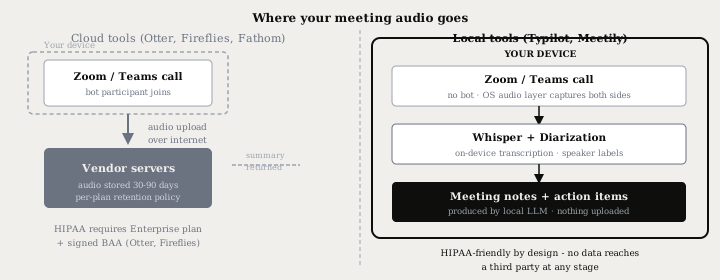
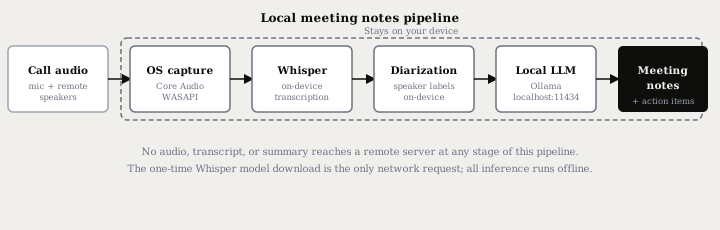
Local meeting notes work by recording call audio at the operating system level - not by joining the call as a participant. Core Audio on macOS, WASAPI on Windows, and PulseAudio on Linux each expose a monitor output that captures both your microphone and the remote participants simultaneously. The audio goes through an on-device Whisper model for transcription, an on-device diarization model for speaker labels, and a local language model for the written recap. Nothing leaves your machine at any point in the pipeline.
Here is how that compares to the bot model, what the local path requires, and which tool fits your setup.
Two approaches to meeting notes
Bot-based tools - Otter.ai, Fireflies.ai, Fathom - send a dedicated account into your call. That account joins as a visible participant, streams the audio to vendor infrastructure, and returns a summary by email or in-app. Your audio lives on a third-party server during processing and, under most plan tiers, for 30-90 days afterward.
Granola occupies a middle position: it records locally on your Mac without a bot joining the call, but sends the transcript to a cloud AI to produce the written summary. Audio stays on device; the text of your conversation does not.
The fully local alternative captures at the OS audio layer. The call software - Zoom, Teams, Meet, or any browser-based video tool - sees only a normal call. No extra account appears in the participant list and nothing travels over the internet.
What the local pipeline requires
Three components cover the full workflow:
-
OS audio capture. A system audio recorder hooks into the operating system's audio output layer and records both sides of the call simultaneously. On macOS this is a Core Audio stream; on Windows, a WASAPI loopback; on Linux, a PulseAudio monitor source. Typilot's meetings feature handles capture automatically - no separate driver or configuration required.
-
On-device transcription. A local Whisper model converts the captured audio to text on your CPU or GPU. The small model (490 MB, roughly 3.4% word error rate) runs in real time on any laptop made since 2020; the large model (~3 GB, ~2.7% WER) produces better accuracy on technical vocabulary and accented speech. After the one-time model download, the pipeline runs fully offline. For the full model-by-model breakdown, see the Whisper accuracy post.
-
Local LLM for the written recap. A language model running at
localhost:11434via Ollama reads the raw transcript and produces action items, a concise summary, and decisions by speaker. The transcript never touches a remote API. The Ollama setup guide covers installation in a few minutes.
Tools at a glance
| Tool | Audio upload | Notes via cloud | Bot joins call | HIPAA-ready |
|---|---|---|---|---|
| Typilot | Never | Never (local Ollama) | No | By design (local) |
| Meetily Community | Never | Never (local Ollama) | No | By design (local) |
| Talat | Never | Optional (BYOK or local) | No | By design (local) |
| Granola | Never (audio only) | Yes - cloud AI | No | No (not certified) |
| Otter.ai | Yes | Yes | Optional | Enterprise + BAA (from July 2025) |
| Fireflies.ai | Yes | Yes | Yes | Healthcare tier + BAA (from Sept 2025) |
| Fathom | Yes | Yes | Yes | No |
Granola's model is a deliberate middle ground - it is bot-free and records locally, but the text of your meeting does reach a cloud model. For teams that need both audio and text to stay on-device, the fully local path is the only option.
Voice activity detection is the single most impactful setting for meeting transcription quality. VAD strips silence before the audio reaches Whisper, eliminating the hallucination-on-silence problem where Whisper's decoder fabricates repeated phrases during quiet gaps. All production-ready local meeting tools enable VAD by default - check the setting if your transcripts contain nonsensical filler text.
HIPAA and regulated industries
The structural privacy question for compliance work is whether any protected health information reaches a third-party server at any point in the pipeline. For fully local tools, the answer is no by design - there is no third-party processor, no data retention clause to audit, and no Business Associate Agreement to request. Otter.ai reached HIPAA compliance in July 2025 and Fireflies launched its Healthcare tier in September 2025, but both require an Enterprise plan with a signed BAA. Granola does not offer HIPAA compliance and is not certified for PHI.
For individual practitioners and small teams handling confidential conversations, the local model avoids the procurement and legal overhead entirely.
Speaker labels
Whisper produces a flat text stream with no speaker attribution. On-device diarization adds the labeling layer: the audio is segmented by voice print, each speaker gets a label (Speaker 1, Speaker 2), and you can rename them once. Typilot's meetings feature learns voices over time - after you apply names across a couple of sessions, subsequent meetings with the same participants are labeled automatically without any re-identification step. For a deeper explanation of how the pipeline works and what accuracy to expect on different call sizes, see the speaker diarization guide.
Meetily's Community Edition includes diarization in the free open-source build (MIT licence, 12,500+ GitHub stars, macOS and Windows). Talat ($49 one-time, Apple Silicon Mac and Windows 10+) runs Whisper locally with optional bring-your-own-key cloud AI for the summary step if you want a more capable model for post-meeting cleanup.
Choosing based on your situation
For a single operator who wants zero configuration: Meetily Community is the free starting point. For a one-time purchase with no subscription: Talat is $49 with lifetime updates. For teams that also want system-wide dictation, AI writing commands, and autocomplete alongside meetings - all running through the same local Ollama runtime - Typilot ships it as a single app on macOS, Windows, and Linux.
If you are comparing cloud services before switching: the Otter compare page, Fireflies compare page, and Granola compare page walk through each head to head with honest notes on where the cloud tools still win.
The short version
Taking meeting notes without sending data to a third party means capturing the OS audio stream - not a bot account - and routing transcription and summarisation through on-device models. The audio and the transcript never leave the machine, which makes the privacy guarantee structural rather than contractual.
Download Typilot for a 3-day free trial on macOS, Windows, and Linux. The full data-flow architecture is on the security page. For the general local transcription workflow, see how to transcribe meetings locally.
Common questions.
How do I take meeting notes without sending audio to a third party?+
Use a local meeting notes tool that captures audio at the OS level rather than via a bot account. Tools like Typilot and Meetily Community hook into Core Audio (macOS), WASAPI (Windows), or PulseAudio (Linux) to record both sides of the call, then process the audio through on-device Whisper for transcription and a local Ollama model for the written recap. No audio, transcript, or summary reaches a remote server at any point.
Do local meeting note tools work with Zoom and Microsoft Teams?+
Yes. Because local tools capture at the OS audio layer rather than joining as a participant, they work with any video call software - Zoom, Teams, Google Meet, or any browser-based tool. The call software sees only a normal audio session. Meetily, Talat, and Typilot all use this approach on macOS and Windows.
Is Granola a local or cloud meeting notes tool?+
Granola is a hybrid: it records locally on your Mac without a bot joining the call, so the audio file stays on your device. However, the transcript is sent to a cloud AI to produce the written summary, meaning the text of your meeting reaches a third-party server. Granola does not offer HIPAA compliance. For end-to-end local processing, tools like Typilot and Meetily keep both the audio and the summary on-device.
Are local meeting note tools HIPAA-compliant?+
Fully local tools are HIPAA-friendly by design because no protected health information reaches a third-party server - there is no BAA to negotiate and no covered entity relationship to manage. Otter.ai and Fireflies.ai reached HIPAA compliance in 2025 but only on Enterprise plans with a signed Business Associate Agreement. Granola is not HIPAA certified.