How Accurate Is Whisper for Meetings?
Whisper large-v3 scores ~2.7% WER on clean benchmarks but 8-12% on real meeting audio. Learn why the gap exists, the hallucination-on-silence issue, and how VAD and model choice close it.
Whisper large-v3 achieves roughly 2.7% word error rate on the LibriSpeech clean benchmark, but real meeting audio - multiple speakers, background noise, and interruptions - typically lands at 8-12% WER. That gap is expected: the benchmark uses studio-recorded audiobooks with one speaker and a professional microphone, which is nothing like a video call. Commercial cloud services run the same 8-12% under identical conditions, so the gap reflects the harder audio, not a weakness unique to Whisper.
Here is what drives that gap, the two limitations that matter most for meetings, and the practical steps to narrow it.
Why meetings score differently than benchmarks
LibriSpeech test-clean is clean, single-speaker, professionally recorded audio. A real meeting involves:
- Multiple speakers - Whisper has no native speaker-change detection, so it processes a multi-speaker call as one continuous monologue.
- Overlapping speech - two people talking simultaneously produces audio the model was not trained to separate.
- Background noise - keyboard sounds, HVAC, and room echo all add signal the model must filter out.
- Accents and technical vocabulary - product names, abbreviations, and non-standard pronunciation increase substitution errors.
- Far-field microphones - a laptop mic placed 60 cm from the speaker produces noticeably noisier audio than a headset or desk mic.
All of these conditions affect cloud services equally. Google Chirp 2, Deepgram Nova-3, and AssemblyAI Universal-2 each post comparable or slightly better real-world WER (roughly 7-10%) than local Whisper, primarily because they run heavier compute on larger models. The gap is small.
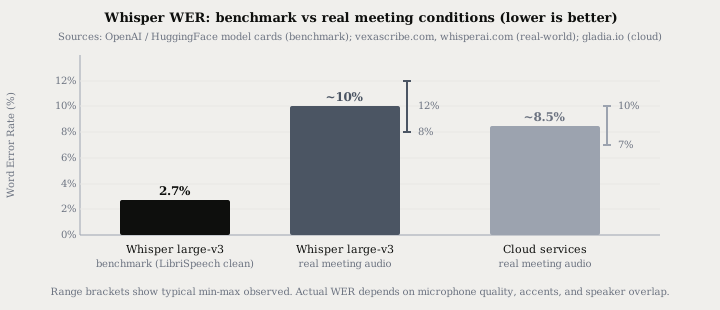
| Condition | Whisper large-v3 WER | Notes |
|---|---|---|
| LibriSpeech test-clean | ~2.7% | One speaker, studio recording |
| LibriSpeech large-v3-turbo | ~3.0% | Pruned decoder; same clean conditions |
| Quiet office, clear headset | ~5-7% | Real speech, controlled environment |
| Real meetings, mixed speakers | 8-12% | Background noise, overlapping speech |
| Technical vocabulary / jargon | Can exceed 15% | Proper nouns, product abbreviations |
At 10% WER on a 1,000-word meeting, roughly 100 words are wrong. In practice, most errors are substituted proper nouns or mangled abbreviations - the transcript is readable and searchable, but you will need to proof-read anything formal or verbatim.
The hallucination problem
Whisper uses an autoregressive decoder that generates tokens one at a time. During silence - a pause between sentences, hold music, a shared-screen moment with no one talking - the decoder can fabricate text rather than output nothing. Common hallucinations include repeated phrases, filler sentences like "Thank you for watching!", or the last sentence looping.
A University of Michigan study found hallucinations in 8 out of 10 public meeting transcripts generated by Whisper. A separate analysis of 13,000+ audio samples recorded approximately 187 hallucination events - roughly a 1.4% rate, concentrated on silent segments.
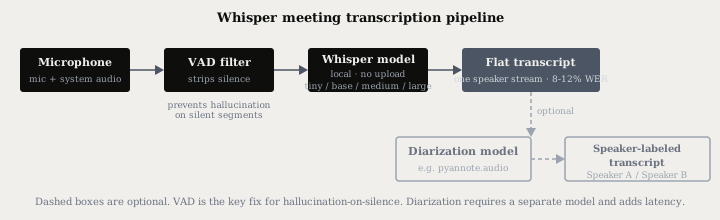
The fix is voice activity detection (VAD) before transcription. VAD identifies which time regions contain speech and strips everything else. When Whisper only receives confirmed speech segments, it has nothing to confabulate over silence. WhisperX and faster-whisper both support pre-transcription VAD; anti-hallucination parameters were added to faster-whisper in February 2026.
NVIDIA's Parakeet TDT uses a transducer decoder rather than an autoregressive one. NVIDIA trained it on 36,000 hours of non-speech audio paired with empty-string targets, so the model has learned what silence sounds like and stays quiet on it. If hallucination on silence is a hard requirement, Parakeet v3 is worth evaluating - see the Whisper large-v3-turbo vs Parakeet breakdown for the full trade-offs (Parakeet needs ~16 GB of unified memory and covers 25 European languages only).
No native speaker diarization
Whisper outputs a single flat text stream. It does not identify who is speaking, when a speaker changes, or how many speakers are present. For a one-on-one interview you can usually infer who said what from context. For a six-person meeting, you get a wall of text with no attribution.
Adding speaker labels requires a separate diarization model - typically pyannote.audio, which runs on-device and is open source. The diarization model runs after Whisper: it takes the audio (not the transcript) and generates time-stamped speaker segments, which are then merged with the Whisper transcript. The result is the "Speaker A / Speaker B" script format.
The trade-off is latency and complexity. Diarization adds a second model inference step, typically 10-30 seconds for a one-hour recording on Apple Silicon. If you need to understand the pipeline, how speaker diarization works covers the full segmentation and embedding process. For an integrated local meeting tool that handles capture, transcription, and notes without the manual setup, see transcribing meetings locally.
Practical steps to improve accuracy
These steps consistently reduce WER on meeting audio without changing the model:
1. Use the large or medium model. The tiny model (39M params, fits in ~390 MB) achieves only around 5.7% WER on clean audio - significantly worse under meeting conditions. The small model (~3.4% on clean) is acceptable for personal notes. For any meeting where accuracy matters, use medium (~2.9% clean, ~1.5 GB) or large (~2.7% clean, ~10 GB).
2. Enable VAD. Trimming silence before inference is the single most effective way to prevent hallucination and speed up transcription. Most production tools - including whisper.cpp, faster-whisper, and integrated apps - support VAD as a setting.
3. Set the language explicitly. Whisper auto-detects language from the first 30 seconds of audio. On short clips or audio that starts with silence, it can guess wrong. Setting --language en (or the relevant language code) avoids this entirely.
4. Use a decent microphone. Moving from a built-in laptop microphone to a USB desk mic or a headset can cut real-world WER by 3-5 percentage points on its own. The model can only transcribe what it receives clearly.
5. Reduce background noise at the source. Close windows, mute non-speaking participants, and avoid recording in high-reverb rooms. Background noise is the dominant driver of the benchmark-to-reality gap.
Local Whisper vs cloud for meetings
For real meeting audio, local Whisper and cloud services are closer than benchmarks suggest - roughly 8-12% vs 7-10% WER. The practical choice is not about accuracy: it is about whether you are willing to upload the recording.
| Whisper (local) | Cloud services | |
|---|---|---|
| Benchmark WER (clean audio) | ~2.7% | Comparable (3-5%) |
| Real-world meetings WER | 8-12% | 7-10% |
| Speaker diarization included | No (separate model) | Often included |
| Privacy | Audio stays on device | Audio uploaded to vendor |
| Works offline | Yes | No |
| Cost | Free after model download | Per-minute or per-seat billing |
| Hallucination on silence | Yes, without VAD | Vendor-managed |
Cloud services run their models on more powerful hardware, which partly explains their slight WER edge on meetings. That 1-3 point accuracy difference is real but often invisible in practice - the difference between 9% and 8% WER on a meeting transcript is roughly 10 words per 1,000. If you are uploading a patient consult, a legal deposition, or an M&A call to achieve it, the trade-off is hard to justify.
The short version
Expect 8-12% WER on real meeting audio, not the 2.7% benchmark. Hallucination on silence is a real problem without VAD - most production tools add VAD as a flag or setting. Speaker diarization requires a separate model and adds pipeline complexity. Cloud services have a slight accuracy edge (7-10% vs 8-12%) but upload your audio to achieve it.
Typilot ships a local Whisper runtime with VAD built in - audio stays on your device throughout, and the 3-day free trial requires no credit card. The security page documents exactly what leaves the machine (nothing, for voice) and what does not. For a comparison of local dictation apps on privacy, see dictation apps that do not upload your voice.
Common questions.
How accurate is Whisper for meeting transcription?+
Whisper large-v3 achieves around 2.7% word error rate on clean benchmark audio (LibriSpeech test-clean), but real meeting conditions - multiple speakers, background noise, and overlapping speech - push WER to roughly 8-12%. Commercial cloud services score similarly in real meetings, around 7-10%, so the gap reflects the harder audio rather than a local-model limitation.
Does Whisper hallucinate during meeting transcription?+
Yes. Whisper's autoregressive decoder can fabricate text during silent segments - inserting repeated phrases or filler sentences like "Thank you for watching!" A University of Michigan study found hallucinations in 8 out of 10 public meeting transcripts. The fix is voice activity detection (VAD), which strips silence before the audio reaches Whisper. Most production tools - whisper.cpp, faster-whisper, and integrated apps - support VAD as a setting.
Can Whisper identify who is speaking in a meeting?+
No. Whisper outputs a flat text stream with no speaker labels. Adding "Speaker A / Speaker B" attribution requires a separate diarization model such as pyannote.audio, which runs on-device and processes the audio after Whisper. The combination is available but adds a second inference step and typically 10-30 extra seconds of processing for a one-hour recording.
What is the best Whisper model for meeting transcription?+
The large model (~2.7% WER on clean audio, ~10 GB RAM) gives the best accuracy for important meetings. The medium model (~2.9% WER, ~1.5 GB) is the practical default on most laptops - it runs in real time on Apple Silicon and recent NVIDIA GPUs. The small model (~3.4% WER, 490 MB) is acceptable for personal notes but shows more errors on technical vocabulary and accented speech.