Dictation Apps That Don't Upload Your Voice
Local Whisper dictation apps keep audio on your device - no upload, no cloud server, fully offline. Compared: Typilot, Superwhisper, Spokenly, Handy, VoiceInk.
A dictation app that does not upload your voice processes speech entirely on your own hardware using a local model such as OpenAI's Whisper. After a one-time model download, your microphone audio never reaches an external server - Whisper achieves around 2.7% word error rate on clean English audio and runs on Mac, Windows, and Linux. In 2026, production-ready tools including Typilot, Superwhisper, Spokenly, and Handy deliver this without requiring a cloud subscription.
Here is how to verify a tool's privacy model and pick the right one for your hardware.
What "no upload" actually means
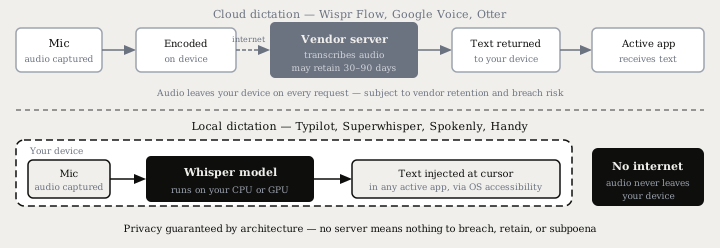
Cloud dictation services - Google Docs Voice Typing, Wispr Flow, Otter - convert your audio on their servers. Your voice is encoded on your device, sent over the network, processed by the vendor's speech recognition stack, and the transcript is returned to you. The audio may be retained on the vendor's servers for 30 to 90 days depending on the service and plan tier.
"No upload" means the inverse: the speech recognition model runs on your machine, audio stays in RAM during processing, and nothing is transmitted. If you disconnected from the internet mid-session, a local dictation tool would keep working without interruption.
This difference is architectural, not a setting. A cloud vendor can update their privacy policy at any time; a local tool has no server to update.
The practical consequences:
- Sensitive conversations - medical consultations, legal depositions, M&A calls - require this. A cloud server adds a third party to a confidential setting by design.
- Offline operation - airplane mode, clinic networks with restricted outbound access, air-gapped environments all work after the initial model download.
- No per-request cost - your CPU or GPU is the only compute involved, which is what makes a one-time lifetime price possible for local tools.
Who processes your voice locally
These tools run speech recognition entirely on your device:
| Tool | Platform | Processing | Price |
|---|---|---|---|
| Typilot | Mac, Windows, Linux | Local Whisper + local Ollama | 3-day free trial |
| Superwhisper | Mac, iOS, Windows | Local Whisper | From $8.49/mo |
| Spokenly | Mac, Windows, iPhone | Local Whisper + Parakeet | Free (BYOK for cloud option) |
| Handy | Mac, Windows, Linux | Local Whisper + Parakeet | Free, open source |
| VoiceInk | Mac | Local Whisper | $25-49 one-time, open source |
| MacWhisper | Mac | Local Whisper | €59 one-time |
For comparison, tools that upload audio on every request:
| Tool | Audio processing | Price |
|---|---|---|
| Wispr Flow | Cloud (vendor servers) | $15-18/mo |
| DictaFlow | Hybrid (local Whisper + optional cloud) | $7/mo |
| Google Docs Voice Typing | Cloud (Google servers) | Free |
| Otter.ai | Cloud | Free + $17/mo Pro |
One edge case worth knowing: Apple's built-in Dictation behaves differently by hardware. On Apple Silicon (M1 or later) it processes on-device with no upload. On Intel Macs it silently falls back to Apple's servers with no visible indicator. If you are on an Intel Mac and privacy matters, a tool that bundles a local Whisper model is the only reliable option.
How to choose between local dictation tools
The tools above share the core privacy guarantee but differ on three practical axes:
Platform. Typilot and Handy both run on Mac, Windows, and Linux. Superwhisper covers Mac, iOS, and Windows. VoiceInk and MacWhisper are Mac-only. MacWhisper handles file transcription only - it does not inject text into a running app - which makes it unsuitable for live dictation.
System-wide text injection. All of the above except MacWhisper support injecting transcribed text at the cursor in whatever app is active, via the OS accessibility layer. The difference is integration depth: Typilot and Superwhisper handle edge cases including terminal emulators, password fields, and Electron-based apps.
AI commands on top of dictation. Spokenly and Handy do transcription only with no AI layer. Superwhisper adds AI polish via cloud models by default (local inference is a paid option). Typilot adds 27 command shortcuts - fix: to correct selected text, rew: to rewrite it, sum: to summarise, gen: to generate - routed entirely to a local Ollama model. No text or prompt leaves the device at any stage.
For a detailed comparison, Typilot vs Superwhisper covers the side-by-side trade-offs on platform, pricing, and AI features.
Hardware you need for local Whisper
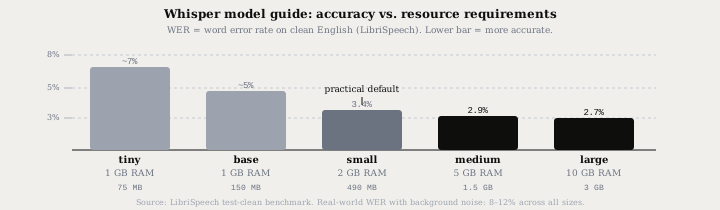
Local speech recognition runs on standard consumer hardware. Whisper ships in five sizes, each trading accuracy for resource requirements:
| Model | Disk | RAM | WER (clean English) | Real-time speed on M2 |
|---|---|---|---|---|
| tiny | ~75 MB | 1 GB | ~7% | 10x |
| base | ~150 MB | 1 GB | ~5% | 7x |
| small | ~490 MB | 2 GB | ~3.4% | 5x |
| medium | ~1.5 GB | 5 GB | ~2.9% | 3x |
| large | ~3 GB | 10 GB | ~2.7% | 1.5x |
WER figures are from the LibriSpeech test-clean benchmark on clean English speech. Real-world dictation with background noise, accents, or technical vocabulary typically runs 8-12% regardless of model size - the same pattern applies to cloud services.
If you are on an Intel Mac or a Windows laptop without a discrete GPU, the small Whisper model (490 MB, ~3.4% WER) is the practical default. It runs real-time on CPU-only hardware made after 2020 and outperforms most cloud services on clean audio.
Getting private dictation into any app
The mechanism that makes local dictation useful in daily work is text injection - delivering the transcript into the active application at the cursor without using the clipboard and without any network request.
Typilot handles this via the macOS Accessibility API on Mac and equivalent system hooks on Windows and Linux. Three activation modes cover different workflows:
- Hold mode - hold a key (default: Fn), speak, release to commit. Best for short phrases between other tasks.
- Toggle-VAD - press once to start; voice activity detection stops the recording automatically on silence. Best for continuous dictation without touching a key.
- Toggle-manual - press to start, press again to stop. Best when you need precise control over exactly what gets transcribed.
Voice activity detection is handled by a local VAD pass before audio reaches Whisper, which trims silence and prevents hallucinated words on quiet segments. The full pipeline - microphone capture, VAD, Whisper transcription, and text injection - runs on your device with no outbound network traffic at any stage.
For teams evaluating this for HIPAA or NDA contexts, the security page documents the architecture in full: what runs where and what never leaves the device.
The short version
A dictation app that does not upload your voice uses a local speech model such as Whisper, so your audio never reaches an external server. The privacy guarantee is architectural - no server means nothing to breach, retain, or subpoena. In 2026 the main options are Typilot (Mac, Windows, Linux, with AI commands via local Ollama), Superwhisper (Mac, iOS, Windows), Spokenly (free, cross-platform), and Handy (free, open source, all platforms).
If you want a single tool that covers local Whisper dictation, VAD, 27 AI command shortcuts, and text injection into every app, Typilot ships a 3-day free trial. The security page has the architecture detail, and features covers what you get beyond dictation.
Common questions.
Does dictation software upload your voice to the cloud?+
It depends on the tool. Cloud dictation services such as Wispr Flow, Google Docs Voice Typing, and Otter.ai send your audio to their servers on every request. Local dictation tools such as Typilot, Superwhisper, Spokenly, and Handy run a local Whisper model on your own hardware, so your audio never leaves the device - not for transcription, and not for AI commands.
Which dictation apps work without sending audio to a server?+
In 2026 the main local-processing options are Typilot (Mac, Windows, Linux), Superwhisper (Mac, iOS, Windows), Spokenly (Mac, Windows, iPhone, free), Handy (Mac, Windows, Linux, free open source), and VoiceInk (Mac, open source). All run Whisper locally. MacWhisper also runs locally but is limited to file transcription and does not inject text into running applications.
How accurate is local dictation compared to cloud services?+
Whisper large reaches around 2.7% word error rate on clean English audio, which is comparable to mainstream cloud services such as Google and Whisper API. On real-world audio with background noise or accents, all tools - local and cloud - typically land in the 8-12% range. The small Whisper model (490 MB, ~3.4% WER) runs in real time on any laptop made after 2020 and outperforms most cloud services on clean audio.
Can I use local dictation offline?+
Yes. All local dictation tools based on Whisper work fully offline after the initial one-time model download. There is no internet connection required for transcription or AI commands once the models are on your device. This includes airplane mode, air-gapped networks, and clinic or legal environments with restricted outbound internet access.