Is Voice Typing Private? Where Your Audio Goes
Voice typing privacy depends on where speech is processed. Google Docs and Windows Voice Typing default to the cloud. Mac Dictation is private on Apple Silicon, not on Intel.
Voice typing is private only when speech recognition runs on your device rather than a remote server. Windows Voice Typing and Google Docs Voice Typing stream audio to cloud servers by default; Mac Dictation is private on Apple Silicon hardware and not on Intel. If you need on-device processing across all hardware and platforms, a standalone tool built on a local Whisper model is the only reliable option.
Here is exactly what each platform does with your audio.
How cloud voice typing works
When you use a cloud-based voice typing tool, your microphone audio does not stay on your machine. The system encodes the recording, sends it over the internet to the vendor's speech recognition servers, those servers return a transcript, and your device discards the audio. The AI work happens remotely, not locally.
This has three practical privacy consequences:
- The vendor holds a recording of everything you said. How long they retain it depends on their current policy, which they can update at any time.
- Any sensitive content - a medical note, a legal conversation, a confidential call - reaches a third-party server by design, not by accident.
- Disrupting internet access stops the tool completely. Airplane mode, a clinic network with restricted outbound access, or an air-gapped machine all break cloud voice typing after the model has been downloaded (or before, if the model itself lives remotely).
Google Docs Voice Typing
Clicking the microphone in Google Docs triggers cloud-based speech recognition. Your audio streams to Google's servers on every dictation session. Google's default data-retention settings allow that data to be stored indefinitely; you can configure auto-delete at 3, 18, or 36 months via your Google Account activity controls, but the audio still travels to Google's infrastructure regardless.
There is no on-device mode in Google Docs Voice Typing. Every session is cloud-only.
Google Meet live captions and real-time transcription use the same infrastructure.
Windows Voice Typing
The Windows 11 Voice Typing bar (Win+H) uses Microsoft's online speech service by default. Your audio is sent to Microsoft, processed remotely, and the transcript is returned to your device. Microsoft states it does not retain recordings beyond providing the transcription, but your audio does traverse the internet and touch Microsoft's servers on every session.
Offline alternative: On Windows 11 version 22H2 (2022) and later, you can enable Voice Access in Settings > Accessibility > Speech. Voice Access is a separate feature from Voice Typing and processes speech on-device with no network traffic. It was designed primarily for hands-free operating system control, but it functions as a dictation tool. The older Windows Speech Recognition, available since Vista, also runs offline but requires an initial voice training session.
Mac Dictation
Mac Dictation behaves differently depending on your hardware:
- Apple Silicon (M1 or later): Dictation runs entirely on-device using Apple's local speech engine. This has been the default since macOS Ventura (2022). Nothing is sent to Apple during a session.
- Intel Mac: Dictation silently falls back to Apple's cloud servers. The feature appears identical in the UI - the only difference is where the audio is processed. There is no built-in option to force offline behaviour on Intel.
Intel MacBook Pros and iMacs were sold until November 2020 and remain widely in use. If you are on Intel hardware and dictate anything sensitive, the built-in Mac Dictation feature is not a reliable private option.
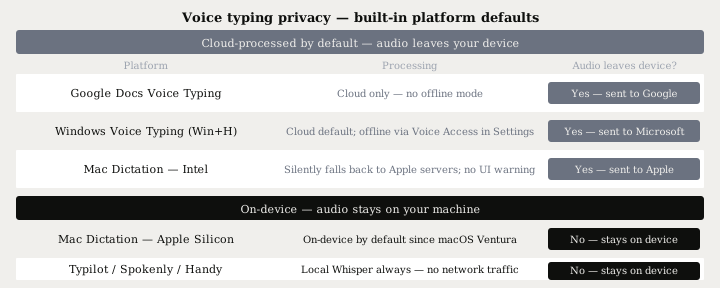
Platform comparison at a glance
| Platform | Default mode | Audio leaves device? |
|---|---|---|
| Google Docs Voice Typing | Cloud (always) | Yes - sent to Google |
| Windows Voice Typing (Win+H) | Cloud | Yes - sent to Microsoft |
| Mac Dictation - Intel | Cloud fallback | Yes - sent to Apple, silently |
| Mac Dictation - Apple Silicon | On-device | No |
| iOS Dictation (A12 chip or later, iOS 17+) | On-device | No on supported hardware |
| Typilot / Spokenly / Handy | On-device Whisper | No, ever |
What on-device processing actually means
When speech recognition runs locally, your audio goes from the microphone into RAM, the model processes it, and the transcript is written to the active application. No network traffic is generated at any stage. You can verify this directly: disconnect from the internet and try dictating. An on-device tool keeps working without interruption; a cloud-dependent one fails immediately.
The privacy consequences extend beyond the obvious:
- No storage risk. There is no server to breach, subpoena, or subject to a policy change. Audio exists only in RAM during processing and is discarded when the session ends.
- Policy-proof. A cloud vendor can update their retention or usage policy at any time. A local model has no remote component that could be updated against your interests.
- Works offline. Airplane mode, a hospital network with restricted outbound traffic, and air-gapped machines all work after the initial model download.
The privacy guarantee of a local tool is architectural, not contractual. A vendor can change a promise. A model that never receives your audio cannot be changed to receive it.
Getting reliable on-device dictation on any platform
Apple Silicon Mac Dictation is the only built-in private option, and only on hardware made after November 2020. For Intel Mac, Windows, Linux, or if you want system-wide text injection into any application - not just a browser text field - a standalone tool built on a local Whisper model is the practical answer.
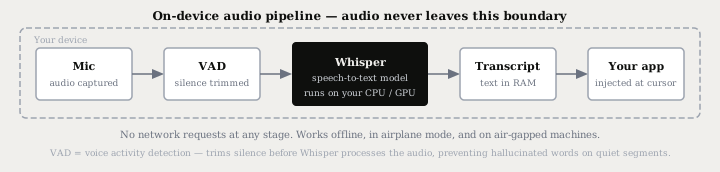
OpenAI Whisper achieves around 2.7% word error rate on clean English audio with the large model - comparable to commercial cloud services - while running entirely on consumer hardware. Tools that package it add system-wide text injection, voice activity detection to stop on silence, and shortcut-based activation that works in any application.
Current on-device options across platforms:
| Tool | Platforms | Price |
|---|---|---|
| Typilot | Mac, Windows, Linux | 3-day free trial |
| Superwhisper | Mac, iOS, Windows | From $8.49/mo |
| Spokenly | Mac, Windows, iPhone | Free tier (local Whisper + Parakeet) |
| Handy | Mac, Windows, Linux | Free, open source |
For a detailed breakdown of what each tool includes beyond raw transcription - AI command layers, voice activity detection, activation modes, and hardware requirements - see dictation apps that do not upload your voice. For the side-by-side on Typilot and a well-known cloud dictation tool, Typilot vs Wispr Flow covers the privacy and feature trade-offs directly.
The short version
Voice typing is private only when speech recognition runs on your device. Google Docs and Windows Voice Typing default to the cloud - your audio reaches vendor servers on every session. Mac Dictation is private on Apple Silicon but silently uses cloud processing on Intel. For reliable on-device dictation on any hardware, a Whisper-based tool is the only option that keeps audio off the internet regardless of platform.
Typilot ships a 3-day free trial and includes local Whisper dictation, voice activity detection, 27 AI command shortcuts through a local Ollama model, and system-wide text injection into any app - nothing leaves your device at any stage. The security page documents the full architecture, and features covers what you get beyond dictation.
Common questions.
Is Google Docs Voice Typing private?+
No. When you use voice typing in Google Docs, your audio is streamed to Google's cloud servers for processing. Google may store that data indefinitely by default, though you can configure auto-delete after 3, 18, or 36 months in your Google Account activity settings.
Does Windows Voice Typing send data to Microsoft?+
Yes, by default. Windows 11 Voice Typing (Win+H) uses Microsoft's online speech service, so audio is sent to Microsoft on every session. On Windows 11 version 22H2 and later, you can enable Voice Access in Settings > Accessibility > Speech to process speech entirely on-device.
Is Mac Dictation private?+
It depends on your hardware. On Apple Silicon (M1 or later), Mac Dictation has processed speech on-device by default since macOS Ventura, so nothing is sent to Apple. On Intel Macs, Dictation silently falls back to Apple's cloud servers with no visible indicator — a local Whisper-based tool is the only reliable private option on older hardware.
Which voice typing tools keep audio on my device?+
Tools built on local Whisper run all speech recognition on your hardware with no network traffic at any stage. Current options include Typilot (Mac, Windows, Linux), Superwhisper (Mac, iOS, Windows), Spokenly (Mac, Windows, iPhone — free tier), and Handy (free, open source, all platforms). You can verify any of them by disconnecting from the internet — local tools keep working; cloud tools fail.