How to Dictate in Any App on Mac
Dictate in any Mac app: offline on Apple Silicon with built-in Dictation, or local Whisper for Intel support, AI commands, and ~2.7% WER accuracy.
You can dictate in any app on a Mac by double-pressing Fn (or the microphone key) to activate Apple's built-in Dictation, or by using a third-party tool that bundles a local Whisper model and injects text at the cursor via the macOS Accessibility API. Built-in Dictation runs offline and privately on Apple Silicon (M1 and later); Intel Macs route audio to Apple's servers. Third-party local tools extend this with full offline support on Intel, around 2.7% word error rate on the large Whisper model, and optional AI commands on top of the transcript - in any app, without copy-pasting.
Here is the full walkthrough of both paths.
macOS built-in Dictation
Apple's Dictation is included in every Mac running macOS Monterey or later and works in any text field - Notes, Mail, Slack, a browser, a code editor, anywhere you can type.
Setup:
- Open System Settings > Keyboard.
- Scroll to Dictation and toggle it on.
- On Apple Silicon, macOS will prompt you to download an enhanced on-device model. Choose this for offline use.
- Set your shortcut. The default is double-press Fn or the dedicated microphone key on newer MacBooks.
To dictate, place the cursor in any text field and press the shortcut. A microphone indicator appears near the bottom of the screen. Speak naturally and the text appears as you talk. Press the shortcut again or click Done to commit.
Apple Silicon vs Intel
The offline/online split is entirely hardware-dependent:
| Mac hardware | How Apple Dictation processes audio | Internet required |
|---|---|---|
| Apple Silicon (M1, M2, M3, M4) | On-device via Neural Engine | No |
| Intel Mac | Sent to Apple's servers | Yes, on every session |
On Apple Silicon, macOS Tahoe (2025-2026) adds auto-punctuation and light formatting to the on-device model via Apple Intelligence. Intel Macs receive no on-device model - there is no workaround inside Apple's ecosystem.
Limits of built-in Dictation
Built-in Dictation transcribes exactly what you say and stops there. There is no rewriting, shortening, translation, or AI commands on top of the transcript. If your workflow involves dictating a rough sentence and having it polished before injection, or speaking a prompt and getting a generated response at the cursor, you need a third-party tool with a local AI layer.
Third-party local Whisper in any app
Third-party dictation tools replace Apple's speech engine with a local OpenAI Whisper model. The full pipeline runs on your device: microphone audio passes through voice activity detection (VAD) to strip silence, then into the Whisper model, and the transcript is injected directly into the active application via the macOS Accessibility API. No audio or text leaves your Mac.
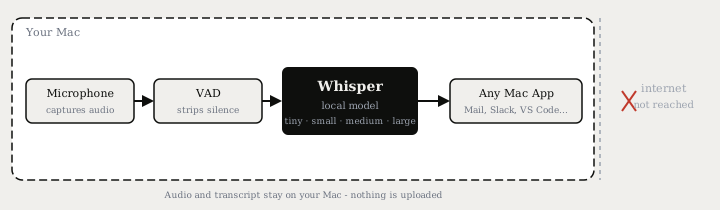
This approach has two concrete advantages over built-in Dictation:
- Offline on Intel Macs. Local Whisper does not need Apple's Neural Engine. The small model (490 MB, ~3.4% WER) runs in real time on any MacBook made after 2018.
- AI commands on the transcript. Because the transcribed text is just text, a local language model can process it before injection - rewriting a sentence, correcting grammar, translating to another language, or responding to a spoken instruction.
Typilot on Mac
Typilot captures microphone input, runs the Whisper model you have selected, and injects the resulting text into the active app. Three activation modes match different workflows:
- Hold - hold Fn (or a key of your choice) to record, release to commit. Best for short bursts.
- Toggle-VAD - press the shortcut once; voice activity detection stops recording automatically when you pause. Best for continuous dictation without having to press anything again.
- Toggle-manual - press to start, press again to stop. Best for precise control over what gets transcribed.
Two output modes are available in Settings > Voice:
- Transcription - the raw transcript is injected at the cursor immediately.
- AI-response - the transcript is sent to a local Ollama model, and the polished response is injected instead. Prefix your spoken input with a command (
fix:,rew:,sum:) to tell the model what to do with your words.
Because Ollama runs locally, neither your voice nor your text travels to any server.
Built-in vs local Whisper: how they compare
| Apple Dictation (Apple Silicon) | Apple Dictation (Intel) | Local Whisper (e.g. Typilot) | |
|---|---|---|---|
| Audio leaves device | No | Yes - Apple servers | No |
| Works offline | Yes | No | Yes |
| Intel Mac offline support | No | No | Yes |
| Accuracy on clean English | Good (Apple model) | Good (cloud) | ~2.7% WER (large model) |
| AI commands on transcript | No | No | Yes (27 built-in, local Ollama) |
| Works in every text field | Yes | Yes | Yes |
| Cost | Free | Free | Varies; Typilot has 3-day trial |
On Apple Silicon, built-in Dictation and local Whisper are both private and offline. The main reasons to use a third-party tool on Apple Silicon are AI commands on top of the transcript, a more configurable shortcut, and cross-platform parity with Windows or Linux.
Hardware: what runs well where
Local Whisper is more compute-intensive than Apple's own on-device model. Apple Silicon accelerates it significantly through the Metal GPU stack. The table below shows approximate real-time factors: a value of 3x means the model processes audio three times faster than it was recorded.
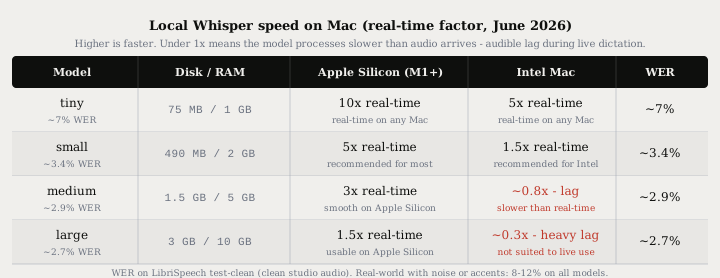
| Whisper model | Disk / RAM | WER (clean English) | Apple Silicon speed | Intel CPU speed |
|---|---|---|---|---|
| tiny | 75 MB / 1 GB | ~7% | 10x real-time | 5x real-time |
| small | 490 MB / 2 GB | ~3.4% | 5x real-time | 1.5x real-time |
| medium | 1.5 GB / 5 GB | ~2.9% | 3x real-time | ~0.8x - audible lag |
| large | 3 GB / 10 GB | ~2.7% | 1.5x real-time | ~0.3x - heavy lag |
WER figures are benchmarks on LibriSpeech test-clean (clean studio audio). Real-world dictation with background noise, accents, or technical vocabulary typically lands in the 8-12% range on all models.
Intel Mac: the small model is the practical default for live dictation. It reaches 3.4% WER, downloads under 500 MB, and runs in real time on any Intel MacBook made after 2018. The medium and large models process slower than real-time on Intel CPU-only hardware and introduce audible lag during live dictation.
Apple Silicon: the medium model is comfortable for live dictation. The large model is practical if you need the best accuracy and have at least 16 GB of RAM.
Getting started
Built-in Dictation (free, Apple Silicon only for offline use)
- System Settings > Keyboard > Dictation - toggle on.
- Download the enhanced on-device model when prompted (Apple Silicon only).
- Double-press Fn in any text field to start, press again or click Done to stop.
Local Whisper with Typilot (Mac and Windows)
- Download Typilot and run the installer.
- The onboarding wizard downloads a Whisper model (tiny by default) and sets up the local AI engine.
- Grant Accessibility permission when prompted. macOS requires this permission for any tool that types into other applications.
- In Settings > Voice, set your activation mode (hold, toggle-VAD, or toggle-manual) and upgrade the Whisper model size if your hardware supports it.
- Press your activation shortcut in any app and start speaking.
For AI commands, Ollama must be running locally. The Ollama setup guide covers model selection and configuration for your hardware.
Other tools for Mac dictation
Several other apps use the same on-device Whisper approach:
- Superwhisper (Mac, Windows, iOS) - polished UI, model switching, custom AI prompts, $8.49/mo or $249.99 lifetime. See the detailed Typilot vs Superwhisper comparison.
- Spokenly - free, runs local Whisper and Parakeet, available on Mac, Windows, and iPhone.
- Handy - free and open source, runs local Whisper and Parakeet on Mac and Windows.
- MacWhisper - Mac only, free tier (small/base models), Pro at around €59 one-time. File-based transcription, not system-wide live dictation.
The key difference across these tools is whether transcribed text is injected directly into the active application or whether you have to copy-paste it. Typilot, Superwhisper, and Spokenly all inject at the cursor. MacWhisper and most CLI-based tools require a manual copy step.
For a broader look at offline dictation options on Mac, Windows, and Linux, the offline speech to text guide covers the cross-platform picture.
The short version
Built-in Dictation is the zero-setup path on Apple Silicon - free, offline, and private, but transcription-only with no AI commands. On Intel Macs or when you need AI commands on top of the transcript, a local Whisper tool closes the gap. Typilot bundles Whisper with three activation modes, 27 AI command shortcuts, and direct text injection into any Mac app - try it free for 3 days. The security page documents exactly what stays on your device and what never leaves it.
Common questions.
Does Mac dictation work in any app?+
Yes. Both Apple's built-in Dictation and third-party tools like Typilot inject transcribed text at the cursor in any text field - Notes, Mail, Slack, VS Code, browsers, anywhere you can type. Built-in Dictation uses a double-press of the Fn key; third-party tools use the macOS Accessibility API to deliver text directly into the active application.
Does Mac dictation work offline?+
On Apple Silicon (M1 or later), Apple's built-in Dictation runs on-device and works fully offline with no internet required. On Intel Macs, built-in Dictation sends audio to Apple's servers and requires an internet connection on every session. Third-party tools like Typilot that bundle a local Whisper model work offline on both Apple Silicon and Intel Macs after a one-time model download.
What is the most accurate dictation app for Mac?+
Local Whisper large reaches around 2.7% word error rate on clean English audio, comparable to mainstream cloud services. The medium model achieves around 2.9% WER and runs at 3x real-time on Apple Silicon. In real-world dictation with background noise, accents, or technical vocabulary, all models - local and cloud - typically land in the 8-12% range. The small Whisper model (3.4% WER, 490 MB) is the practical default for Intel Macs as it runs in real time on CPU-only hardware.
Do I need Apple Silicon for local Whisper dictation on Mac?+
No, but Apple Silicon helps significantly. The small Whisper model (490 MB, ~3.4% WER) runs in real time on any Intel MacBook made after 2018. The medium and large models introduce audible lag on Intel CPU-only hardware and are best suited to Apple Silicon or a discrete GPU. If you are on an Intel Mac, the small model is the practical default for live dictation.