Best Dictation Software for Developers
Compare Typilot, Aqua Voice, Wispr Flow, DictaFlow, Voibe, and Handy for developer dictation in 2026 - local vs cloud, code vocab, IDE integration, and pricing.
For developers, the right dictation tool comes down to one question: does your code stay on your machine? Cloud-backed tools such as Aqua Voice and Wispr Flow offer vocabulary tuned for programming identifiers and native integrations with Cursor and VS Code, but your audio reaches their servers. Local tools - Typilot, Voibe, Handy - keep all transcription on-device. In 2026, both categories have mature offerings; the choice is a trade-off between code-vocabulary accuracy and data privacy, not a choice between a good tool and a mediocre one.
Here is how the main options compare, and how to pick.
What developers need that most users do not
Generic dictation tools are optimised for prose. Developer workflows add requirements that most tools handle poorly:
- Technical vocabulary - identifiers like
getUserById, package names like@tanstack/query, and operator sequences like!== nullare nothing like natural-language words. A model trained on prose misrecognises them constantly. - Any-app injection - text has to land in a terminal, an IDE editor pane, a GitHub comment box, a Slack message, or a browser. App-specific plugins solve one location; system-wide tools solve all of them.
- Proprietary code privacy - cloud services add a third party to codebases under NDA or compliance rules. One toggle away from "Privacy Mode" is not the same as local-only.
- RSI and fatigue reduction - repetitive strain injuries are common in developers; voice input reduces keyboard load, but only if the tool is fast and reliable enough to actually replace typing rather than add friction.
Developer dictation tools compared
| Tool | Platform | Processing | Developer features | Price |
|---|---|---|---|---|
| Typilot | Mac, Windows, Linux | Local Whisper + local Ollama | 27 AI command shortcuts, autocomplete, any-app injection | 3-day free trial |
| Aqua Voice | Mac, Windows | Cloud (Avalon model) | Code-vocab tuning (claims 97.4% on identifiers), 800-term custom dict, SOC 2 Type II | $8/mo |
| Wispr Flow | Mac, Windows, iOS | Cloud | Cursor/Windsurf/VS Code native integration, file tagging by voice | $15/mo ($12/mo annual) |
| DictaFlow | Mac, Windows, iOS | Hybrid (local Whisper + cloud AI opt-in) | App-Aware context, Knowledge Base for custom vocab | $7/mo |
| Voibe | Mac | Local Whisper | Developer mode with VS Code / Cursor file resolution | $7.50/mo or $149 lifetime |
| Handy | Mac, Windows, Linux | Local Whisper + Parakeet | Transcription only; Raycast extension on Mac | Free, open source |
| Talon Voice | Mac, Windows, Linux | Local (proprietary engine) | Programmable grammar, editor macros, full voice control | Free (Patreon) |
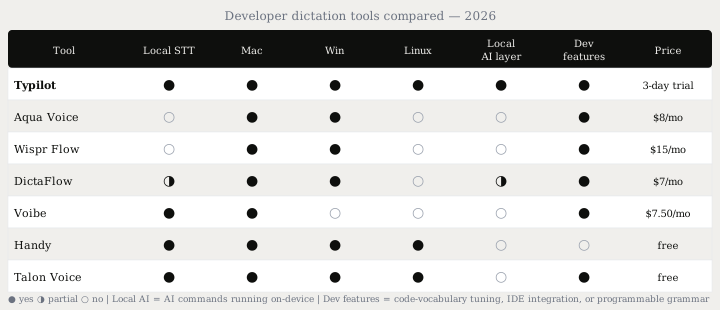
Cloud tools: Aqua Voice and Wispr Flow
Aqua Voice is built for technical users. Its Avalon model claims 97.4% accuracy on coding vocabulary - identifiers, package names, and brand terms - compared to 65.1% for standard Whisper on the same test set, which is the specific failure mode that frustrates developers most. An 800-term custom dictionary can be trained on your own codebase's identifiers. Processing is cloud-only; SOC 2 Type II certification and an opt-in Privacy Mode cover compliance-adjacent teams, but audio and transcripts reach Aqua Voice's servers on every request. Aqua Voice covers Mac and Windows at $8/mo. See Typilot vs Aqua Voice for the full side-by-side.
Wispr Flow ($15/mo monthly, $12/mo annual) takes the broadest cloud approach: native integrations with Cursor, Windsurf, and VS Code, plus a file-tagging feature that lets you mention a filename by voice and have it resolved in the prompt. It handles technical terms and code documentation well through cloud inference. No local or lifetime option; audio goes to Wispr's servers. SOC 2 + HIPAA certification applies. See Typilot vs Wispr Flow.
Hybrid: DictaFlow
DictaFlow ($7/mo) splits the difference. Transcription uses local Whisper by default - audio does not leave the device at that stage. An optional cloud AI layer handles document-aware formatting and cleanup. App-Aware context detection reads the active application and adjusts punctuation rules accordingly, treating code comment text differently from prose. A Knowledge Base can hold custom vocabulary for your project's identifiers. "Actually Override" handles voice-only correction without touching the keyboard. Runs on Mac, Windows, and iOS (no Linux).
Local tools: Typilot, Voibe, and Handy
Voibe ($7.50/mo or $149 lifetime, Mac-only) is the most developer-targeted purely local option. Its developer mode specifically handles file and folder name resolution in VS Code and Cursor - identifiers that generic Whisper frequently mangles on first pass. Local Whisper means nothing leaves the device; the lifetime licence eliminates ongoing cost. Mac-only is the main constraint.
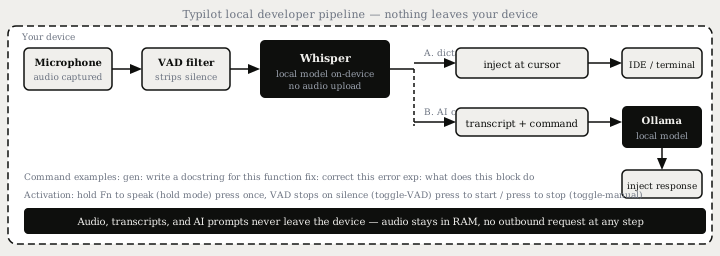
Typilot (3-day free trial) combines local Whisper dictation with a system-wide AI layer backed by a local Ollama model. For developer workflows, this means 27 command shortcuts run in any application without a cloud call: exp: to get an explanation of selected code, fix: to correct it, gen: to generate new content from a spoken prompt, rew: to rewrite it for clarity, rev: to review for problems. The autocomplete mode adds system-wide inline completions with a Code domain mode that adjusts parameters for programming context - all routed to the local model, with no code sent externally.
Activation modes match developer patterns: hold-to-record for short phrases between tasks, toggle-VAD for longer sessions where VAD ends the recording on silence, toggle-manual for precise control over what gets transcribed. Typilot runs on Mac, Windows, and Linux - the only tool in this list with a Linux build, which matters for developers on Ubuntu or Fedora workstations.
Handy (free, open source) is transcription-only with no AI layer. It runs locally on Mac, Windows, and Linux via local Whisper or Parakeet, and a Raycast extension covers Mac developers on Raycast. For developers who want to dictate commit messages or comments verbatim, without any AI involvement, Handy is the zero-cost option. No formatting, no vocabulary tuning, no AI commands.
Full voice control: Talon Voice
Talon Voice is a different category. Rather than dictating prose and injecting it, Talon provides a programmable voice grammar - you define custom commands like "go line five" or "select function" that execute editor actions, run macros, or trigger hotkeys. It is the standard tool for developers with RSI or carpal tunnel who need hands-free computing beyond text input, not just faster prose entry.
The learning curve is steeper than any dictation tool; a working Talon setup for coding takes an evening or weekend to configure with the community-maintained Knausj Talon scripts. The payoff is a fully keyboard-free workflow. Talon uses its own proprietary speech recognition engine (not Whisper) and is free, supported by Patreon.
For developers without an RSI need, combining a system-wide dictation tool with the existing keyboard workflow is the faster starting point. Talon and a dictation tool are also not mutually exclusive: some developers use Talon for editor navigation and a dictation tool for prose writing.
Local vs cloud for developer code
The privacy question for developers is narrower than for general users: it is about proprietary code, not personal data.
| Consideration | Cloud (Aqua Voice, Wispr Flow) | Local (Typilot, Voibe, Handy) |
|---|---|---|
| Audio data | Reaches vendor servers on every request | Stays in device RAM, deleted after transcription |
| Code identifiers | Transcribed server-side; subject to retention | Never leave the device |
| Data retention | 30-90 days depending on service / plan tier | None - no server |
| Compliance (HIPAA, NDA) | Possible with Enterprise tier + BAA | Architectural guarantee - no server to configure |
| Vocabulary for code | Tuned or trainable (Aqua Voice, DictaFlow) | Standard Whisper (no code-specific tuning) |
| Linux support | No | Yes (Typilot, Handy) |
For dictating commit messages, documentation, and Slack messages - the bulk of developer prose - vocabulary accuracy differences between cloud and local tools matter less than in-editor dictation of identifiers. Standard Whisper on local handles natural-language developer prose at around 3-5% WER on clean audio. The vocabulary gap is most visible when dictating package names, camelCase identifiers, or language keywords.
The short version
Cloud tools (Aqua Voice, Wispr Flow) offer the best code-vocabulary accuracy and IDE integrations at $8-15/mo, but audio reaches their servers. Local tools (Typilot, Voibe, Handy) give you an architectural privacy guarantee with no data egress. DictaFlow is the hybrid: local Whisper transcription, optional cloud AI layer. Talon Voice is the full keyboard-replacement option for RSI cases, not a dictation tool in the same sense.
For local AI commands on top of system-wide dictation - and the only option with a Linux build - Typilot ships a 3-day free trial with no audio upload at any stage. The security page documents the full local pipeline, and features covers what you get beyond dictation: AI commands, autocomplete, and local Ollama integration. For developer dictation without any cloud dependency, see why Typilot is local-first and the Ollama setup guide.
Common questions.
Does dictation software work for programming in a code editor or terminal?+
Yes. System-wide dictation tools like Typilot, Wispr Flow, and Handy inject transcribed text at the cursor in any running application via the OS accessibility layer - including terminal emulators, VS Code, Cursor, and browser-based tools. The main limitation is technical vocabulary: package names, camelCase identifiers, and operator sequences need a code-tuned model or a custom dictionary to transcribe accurately.
Which dictation tool is best for developers who need local processing?+
Typilot, Voibe, and Handy all run speech recognition locally with no audio upload. Typilot covers Mac, Windows, and Linux and adds 27 AI command shortcuts (gen:, fix:, exp:) routed to a local Ollama model. Voibe (Mac-only) adds a developer mode with IDE-aware file and folder name resolution. Handy (Mac/Windows/Linux) is free and open source but provides transcription only, with no AI layer.
What is Talon Voice and when should I use it instead of a dictation app?+
Talon Voice is a programmable voice control system, not a dictation tool. It lets developers define custom commands to trigger editor actions, run keyboard macros, and navigate code entirely by voice - replacing the keyboard rather than augmenting it. It is the standard tool for developers with RSI or carpal tunnel syndrome who need hands-free computing. Free and supported by Patreon. The learning curve is steeper than any dictation app; a working coding setup takes a weekend to configure.
Is cloud dictation software safe to use with proprietary or confidential code?+
Cloud dictation services like Aqua Voice and Wispr Flow process audio on vendor servers, where it may be retained for 30 to 90 days depending on the service tier. For code under NDA or in regulated industries, this adds a third party to every dictation session. Local tools like Typilot and Handy process audio entirely on-device; the transcript is never transmitted, giving an architectural privacy guarantee rather than a policy-based one.