Best AI Typing Assistants 2026
The best AI typing assistants for 2026 rated on privacy, offline use, and AI commands: Typilot, Wispr Flow, Superwhisper, Grammarly, and Handy compared.
The best AI typing assistant for offline and privacy-sensitive work in 2026 is Typilot: it runs Whisper speech recognition and 27 AI command shortcuts entirely on your machine, with nothing uploaded to any server. For cloud-backed voice dictation with the widest platform reach, Wispr Flow is the strongest contender - polished in-app voice across Mac, Windows, iOS, and Android for $15 to $18 per month. If you only need free local transcription without an AI command layer, the open-source Handy app is a zero-cost alternative.
Here is a full breakdown of the five tools most worth knowing.
What to look for
Three distinct functions define this category:
Voice dictation in any app - speak and have transcribed text appear at the cursor in whatever app you already have open. The best tools work in VS Code, Slack, Gmail, Notion, and terminal windows without requiring a dedicated dictation panel.
AI command shortcuts - type a short prefix followed by an instruction and the tool reads surrounding context, routes it through an AI model, and injects the result. This replaces the copy-paste loop to a separate chat interface. Typilot uses prefixes like gen:, fix:, rew:, sum:, and trl: - 27 in total, all customisable.
Writing correction and autocomplete - inline suggestions, grammar fixes, and ghost-text completions that appear as you type. Grammarly dominates this lane; Typilot adds system-wide ghost-text completions via its AI autocomplete mode.
Most tools in this category cover one or two of these functions. Typilot is the only option here that covers all three without cloud dependency.
How the main tools compare
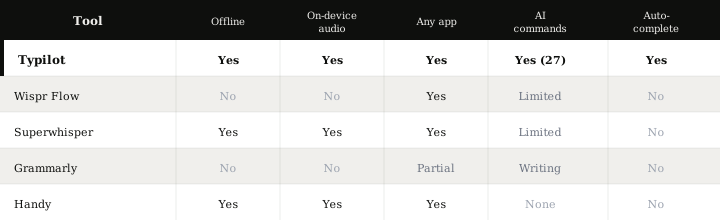
| Tool | Platform | Audio processing | Offline | AI commands | Autocomplete | Price |
|---|---|---|---|---|---|---|
| Typilot | Mac, Windows, Linux | On-device Whisper | Yes | 27 built-in | Yes | 3-day trial; one-time licence |
| Wispr Flow | Mac, Windows, iOS, Android | Cloud | No | Limited | No | $15-18/month |
| Superwhisper | Mac, Windows, iOS | On-device Whisper | Yes | Custom modes | No | $8.49/month or $249 lifetime |
| Grammarly | Browser, Mac, Windows | Cloud | No | Writing correction | No | Free tier; paid plans |
| Handy | Mac, Windows | On-device Whisper | Yes | None | No | Free |
Typilot
Typilot is a local AI assistant for Mac, Windows, and Linux that handles voice dictation, AI command shortcuts, and system-wide autocomplete without any cloud dependency. The voice mode supports three activation styles: hold-to-talk (hold Fn to record, release to commit), toggle with Voice Activity Detection (starts on a keypress, stops automatically when silence is detected), and manual toggle (start and stop with the same shortcut). All three use on-device Whisper - nothing is uploaded.
Whisper model choice determines accuracy and RAM requirements. The tiny model (~7% word error rate on clean English) runs on any laptop with 8 GB RAM. The small model (~3.4% WER) needs around 500 MB download and runs in real time on hardware made after 2020. The large model (~2.7% WER) is best on machines with 32 GB RAM or a discrete GPU with 8+ GB VRAM. These are benchmarks on clean audio; real-world dictation with background noise or accents typically lands 8-12% WER even on the large model.
Beyond dictation, the 27 built-in command prefixes route text through a local Ollama model running at localhost:11434. The default model is qwen2.5:0.5b - small enough to run on any hardware, capable enough for rewrites and summaries. Nothing about your commands or their context reaches a remote server. After the 3-day free trial, a one-time licence is required; there is no monthly subscription.
Wispr Flow
Wispr Flow is the leading cloud-backed voice typing tool, available on Mac, Windows, iOS, and Android. Hold a hotkey, speak naturally, and clean, context-aware text appears at the cursor in whatever app you have open. The output formatting is notably polished: Wispr Flow infers whether you are writing an email, a Slack message, or code and adjusts the style accordingly.
The trade-off is cloud dependency - audio is sent to Wispr's servers on every request, so it does not work offline and your audio leaves the device. At $15-18 per month there is no lifetime option. For users who need cross-platform mobile support and are comfortable with cloud processing, the experience is class-leading. For a detailed comparison, see Typilot vs Wispr Flow.
Superwhisper
Superwhisper runs local Whisper transcription on Mac, Windows, and iOS, making it one of the few tools that covers the full Apple device stack with on-device audio. Offline transcription is available across all three platforms, and a $249 lifetime licence avoids recurring fees. The AI layer focuses on custom formatting modes - tone, length, and style adjustments - rather than a full command prefix system.
Typilot has the broader AI command set (27 prefixes versus custom modes), adds system-wide autocomplete, and supports Linux. Superwhisper has the iOS app that Typilot currently does not offer - a meaningful advantage for users who work across Mac and iPhone. See the Typilot vs Superwhisper page for a full breakdown.
Grammarly
Grammarly is the category standard for writing correction, not voice dictation. It works as a browser extension in Chrome, Firefox, and Edge, and as a desktop app with native integrations for Word and Outlook. The free tier covers grammar, spelling, and basic clarity suggestions; paid plans add tone detection, vocabulary refinement, and AI-assisted rewriting.
Voice transcription is not part of Grammarly's core product. Its browser coverage is the strongest of any tool here, which is why it remains the default choice for writers who work primarily in web apps and do not need offline support or voice input. If your workflow is text-heavy and browser-based, Grammarly is a sensible complement rather than a replacement for a local dictation tool.
Handy
Handy is a free, open-source dictation app for Mac and Windows that runs Whisper and Parakeet models locally. It works offline, requires no account, and injects transcribed text into any application. For users who only need reliable local transcription without an AI command layer or autocomplete, it answers the question cleanly.
Setup is more manual than Typilot's onboarding wizard, and there is no command system, inline autocomplete, or AI processing beyond transcription. The price is zero - which makes it the right answer for anyone who simply wants a free local Whisper front-end.
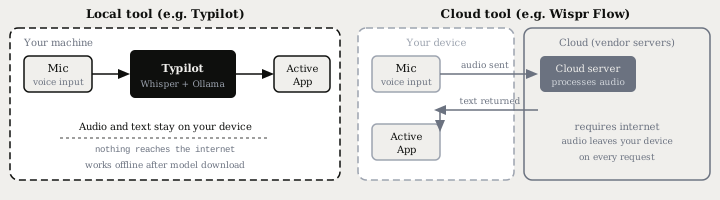
The Whisper small model (roughly 3.4% WER on clean English audio) is available in both Typilot and Handy at no recurring cost after a one-time download of around 500 MB. The key difference is what happens after transcription: Typilot routes the text through 27 AI commands via a local Ollama model; Handy stops at the transcript and injects it.
The short version
If privacy, offline access, and AI command depth are the priorities, Typilot runs the full stack locally - Whisper for speech, Ollama for AI commands, and ghost-text autocomplete - with no audio upload and no monthly fee. For cloud-backed dictation with the widest platform reach including mobile, Wispr Flow is the most polished option at the cost of cloud dependency. Handy covers free local transcription when the AI command layer is not needed.
Download the 3-day free trial at /download and read the full data flow - what runs on your device and what Typilot never touches - at /security. The posts run a local AI assistant with Ollama, offline speech to text without an internet connection, and why Typilot is local-first cover the underlying local model layer in more depth.
Common questions.
What is the best AI typing assistant for privacy?+
Typilot is the strongest option for privacy - it runs Whisper speech recognition and AI commands entirely on your machine, so your audio and text never leave the device. Superwhisper and the open-source Handy app also process audio on-device. Cloud tools like Wispr Flow and Grammarly send audio or text to remote servers on every request.
Which AI typing assistants work offline?+
Typilot, Superwhisper, and Handy all run local Whisper models and work offline after a one-time model download. Wispr Flow and Grammarly both require an active internet connection. For offline dictation, Typilot's small Whisper model (around 3.4% word error rate on clean English) runs in real time on any laptop with 8 GB RAM.
Is there a free AI typing assistant?+
Handy is a free, open-source tool that runs Whisper locally for dictation on Mac and Windows - transcription only, no AI commands. Windows Voice Typing (Win+H) is also free but requires an internet connection. Typilot offers a 3-day free trial with full functionality including voice dictation, 27 AI command shortcuts, and system-wide autocomplete.
What is the difference between an AI typing assistant and a dictation app?+
A dictation app converts speech to text and stops there. An AI typing assistant adds a command layer: short prefixes like gen:, fix:, or rew: instruct the tool to generate, correct, or rewrite text using an AI model, then inject the result at the cursor in any app. Typilot combines both - on-device Whisper for dictation and 27 AI command shortcuts via a local Ollama model.